
Chamaileon | The All-in-One Email Design Platform for Teams
TL;DR:
Chamaileon is an email design platform that helps teams create, collaborate on, and deploy responsive email campaigns faster. With drag-and-drop editing, reusable templates, real-time collaboration, and seamless ESP integrations, it’s ideal for marketing teams, agencies, and enterprises seeking consistent, professional emails without coding. Flexible pricing and robust features make it a scalable solution for businesses of all sizes.
Chamaileon is an all-in-one email creation and collaboration platform designed to simplify how teams design, manage, and deploy professional email campaigns. It offers everything from a no-code drag-and-drop email editor and modular design systems to reusable templates, real-time collaboration, and responsive HTML output. By combining these tools into one platform, Chamaileon empowers marketing teams, agencies, and enterprises to streamline their email production, maintain brand consistency, and reduce time-to-launch for campaigns. Primarily serving small to large teams, Chamaileon provides accessible, user-friendly solutions without requiring coding skills. Its transparent pricing, integration capabilities, and enterprise-ready features make it especially valuable for marketers, designers, and agencies who want a reliable platform to manage professional email campaigns efficiently.
Table of contents
• Chamaileon for Business: Streamline Email Workflows and Boost Productivity
• Chamaileon Features: Powerful Tools for Faster, Smarter Email Design
• How to Use Chamaileon: From Templates to Campaigns with Ease
• Chamaileon Pricing: Enterprise Quality Without Breaking the Bank
• Chamaileon Collaborative Real‑Time Email Builder: Accelerate Team Workflows
• Why Real-Time Collaboration Matters for Email Production
• Chamaileon Drag‑and‑Drop Modular Email Design System: Consistency at Scale
• Why Modular Design Systems Matter for Brand Consistency
• Chamaileon Advanced Responsive HTML Tools: Optimize Emails Across Devices
• Why HTML Optimization Matters for Email Engagement
• Chamaileon Integrated Review and Approval System: Streamline Workflows
• Why Integrated Review and Approval Matters for Team Efficiency
• Chamaileon Alternatives: How It Compares to Other Email Platforms
• Chamaileon Alternatives: How It Compares to Other Email Platforms (duplicate)
• Is Chamaileon Worth It: Why Teams Love This Email Platform
• Frequently Asked Questions
What Is Chamaileon and What Does It Do?
Chamaileon is a collaborative email platform for teams to design, edit, and manage responsive email campaigns without coding. It is especially popular with marketing teams, agencies, and enterprises that want a simple, visual, and scalable solution for email creation and management.
Here’s what Chamaileon does
- No-Code Drag-and-Drop Email Editor: Chamaileon lets users visually build email templates using modular blocks and pre-designed components, eliminating the need for HTML knowledge.
- Team Collaboration Tools: Multiple team members can work on the same email simultaneously, leave comments, track changes, and approve designs in real-time.
- Reusable Email Design Systems: Users can create centralized brand elements, blocks, and templates to maintain consistency across all campaigns.
- Responsive HTML Output: Chamaileon produces bulletproof HTML that renders correctly across all major email clients and devices.
- ESP and CRM Integrations: Designed to export emails directly to platforms like Mailchimp, HubSpot, Salesforce Pardot, Marketo, and other automation systems.
- Template Import and Migration: Existing HTML templates can be imported into Chamaileon, converted into editable blocks, and reused within the platform.
In short, Chamaileon provides teams with a complete toolkit for email design, collaboration, and deployment, allowing them to focus less on coding and manual workflows and more on creating high-quality campaigns.
Chamaileon for Business: Streamline Email Workflows and Boost Productivity
Whether you are a small startup, a growing marketing team, or a large agency managing multiple clients, Chamaileon is designed to meet you where you are and scale with your workflow. Its combination of visual editing, reusable design systems, and collaboration features allows teams to create consistent, responsive emails faster and more efficiently.
Here’s how Chamaileon delivers value across different business sizes and roles
- Chamaileon for Small Businesses: Easy Email Creation Without Coding
Small marketing teams can leverage the drag-and-drop editor and prebuilt components to quickly design professional emails without relying on developers or HTML knowledge. This is ideal for businesses wanting consistent and branded campaigns with minimal effort. - Chamaileon for Mid-Size Marketing Teams: Scalable Collaboration
As your campaigns grow, Chamaileon offers shared workspaces, role-based permissions, and reusable design systems to keep team collaboration smooth, reduce bottlenecks, and ensure consistent brand messaging. - Chamaileon for Agencies: Manage Multiple Clients Efficiently
Agencies can centralize client templates, use shared components, and control approvals across teams. Detailed workflow tracking and template management help deliver client campaigns faster while maintaining quality. - Chamaileon for Enterprise: Secure and Enterprise-Ready Features
Large organizations benefit from advanced features including role-based access control, GDPR and ISO compliance, dedicated support, custom integrations, and robust design governance for teams across departments. - Chamaileon for Designers: Build Reusable Components
Designers can set up brand elements, blocks, and templates so that all team members work with approved, on-brand assets. - Chamaileon for Marketers: Faster Campaign Launches
Marketers can iterate content directly in the platform, preview campaigns, and export to ESPs without relying on developers, accelerating time-to-launch and optimizing workflow.
Chamaileon Features: Powerful Tools for Faster, Smarter Email Design
Chamaileon offers a comprehensive set of features designed to simplify email creation and improve collaboration
- Drag-and-Drop Email Editor: Build professional emails visually using modular blocks, images, text, buttons, and predesigned templates.
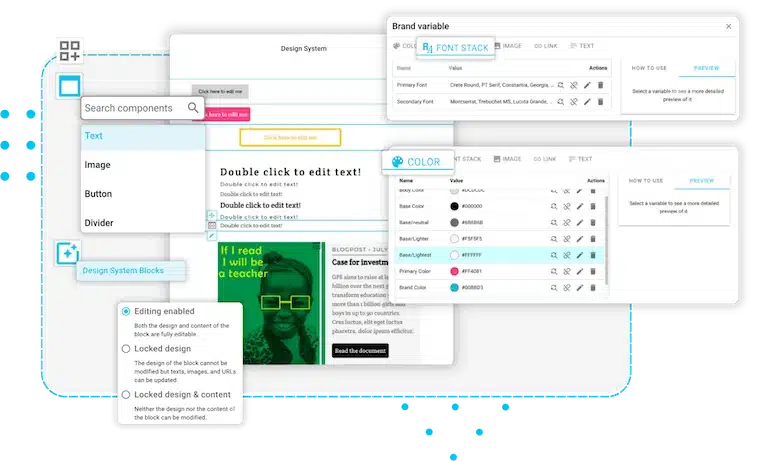
- Reusable Email Design Systems: Centralize brand elements such as colors, fonts, logos, and block designs to maintain consistency across all campaigns.
- Team Collaboration: Multiple users can edit emails simultaneously, leave feedback, and approve designs, reducing back-and-forth emails.
- Responsive HTML Output: Every email is automatically optimized for desktops, tablets, and mobile devices to ensure consistent rendering.
- Unlimited Test Emails and Exports: Send test emails without limitations and export HTML code to any ESP or CRM.
- Role-Based Permissions: Control access for viewers, editors, and admins to ensure secure workflows.
- Chamaileon Integrations: Sync with popular marketing platforms, automation tools, and CRMs for smooth deployment.
- Template Import and Migration: Convert existing HTML emails into reusable, editable blocks within Chamaileon.
- Modular Blocks and Components: Build complex email layouts faster with prebuilt or custom blocks that can be reused across multiple campaigns.
These features empower teams to save time, reduce errors, and maintain control over email production while scaling collaboration.
How to Use Chamaileon: From Templates to Campaigns with Ease
Using Chamaileon is simple and intuitive, allowing teams to efficiently create, manage, and deploy email campaigns
Here’s a step-by-step overview
- Create an Account: Sign up and set up your team workspace with roles and permissions.
- Set Up Your Design System: Define your brand’s colors, fonts, reusable blocks, and templates to ensure consistent emails across campaigns.
- Build Emails: Use the drag-and-drop editor to design emails from scratch, select prebuilt blocks, or import existing templates.
- Collaborate with Your Team: Invite team members, assign roles, leave comments, and review changes in real-time to improve workflow efficiency.
- Preview and Test: Send test emails and preview campaigns on different devices to ensure responsive design and accurate rendering.
- Export and Deploy: Export the HTML or push campaigns to your preferred ESP or CRM for delivery.
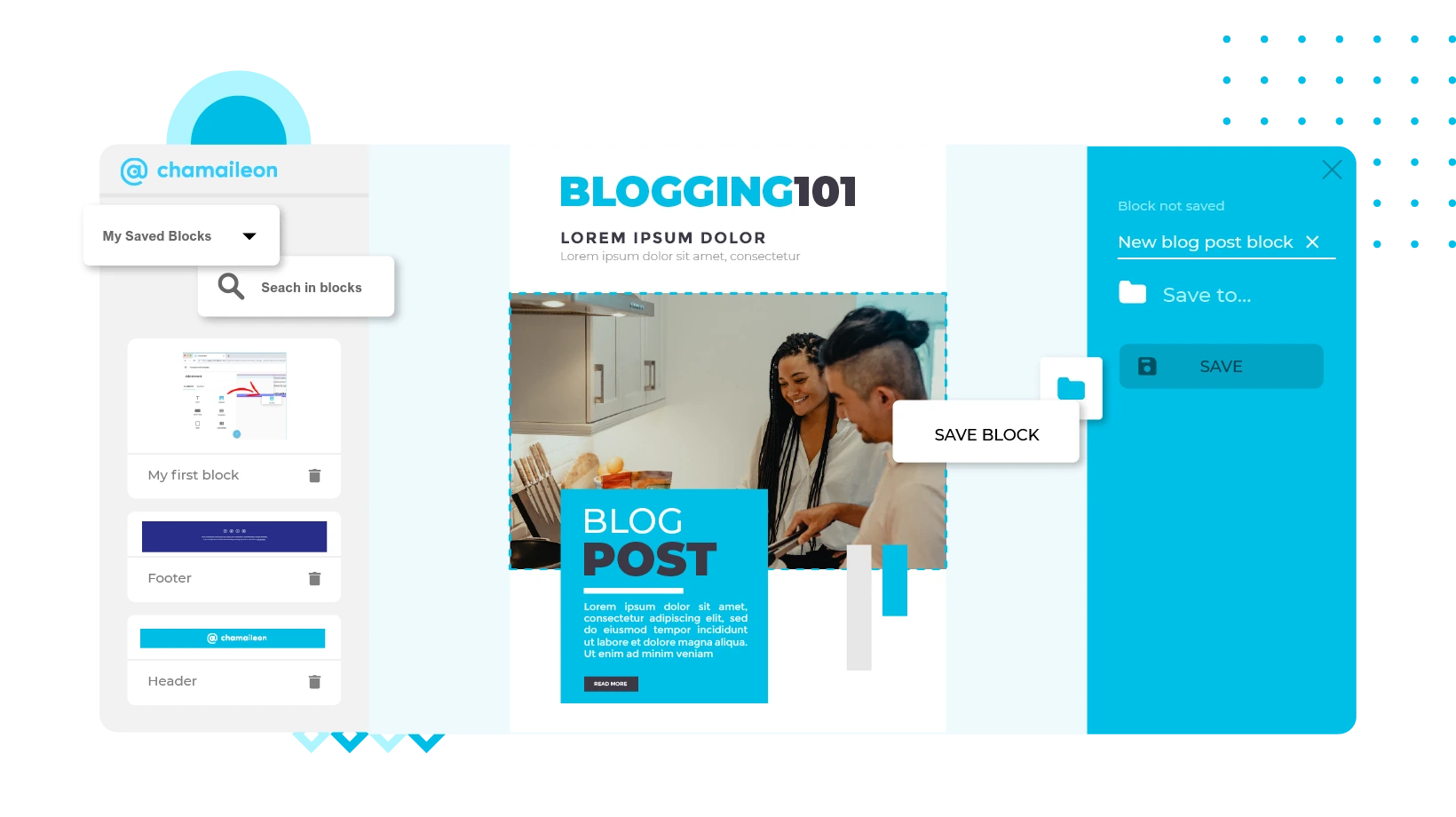
- Maintain and Reuse: Save frequently used components, templates, and blocks to accelerate future email production.
By following these steps, Chamaileon helps teams streamline email workflows, maintain brand consistency, and save significant time on manual processes.
Chamaileon Pricing: Enterprise Quality Without Breaking the Bank
Chamaileon pricing plans are designed to provide top-tier email creation and collaboration tools at a fraction of the cost of competitors like Knak, Stensul, Taxi, or Dyspatch. Below is a detailed overview of Chamaileon’s pricing approach:
Redefined Pricing Chamaileon’s pricing starts from $400 per month or $4,000 per year, delivering enterprise-quality features without requiring an upfront annual contract. This model allows teams to access professional email design, collaboration, and export tools without paying 2x to 4x more than other email builders.
Efficiency Savings Chamaileon keeps costs lower by minimizing operational expenses. The company operates with a small, fully remote international team, with no office overhead or unnecessary spending on events, advertising, or executive salaries. These savings are passed directly to customers while maintaining high product quality and dedicated customer success.
No Obligations or Hidden Fees Unlike competitors that often require expensive day-one contracts, Chamaileon offers transparent pricing with no hidden costs. Teams can get started immediately and scale their usage without being pressured into long-term commitments.
Each plan is structured to provide all essential features for email creation, collaboration, and design system management, making it suitable for small marketing teams, agencies, or large enterprises seeking a cost-efficient, high-quality platform.
Chamaileon Collaborative Real‑Time Email Builder: Accelerate Team Workflows
Why Real-Time Collaboration Matters for Email Production
Chamaileon’s collaborative real-time email builder allows multiple team members to work on the same email template simultaneously. Designers, copywriters, and reviewers can see edits as they happen, leave comments, and approve changes in real-time. This eliminates version conflicts, reduces production delays, and ensures everyone is aligned on campaign goals, helping teams launch emails faster and more efficiently.
Supported Tools & Features: Work Together Seamlessly
The platform supports live editing, inline commenting, and role-based permissions. Team members can track progress, view changes, and resolve feedback without relying on external tools like email threads or chat apps.
Real-Time Collaboration in Action: From Small Teams to Enterprises
Whether it’s a small marketing team designing newsletters, an agency managing multiple clients, or an enterprise coordinating campaigns across departments, real-time collaboration ensures that emails are delivered on time, on brand, and without miscommunication.

Chamaileon Drag‑and‑Drop Modular Email Design System: Consistency at Scale
Why Modular Design Systems Matter for Brand Consistency
Chamaileon’s drag-and-drop modular design system allows users to create, save, and reuse email blocks, components, and templates. This ensures every campaign maintains a consistent brand look while allowing flexibility for unique designs. Marketing teams no longer need to start from scratch for each email, speeding up production and maintaining high-quality standards.
Supported Tools & Features: Build Emails Faster
Users can drag prebuilt headers, footers, buttons, and product showcases into emails. Reusable blocks and templates streamline workflows, reduce errors, and enable teams to maintain design consistency across all campaigns.
Modular Design in Action: Efficient High-Volume Campaigns
From small business newsletters to multi-channel enterprise campaigns, modular blocks allow teams to quickly assemble emails while preserving brand integrity, ensuring campaigns are visually consistent and professionally designed.
Chamaileon Advanced Responsive HTML Tools: Optimize Emails Across Devices
Why HTML Optimization Matters for Email Engagement
Chamaileon advanced HTML tools ensure emails render correctly on every device and client. Dynamic content can be added using templating languages like Handlebars, Liquid, and Mailchimp syntax, while accessibility enhancements and Outlook-specific fixes ensure professional presentation. This reduces broken layouts, improves engagement, and boosts campaign performance.
Supported Tools & Features: Build Bulletproof Emails
The platform includes responsive previews, Gmail Promotions tab annotations, accessibility options, and VML support for Outlook backgrounds. These features allow teams to create visually appealing, functional emails without manual coding.
HTML Optimization in Action: Seamless User Experience
Whether recipients open emails on mobile, desktop, or webmail clients, Chamaileon ensures consistent rendering, readable layouts, and optimized delivery, giving marketers confidence that their campaigns look great for every subscriber.

Chamaileon Integrated Review and Approval System: Streamline Workflows
Why Integrated Review and Approval Matters for Team Efficiency
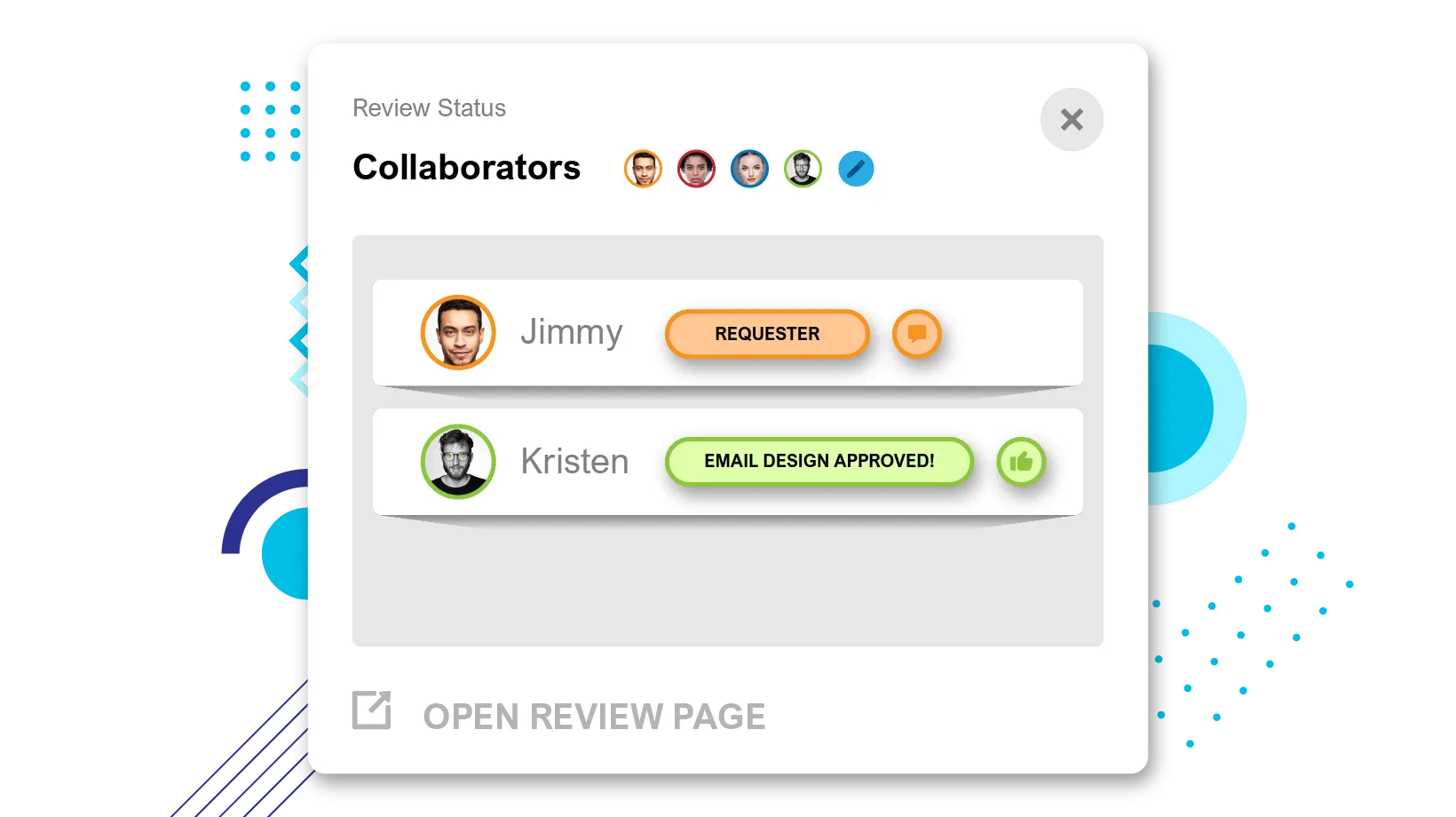
Chamaileon review and approval system centralizes workflows within the platform, removing the need for scattered emails or external collaboration tools. Teams can gather feedback, request approvals, and manage changes efficiently, reducing errors and ensuring faster campaign launches.
Supported Tools & Features: Organize and Approve with Ease
Users can comment directly on email previews, assign roles for reviewers, and approve or reject designs within the system. Folder-based organization keeps templates, images, and assets accessible and secure.
Review & Approval in Action: Smooth Campaign Management
From small teams coordinating a single newsletter to large enterprises handling hundreds of campaigns, the integrated review and approval system ensures that emails are reviewed systematically, feedback is addressed quickly, and campaigns launch on schedule with full accountability.
Chamaileon Alternatives: How It Compares to Other Email Platforms
When exploring email design and template building platforms, it’s natural to compare Chamaileon with other popular solutions. While each tool has its strengths, Chamaileon stands out for real-time collaboration, modular design systems, and responsive email code generation. Teams often evaluate alternatives based on features, ease of use, pricing, and integrations.
- Chamaileon vs Beefree Beefree offers a highly usable and intuitive email template builder that is often considered easier to use than Chamaileon, with a strong focus on quick design creation and simplicity. Reviewers note Beefree scores higher in usability and meeting basic template needs, making it attractive for smaller teams or those wanting a lightweight builder.
- Chamaileon vs Stripo.email Stripo.email is frequently rated slightly higher than Chamaileon for ease of use and support. It provides a visual drag-and-drop editor with a large library of pre-designed templates and blocks, making it easy to get started quickly. Stripo is also noted for its broad ESP export support and strong template variety.
- Chamaileon vs Constant Contact Constant Contact combines email design with broader email marketing features such as campaign automation, list management, and analytics. Reviewers indicate it may take longer to reach ROI and can be more expensive, but it excels in overall marketing workflow integration and support.
- Chamaileon vs MailerLite MailerLite is praised for its intuitive interface and great customer support, particularly for small businesses and teams new to email marketing. Users often highlight its ease of use and free tier as major advantages, though Chamaileon may offer more powerful collaborative design features for mid‑market and enterprise teams focused on template systems.
- Chamaileon vs Stensul Stensul focuses on enterprise-level email production, offering drag-and-drop editors and centralized workflow management. While it provides strong automation and compliance features, it is generally more expensive than Chamaileon, making Chamaileon a more cost-efficient solution for teams that still need collaboration and modular design capabilities.
- Chamaileon vs Knak Knak specializes in marketing template creation for Salesforce and Marketo users, with prebuilt campaign structures and easy ESP integration. However, its pricing is significantly higher, and it lacks some of the real-time team collaboration and modular block flexibility that Chamaileon provides, making Chamaileon more attractive for teams needing speed and reusability.
- Chamaileon vs Taxi for Email Taxi for Email is a widely used enterprise email platform known for campaign governance and brand compliance. While it offers robust features, users often cite slower workflows and higher costs compared to Chamaileon, which provides similar enterprise-level tools with a more streamlined, user-friendly interface.
- Chamaileon vs BeePro BeePro delivers a drag-and-drop email editor with a strong focus on design templates for small and mid-size teams. While it is very easy to use, it lacks the collaborative real-time editing and reusable modular systems of Chamaileon, which makes Chamaileon a better choice for teams managing multiple campaigns or clients.
Is Chamaileon Worth It: Why Teams Love This Email Platform
Chamaileon is certainly worth considering for teams and organizations seeking a professional email design and collaboration solution with powerful modular systems, real‑time editing, and responsive output. The platform’s focus on workflow efficiency and team collaboration makes it well‑suited for mid‑size marketing teams, agencies, and enterprises that need consistent branding and scalable email production. Its features enable non‑technical users to design and iterate on email campaigns without HTML, while also supporting developers and designers with flexible template systems.
Overall, Chamaileon offers a balanced toolkit that reduces manual coding, centralizes approvals, and improves production timelines, making it a strong contender among email template builders, even if some alternatives may be more user‑friendly for smaller teams or offer broader email marketing capabilities.
Key Takeaways:
- Real-time collaboration stands out: Chamaileon excels in allowing multiple users to work together on email design simultaneously, reducing delays and version issues compared to traditional workflows.
- Strong modular design system: The ability to reuse components and blocks drives consistency and efficiency in campaign creation.
- Responsive email output: Chamaileon’s HTML generation ensures emails render reliably across devices and clients, which is critical for professional campaigns.
- Better for mid-market and enterprise teams: While highly capable, Chamaileon’s pricing model and feature set are especially valuable for teams with structured workflows and design governance needs, though smaller teams may prefer simpler or lower‑cost tools.
Frequently Asked Questions
1. What is Chamaileon best used for?
2. Does Chamaileon offer a free trial?
3. How much does Chamaileon cost?
4. Can I switch plans later?
5. Does Chamaileon integrate with other tools?
6. Is Chamaileon suitable for remote teams?
7. Does Chamaileon require coding knowledge?
8. How secure is my data in Chamaileon?
9. Does Chamaileon offer an SDK for developers?
10. Can Chamaileon handle high-volume campaigns?
Disclosure: We are independent Affiliates, not employees. We receive referral payments from this company. The opinions expressed here are our own and are not official statements of the company.
(877) 522-7738
Blogs
Enterprise SEO: How Large Websites Can Scale Rankings Effectively
Large websites don’t win by fixing pages one at a time. Learn how enterprise SEO scales rankings through crawl control, template fixes, safe content scaling and AI search readiness.
How to Customize Sales Popups on Shopify to Match Your Brand
Learn how to customize sales popups on Shopify to match your brand, from colors, fonts, and position to message text, timing, and mobile testing.
How Shopify Sales Notifications Help Build Social Proof and Increase Sales
Learn how Shopify sales notifications build social proof, reduce shopper hesitation, and support sales, plus best practices and how to add them to your store.
Franchise SEO Challenges and How Multi-Location Brands Can Overcome Them
Franchise SEO is mostly a coordination problem. See the 10 challenges multi-location brands face, from duplicate location pages and listing drift to profile ownership and AI search, and how to fix each one at scale.
Google Ads Benchmarks 2026: What the Numbers Actually Mean for Your Account
Google Ads Search averages for 2026 are a 6.64% CTR, $5.42 CPC, 8.18% conversion rate and $66.69 cost per lead. Learn how to find your break-even CPL and which metric is holding your account back.
Best Shopify Sales Popup Apps to Boost Customer Trust and Conversions
Compare seven Shopify sales popup apps on features, customization, pricing, and ease of use, and learn how to pick one that builds trust without guesswork.
Franchise vs Enterprise Digital Marketing: Key Differences & Best Practices
Franchise and enterprise marketing both manage many locations under one brand, but they run on different rules. See who controls the budget, brand and data in each model, and the best practices that work for both.
How to Add a Shopify Sales Popup: Step-by-Step Guide
Learn how to add a Shopify sales popup in seven steps. Pick an app, set display rules, test on mobile, and track whether it works, with no coding needed.
Google Partner Rewards Store Not Working? We Hit a Redirect Loop, and Here’s What to Do
Stuck in a Google Partner Rewards Store redirect loop? Discover the exact causes behind the login bug and practical troubleshooting steps to redeem your partner points.
GloriaFood Is Shutting Down: Your 7-Step Plan and a Replacement to Try
With Oracle discontinuing GloriaFood, restaurants must plan ahead: explore a 7-step migration blueprint, data export tips, and top online ordering replacements.
Best Shopify Image Optimization Apps: How to Choose the Right Tool for Your Store
Learn what to look for in a Shopify image optimization app, the main types of tools, how to compare apps fairly, and the mistakes to avoid when choosing the right one.
Shopify Image Optimization Checklist: What to Do Before and After Uploading Product Photos
Use this Shopify image optimization checklist to prepare product photos before you upload, finish the job after, avoid common mistakes, and handle large catalogs in bulk.
Beehiiv Newsletter Platform: Pricing, Features, and Monetization Tools
Explore the beehiiv newsletter platform to streamline your communication and engage with your audience effectively.
Shopify Core Web Vitals and Images: How to Find and Fix Image-Related Speed Issues
Learn how images affect Shopify Core Web Vitals, how to find image-related speed issues, the most common mistakes, and how to fix them, including for large product catalogs.
Shopify Fake Cart Bot Attack: What Stopped 500+ Fake Carts an Hour (and a Script We Can’t Rule Out)
A client’s Shopify store was hit with 500+ fake carts an hour, and captchas, rate limits and bot apps didn’t stop it. Here’s why the traffic bypassed our security, the one fix that worked, and a third-party script lead we’re still tracing.
Getting information about your case and your options is your FIRST move. Get a FREE case evaluation now…
Find Yourself a Marketing Expert Near You!
(877) 522-7738