
Collect.Chat | Engage Visitors, Capture Leads, Schedule Meetings
TL;DR:
Collect.Chat is a chatbot platform that helps businesses engage website visitors, capture leads, automate meeting bookings, and streamline customer interactions. It offers a drag-and-drop builder, flexible pricing plans from Free to Plus, WordPress and CRM integrations, and powerful analytics. Ideal for small to medium businesses and agencies, it boosts conversions, saves time, and makes lead generation effortless.
Collect.Chat is an all-in-one conversational chatbot platform designed to simplify how businesses engage website visitors, capture leads, and automate interactions. It offers a drag-and-drop chatbot builder, meeting booking tools, lead generation capabilities, and seamless integration with WordPress and other platforms. By combining these tools into one ecosystem, Collect.Chat empowers businesses to replace traditional web forms and surveys with interactive chatbots that collect information efficiently and engage visitors naturally. Primarily serving small and medium-sized businesses, agencies, and marketing teams, Collect.Chat provides accessible, user-friendly solutions without complex setup. Its flexible pricing plans including the Free Plan, Lite Plan, Standard Plan, and Plus Plan, along with versatile features like Google Form to Chatbot conversion and website embedding, make it especially valuable for businesses looking to automate lead capture, schedule meetings, and enhance visitor engagement on websites.

Table of contents
- What Is Collect.Chat and What Does It Do?
- Collect.Chat for Businesses: Automate Engagement and Capture Leads
- Collect.Chat Features: Powerful Tools to Boost Conversions
- How to Use Collect.Chat: From Setup to Success
- Collect.Chat Pricing: Flexible Plans for Every Business
- Free Plan
- Lite Plan
- Standard Plan
- Plus Plan
- Collect.Chat Drag & Drop Builder
- Why Builder Matters
- Collect.ChatMeeting Booking
- Why Meeting Booking Matters
- Collect.Chat Lead Generation
- Why Lead Generation Matters
- Collect.Chat Alternatives: Compare and Find the Best Fit
- Is Collect.Chat Worth It? Maximize Leads and Efficiency
- Key Takeaways
- Frequently Asked Questions
What Is Collect.Chat and What Does It Do?
Collect.Chat is a conversational chatbot platform for businesses to engage visitors, capture leads, and automate processes online. It is especially popular with small and medium-sized businesses, agencies, and marketers who want a simple, affordable way to collect data, schedule meetings, and enhance website interactions without complicated technical setups.
Here’s what Collect.Chat does:
- Creates Conversational Website Chatbots: Collect.Chat allows businesses to replace static forms with interactive website chatbots that guide visitors through a series of questions and capture responses in real-time.
- Enables Lead Generation: The platform helps collect qualified leads automatically and integrates with email platforms, CRM systems, and Slack for streamlined follow-ups.
- Supports Meeting Booking: With built-in meeting booking features, visitors can schedule appointments directly through the chatbot without leaving the website.
- Offers a Chatbot Builder: The no-code chatbot builder makes designing custom bots easy and quick. Users can set up conversational flows, logic, and responses without technical expertise.
- Integrates with WordPress and Other Platforms: Collect.Chat can be embedded on any website including WordPress sites and converted from existing Google Forms to chatbots for better engagement.
- Provides Flexible Pricing Options: Businesses can start with the Free Plan, scale to Lite, Standard, or Plus Plans as their needs grow, ensuring solutions for small teams and larger agencies alike.
In short, Collect.Chat gives businesses a complete toolkit for website chatbots, lead generation, meeting scheduling, and visitor engagement helping them focus on growth and efficiency.
Collect.Chat for Businesses: Automate Engagement and Capture Leads
Whether you’re a small startup, a fast-growing marketing team, or an agency managing multiple clients, Collect.Chat is designed to meet you where you are and grow with you. Its combination of chatbot building, meeting booking, and lead generation tools, along with integrations like WordPress and Google Form to Chatbot, allows businesses to automate engagement and capture valuable data efficiently.
Here’s how Collect.Chat delivers value across different business sizes and roles
- Collect.Chat for Small Businesses: Simple Engagement Without Complexity: Small teams can use the Free Plan or Lite Plan to deploy interactive website chatbots, capture leads, and schedule meetings without technical expertise or high costs.
- Collect.Chat for Mid-Size Marketing Teams: Scale With Ease: Teams can leverage the Standard Plan to integrate chatbots with CRM tools, track leads, and run multiple conversational flows simultaneously.
- Collect.Chat for Agencies: Manage Multiple Clients: Agencies can utilize the Plus Plan to build and deploy multiple bots across client websites, embed chatbots in WordPress, and convert Google Forms to chatbots for higher engagement and reporting.
- Collect.Chat for Sales Teams: Prioritize High-Quality Leads: Sales reps can focus on prospects ready to convert as Collect.Chat automatically captures lead generation data, organizes responses, and even schedules meetings with potential clients.
- Collect.Chat for Marketing Managers: Data-Driven Campaign Optimization: Marketers get analytics from each chatbot interaction to understand visitor behavior, optimize campaigns, and maximize conversions across multiple channels.
- Collect.Chat for Customer Support Teams: Faster Routing and Better Service: Support teams can use chatbots to answer common questions, collect visitor info, and direct inquiries to the right team member automatically, improving response time and customer satisfaction.
Collect.Chat Features: Powerful Tools to Boost Conversions
Collect.Chat offers a comprehensive set of features designed to simplify visitor engagement, automate lead collection, and streamline scheduling.
These features include:
- Collect.Chat No-Code Chatbot Builder: Design website chatbots with drag-and-drop ease without any technical skills.
- Collect.Chat Lead Generation Tools: Automatically capture visitor information and send it to email, CRM systems, or other integrated platforms.
- Meeting Booking Integration: Allow visitors to book appointments directly through the chatbot.
- Google Form to Chatbot Conversion: Turn existing forms into interactive chatbots to increase completion rates.
- Collect.Chat WordPress Compatibility: Embed chatbots seamlessly on WordPress websites with simple installation.
- Collect.Chat Multi-Plan Flexibility: Plans include Free Plan, Lite Plan, Standard Plan, and Plus Plan, accommodating businesses of all sizes.
- Collect.Chat Analytics Dashboard: Track chatbot conversations, measure engagement, and optimize flows based on visitor behavior.
These features empower businesses to engage users better, collect higher-quality leads, and streamline online interactions efficiently.
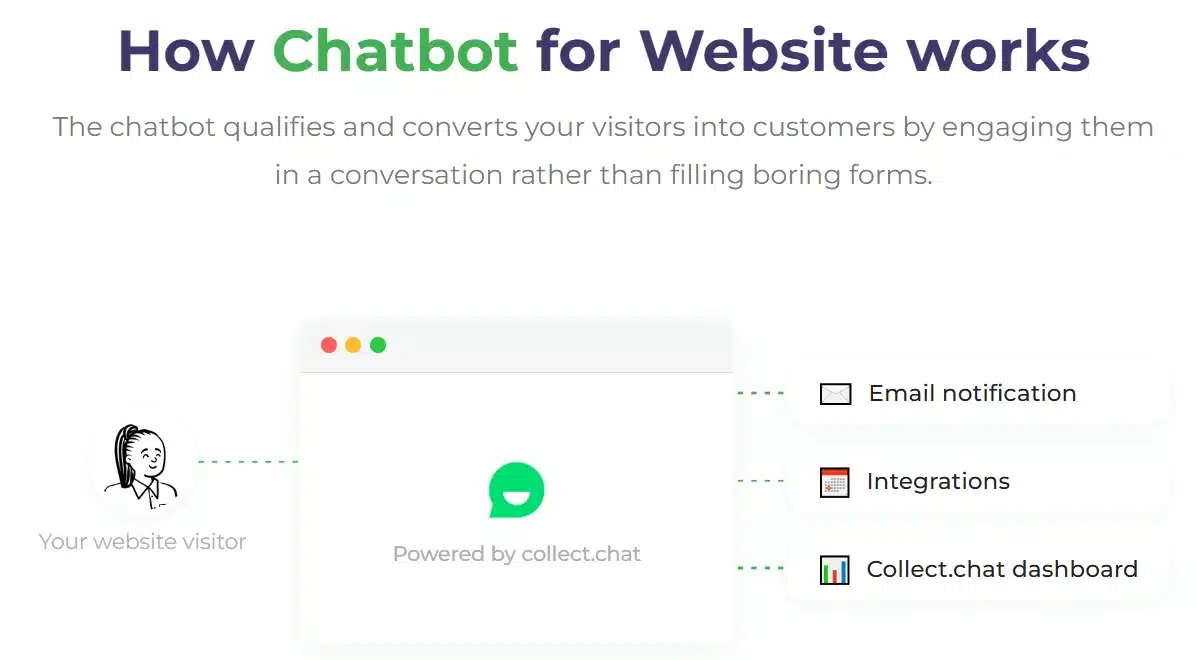
How to Use Collect.Chat: From Setup to Success
Using Collect.Chat is simple and intuitive, allowing businesses to efficiently manage chatbots, lead capture, and meeting scheduling.
Here’s a step-by-step overview:
- Create an Account: Sign up for Collect.Chat and select a plan starting with the Free Plan or upgrade to Lite, Standard, or Plus Plan depending on your needs.
- Build Your Chatbot: Use the chatbot builder to design conversation flows, add questions, and set responses for visitors.
- Enable Lead Generation: Configure the bot to collect visitor data and integrate with email or CRM systems for follow-up.
- Set Up Meeting Booking: Activate meeting booking features so visitors can schedule appointments directly through the chatbot.
- Convert Existing Forms: Use the Google Form to Chatbot feature to transform existing surveys and forms into interactive chatbots.
- Embed on Your Website: Place the chatbot on your website, including WordPress sites, using the provided code snippet or plugin.
- Monitor and Optimize: Check the analytics dashboard to review responses, track engagement, and improve the chatbot flow over time.
By following these steps, businesses can leverage Collect.Chat to streamline visitor engagement, increase lead generation, and simplify meeting scheduling efficiently.
Collect.Chat Pricing: Flexible Plans for Every Business
Collect.Chat pricing plans designed to suit businesses of all sizes, from small startups to large marketing teams and agencies. Below is a detailed breakdown of Collect.Chat’s pricing plans:
Free Plan $0/month
The Free Plan is ideal for individuals or small teams just getting started with Collect.Chat. It includes unlimited bots and allows up to 50 responses per month. Users can access basic features to start building website chatbots, test lead generation, and use meeting booking tools without any cost. This plan is perfect for experimenting with the platform and understanding how conversational chatbots can engage website visitors.
Lite Plan $18/month (billed yearly)
The Lite Plan is designed for small businesses or growing teams. It includes unlimited bots, up to 500 responses per month, and 1 webhook integration. Users also gain access to features such as appointment booking, logical jumps, notification email routing, and native 3rd party integrations. This plan is ideal for businesses looking to capture leads, schedule meetings, and automate basic interactions with more reliability than the Free Plan.
Standard Plan $35/month (billed yearly)
The Standard Plan is suited for mid-sized businesses or marketing teams needing more robust functionality. It includes unlimited bots, up to 2,500 responses per month, and unlimited webhook integrations. Additional features include responses & insights, campaign tracking, and team collaboration. Businesses on this plan can use Google Form to Chatbot conversion, enhance visitor engagement, and manage multiple chat flows efficiently.
Plus Plan $69/month (billed yearly)
The Plus Plan is designed for larger teams or agencies managing multiple clients. It includes unlimited bots, up to 5,000 responses per month, unlimited webhook integrations, and advanced capabilities such as custom domain setup, phone number OTP validation, and removal of Collect.Chat branding. This plan provides the full suite of features, enabling agencies and larger businesses to deploy chatbots at scale, manage WordPress integrations, track performance, and maximize lead generation efforts.
Each Collect.Chat plan is tailored to meet different business needs, whether you are just starting out or managing multiple client websites. All charges are in USD and billed yearly where applicable.
Collect.Chat Drag & Drop Builder: Build Powerful Chatbots Without Writing a Single Line of Code
Why the Drag & Drop Builder Matters for Business Success
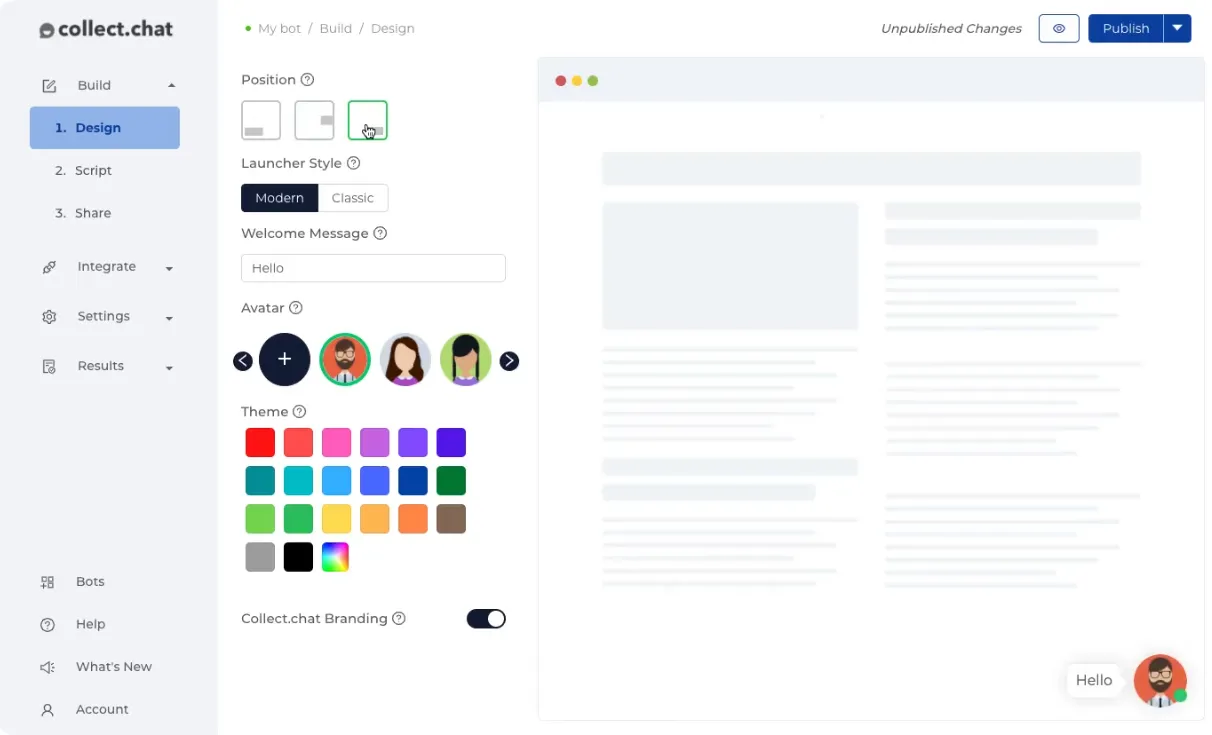
Collect.Chat’s drag-and-drop builder is designed to make creating chatbots effortless for any business, from small startups to large agencies. By combining an intuitive visual interface with powerful logic and customization options, it ensures businesses can launch interactive website chatbots quickly and without technical expertise. The result is faster setup, engaging visitor interactions, and more leads captured with less effort.
Supported Tools & Features: Create Bots Your Way
The drag-and-drop builder lets users design conversation flows, add multiple question types, incorporate logical jumps, and customize responses. Businesses can build lead generation bots, integrate meeting booking, and use Google Form to Chatbot conversion, all without writing a single line of code.
Drag & Drop Builder in Action: From Simple Bots to Complex Flows
Whether it’s a small business collecting email leads, a marketing team running a multi-step survey, or an agency building bots for multiple clients, the drag-and-drop builder provides flexibility and speed. Teams of any size can design chatbots that are functional, engaging, and optimized for conversions.
Collect.Chat Meeting Booking: Seamlessly Schedule Appointments Directly Through Your Chatbot
Why Meeting Booking Matters for Business Success
Collect.Chat’s meeting booking feature helps businesses eliminate scheduling friction and ensures no potential lead is lost. By allowing visitors to book appointments directly through a chatbot, teams save time, reduce missed opportunities, and improve customer experience.
Supported Tools & Features: Schedule Smarter
The chatbot can display real-time availability, integrate with calendars, and automate confirmations and reminders. This ensures appointments are accurate and hassle-free for both staff and visitors. Businesses can combine booking with lead capture, improving overall efficiency.
Meeting Booking in Action: From Small Teams to Large Agencies
Whether a local service provider, a startup, or a large marketing agency, meeting booking via Collect.Chat ensures that scheduling happens automatically 24/7. Visitors can secure appointments anytime, while teams focus on delivering services rather than managing calendars manually.

Collect.Chat Lead Generation: Capture High-Quality Leads Automatically Around the Clock
Why Lead Generation Matters for Business Success
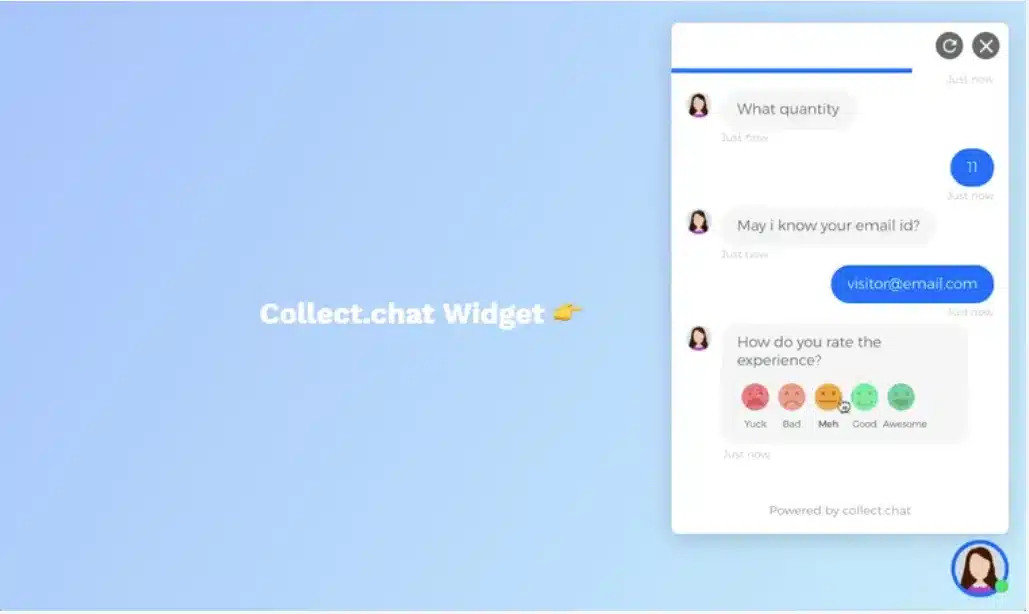
Collect.Chat’s lead generation features allow businesses to capture visitor information in real time without relying on static web forms. By automating lead capture through interactive chatbots, teams can increase engagement, qualify prospects, and grow their customer base efficiently.
Supported Tools & Features: Capture Leads Effortlessly
The platform collects visitor responses, segments leads based on answers, and sends data to email, CRM systems, or other integrations. Combined with chatbot flows, meeting booking, and Google Form to Chatbot conversion, businesses can automate marketing and sales processes seamlessly.
Lead Generation in Action: From First Contact to Conversion
Whether capturing email subscribers, booking appointments, or qualifying potential clients, Collect.Chat ensures that every interaction is recorded and actionable. This allows sales and marketing teams to prioritize high-quality leads and increase conversion rates without manual follow-up.
Collect.Chat Alternatives: Compare and Find the Best Fit
When exploring conversational chatbot and lead generation platforms, it’s natural to compare Collect.Chat with other popular solutions. While each tool has its strengths, Collect.Chat stands out for its drag-and-drop chatbot builder, meeting booking, lead generation, and ease of integration with platforms like WordPress. Here’s how Collect.Chat stacks up against the competition and why it might be the better choice for your business.
- Collect.Chat vs Tidio Tidio combines live chat, chatbots, and email marketing in one platform. It is highly customizable, with features for automating conversations, segmenting visitors, and integrating with e-commerce tools. Many small businesses choose Tidio for its all-in-one approach and ease of setup. Collect.Chat differentiates itself with more advanced lead generation workflows, meeting booking integration, and a dedicated drag-and-drop builder.
- Collect.Chat vs Intercom Intercom is a robust customer messaging platform offering chat, helpdesk, and product tours. It is often praised for its automation capabilities and deep CRM integrations. Collect.Chat is typically simpler and more affordable, making it ideal for businesses seeking quick chatbot deployment and lead capture without the complexity of full-scale customer support software.
- Collect.Chat vs Drift Drift focuses on conversational marketing and sales acceleration for mid-sized and enterprise businesses. It excels at AI-powered chat routing, lead scoring, and CRM automation. Collect.Chat provides similar engagement and lead capture features at a lower cost and with more straightforward setup, especially for small to medium-sized businesses.
- Collect.Chat vs ManyChat ManyChat is known for its Messenger-based bots and social media marketing focus. It works well for businesses that rely heavily on social platforms for lead generation. Collect.Chat, on the other hand, focuses on website-based bots, appointment scheduling, and capturing leads directly from your site or Google Form conversion, giving more control over visitor engagement.
Is Collect.Chat Worth It? Maximize Leads and Efficiency
Collect.Chat is certainly worth considering for businesses looking for an efficient, affordable, and easy-to-use chatbot solution. It offers a range of features including drag-and-drop bot building, lead generation, meeting booking, and analytics, all designed to automate visitor engagement and streamline business processes. Its user-friendly interface allows businesses to create interactive chatbots without technical skills, saving time and reducing manual effort. Collect.Chat’s flexibility caters to businesses of all sizes, from small startups to growing agencies, with plans including Free, Lite, Standard, and Plus to match different business needs. The platform’s features like Google Form to Chatbot conversion tool, WordPress integration, and customized conversational flows make it ideal for companies looking to improve conversions, automate scheduling, and capture high-quality leads efficiently. Overall, Collect.Chat’s functionality, ease of use, and competitive pricing make it a strong contender for businesses seeking a robust conversational marketing solution.
Key Takeaways
- Collect.Chat offers a simple, no-code platform to create website chatbots, capture leads, and automate meeting booking.
- Compared to alternatives like Tidio, Intercom, Drift, and ManyChat, it provides a cost-effective, easy-to-deploy solution for small to medium-sized businesses.
- Flexible pricing plans including Free, Lite, Standard, and Plus make it scalable as your business grows.
- Features like Google Form to Chatbot conversion and WordPress integration enhance usability and maximize lead capture efficiency.
Frequently Asked Questions
1. What is Collect.Chat best used for?
Collect.Chat is an all-in-one chatbot platform designed to help businesses engage website visitors, capture leads, automate meeting bookings, and collect feedback. It is ideal for small to medium-sized businesses, marketing teams, and agencies that want to improve conversions and streamline interactions without coding.
2. Does Collect.Chat have a free plan?
Yes, Collect.Chat Free Plan is available allows businesses to get started with unlimited bots and up to 50 responses per month. It includes access to the drag-and-drop builder, basic lead generation, and meeting booking, making it easy to test the platform before upgrading.
3. How much does Collect.Chat cost?
1. Lite Plan: $18/month (billed yearly) – includes 500 responses/month, 1 webhook integration, and basic automation.
2. Standard Plan: $35/month (billed yearly) – includes 2,500 responses/month, unlimited webhook integrations, analytics, and team collaboration.
3. Plus Plan: $69/month (billed yearly) – includes 5,000 responses/month, custom domain, phone OTP validation, and ability to remove branding.
4. Can I switch plans later?
Yes, you can upgrade or downgrade your plan anytime without losing your bots, responses, or settings, which makes it easy to scale your usage as your business grows.
5. Does Collect.Chat integrate with other tools?
Yes, Collect.Chat supports integrations with WordPress, popular CRM platforms, email marketing tools, and webhooks. You can also convert Google Forms into interactive chatbots for better engagement.
6. Is Collect.Chat suitable for remote teams?
Yes. Because it is cloud-based, teams can create, manage, and monitor chatbots from anywhere. Collaboration features allow multiple users to manage bots and review analytics in real-time.
7. How secure is my data?
Collect.Chat uses encryption, secure cloud storage, and regular backups to protect all visitor information, booking details, and chatbot analytics.
8. Can I remove Collect.Chat branding?
Yes. The Plus Plan allows businesses to remove Collect.Chat branding and use a custom domain, making chatbots fully professional and integrated into your website.
Ready to see how Collect.Chat can transform your website into a 24/7 lead-generating machine? Start with the Free Plan today and experience how easy it is to engage visitors, capture leads, and schedule meetings, all without any coding. Upgrade anytime as your business grows and take full advantage of advanced features, integrations, and analytics to streamline operations and boost conversions.
Disclosure: We are independent Affiliates, not employees. We receive referral payments from this company. The opinions expressed here are our own and are not official statements of the company.
(877) 522-7738
Blogs
How Enterprise Brands Manage Social Media at Scale
At enterprise scale, social media is an operations problem. Learn how large brands choose an operating model, secure accounts, match approvals to risk, scale customer care and measure results across every team.
Agency Referral Program: How to Earn Recurring Commission for Referring Clients to a Marketing Agency
An agency referral program pays you when a business you introduce becomes a client. See how these programs work, what fair recurring commission looks like, who earns the most and what a referral is worth, with real math.
Retiring Your Google LSA Management Retainer: How AI Agents Replace Agencies
For new clients, we’re retiring the monthly Google LSA retainer. A one-time $750 setup builds an AI agent that rates every charged lead, matches spend to capacity and reports weekly.
Franchise Social Media Marketing: How to Stay Consistent Across Locations
Franchise brands don’t need every location to post the same thing. Learn how to keep social media consistent across locations with clear account ownership, simple guidelines, content kits, compliance rules and per-location reporting.
Franchise PPC Marketing: How to Manage Ads Across Multiple Locations
Franchise PPC fails when locations compete with each other and nobody can see results per location. Learn how to set territories, budgets, brand-term rules, automation guardrails and call tracking across every location.
Recent Sales Notifications for Shopify: How to Show Customer Purchase Activity
Learn how to show recent sales notifications on Shopify. See what they are, why they build trust, how to set them up step by step, and best practices.
How to Claim Your Business on ChatGPT: Step-by-Step Guide
Learn how to claim your business on ChatGPT with this step-by-step guide to Business Hub, verification, Shopify setup, Business Agents, and insights.
Enterprise SEO: How Large Websites Can Scale Rankings Effectively
Large websites don’t win by fixing pages one at a time. Learn how enterprise SEO scales rankings through crawl control, template fixes, safe content scaling and AI search readiness.
How to Customize Sales Popups on Shopify to Match Your Brand
Learn how to customize sales popups on Shopify to match your brand, from colors, fonts, and position to message text, timing, and mobile testing.
How Shopify Sales Notifications Help Build Social Proof and Increase Sales
Learn how Shopify sales notifications build social proof, reduce shopper hesitation, and support sales, plus best practices and how to add them to your store.
Franchise SEO Challenges and How Multi-Location Brands Can Overcome Them
Franchise SEO is mostly a coordination problem. See the 10 challenges multi-location brands face, from duplicate location pages and listing drift to profile ownership and AI search, and how to fix each one at scale.
Google Ads Benchmarks 2026: What the Numbers Actually Mean for Your Account
Google Ads Search averages for 2026 are a 6.64% CTR, $5.42 CPC, 8.18% conversion rate and $66.69 cost per lead. Learn how to find your break-even CPL and which metric is holding your account back.
Best Shopify Sales Popup Apps to Boost Customer Trust and Conversions
Compare seven Shopify sales popup apps on features, customization, pricing, and ease of use, and learn how to pick one that builds trust without guesswork.
Franchise vs Enterprise Digital Marketing: Key Differences & Best Practices
Franchise and enterprise marketing both manage many locations under one brand, but they run on different rules. See who controls the budget, brand and data in each model, and the best practices that work for both.
How to Add a Shopify Sales Popup: Step-by-Step Guide
Learn how to add a Shopify sales popup in seven steps. Pick an app, set display rules, test on mobile, and track whether it works, with no coding needed.
Getting information about your case and your options is your FIRST move. Get a FREE case evaluation now…
Find Yourself a Marketing Expert Near You!
(877) 522-7738