
How to Fix Duplicate Product Schema in Shopify
TL;DR:
- Why it happens: Shopify themes, SEO apps, review apps, and custom code can generate overlapping Product schema on the same page.
- When it matters: Multiple JSON-LD blocks aren’t automatically an error. The real concern is conflicting product prices, availability, SKUs, ratings, or URLs.
- How to fix it: Back up your theme, identify each schema source, remove unnecessary overlaps, and validate the live page after making changes.
- Don’t confuse duplicates with variants: A ProductGroup containing individual Product entries can be legitimate Shopify structured data.
- How to prevent it: Check your existing theme and apps before adding another schema generator. JSON-LD for SEO can help automate structured data, provided overlapping implementations are handled correctly.
Have you inspected a Shopify product page and found multiple Product schema blocks? Before removing anything, it’s worth finding out where they come from. Your Shopify theme, an SEO app, a review app, or custom code may each add structured data to the same page.
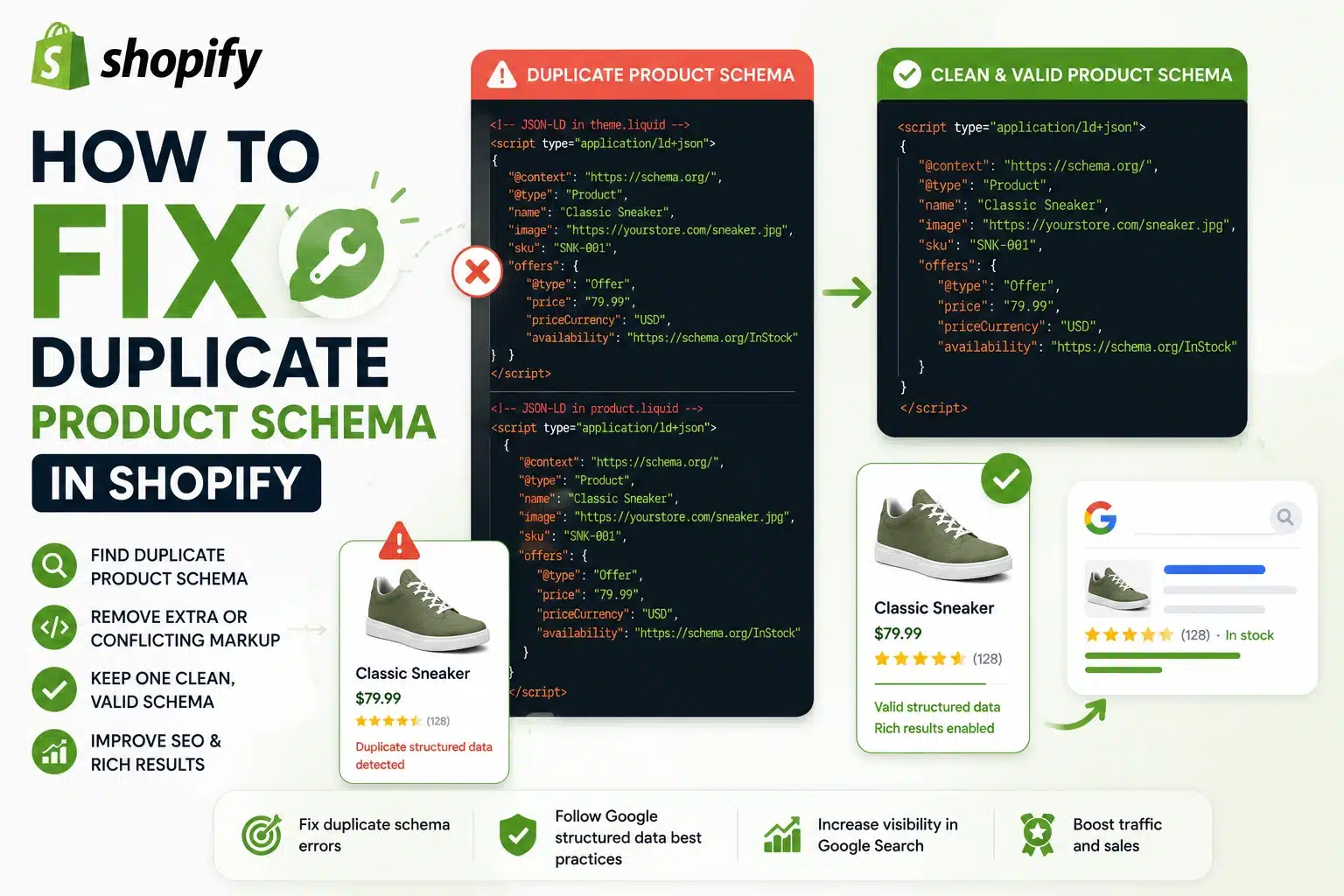
Seeing multiple JSON-LD blocks doesn’t automatically mean something is wrong. The problem arises when different implementations describe the same product but disagree on details such as price, availability, product identifiers, or review counts. These inconsistencies can make your structured data less reliable.
In this guide, you’ll learn how to find duplicate Product schema, identify its source, decide which markup to keep, and validate the fix without accidentally removing useful product or review information.
What Is Duplicate Product Schema?
Normal structured data:
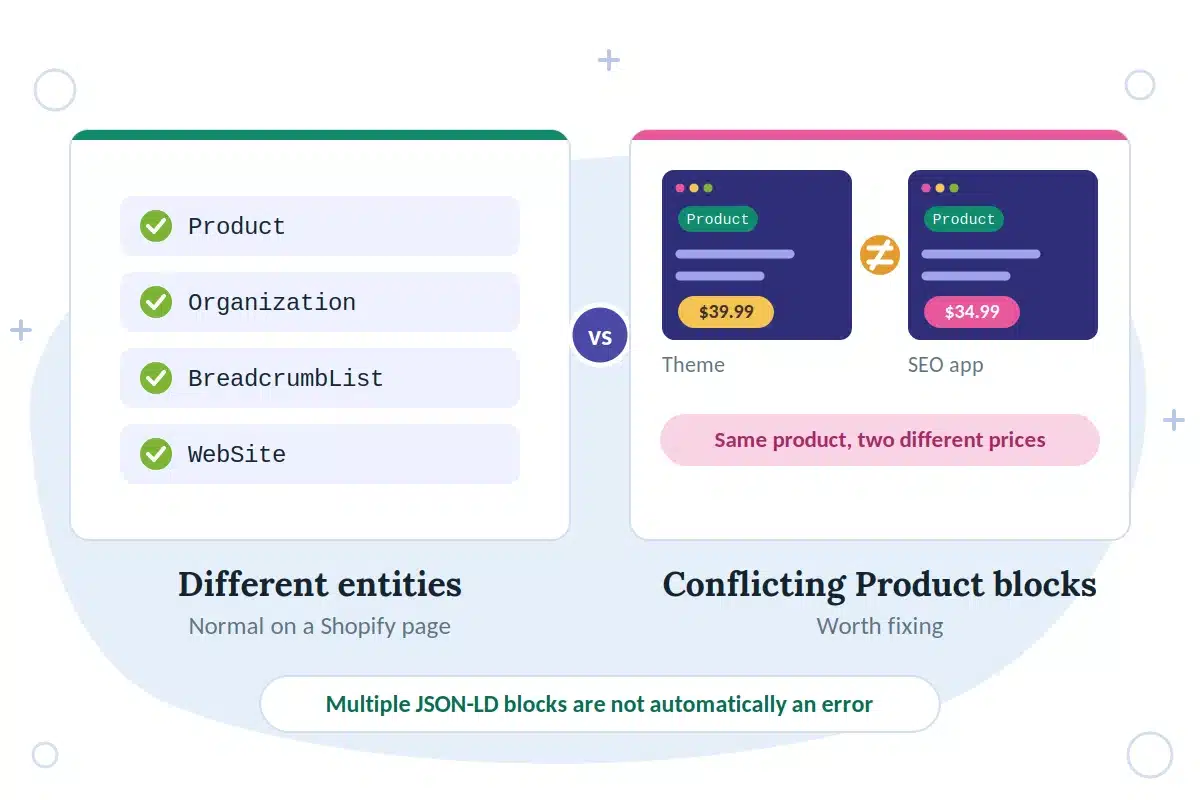
A Shopify page can contain several different entities: Product, Organization, BreadcrumbList, WebSite, and Review. Having more than one block is not inherently a problem. Telling the normal from the problematic is a classic job for technical SEO services.
Potentially problematic duplicate Product schema: The issue appears when multiple implementations create overlapping Product markup for the same product, especially when they disagree on:
- Prices
- Availability
- SKUs and GTINs
- Review counts and ratings
- Product URLs
The distinction matters for both SEO accuracy and trust: redundant but consistent markup is a clean-up task, while conflicting markup can mislead search engines about what you sell.
Why Does Shopify Have Duplicate Product Schema?
There are five usual suspects and our Shopify SEO services team checks each of them first on any new store.
- Your Shopify theme: Many themes already generate Product structured data. Shopify’s
structured_dataLiquid filter can output Product or ProductGroup markup depending on the product’s variants. - SEO or schema apps: Another app may add its own JSON-LD on top of the theme’s.
- Review apps: Review apps may add Product and review structured data.
- Custom Liquid or developer code: A previous developer may have inserted JSON-LD manually and then left it behind:
- Multiple SEO apps: Two separate SEO apps can each generate Product schema.
That list gives you a short set of suspects to check, in roughly the order they’re most likely.
How to Check for Duplicate Product Schema
The check takes only a few minutes, for a catalog-wide view, our SEO audit services scan every product template at once.
- Open a Shopify product page: Use a live product URL.
- View the page source: Press Ctrl+U (Cmd+Option+U on Mac) and search for
application/ld+json. - Search for Product: Look for blocks with a type of Product. Also check for ProductGroup, because Shopify’s structured data filter can output it for products with variants.
- Count the implementations: Identify every Product-related JSON-LD block and work out where each one comes from.
How to Find Which App Is Creating the Duplicate Schema
Work through the likely sources one at a time because leftover code is so common, regular website maintenance services help keep orphaned snippets from piling up.
- Check your theme: Look through the product template and related Liquid files.
- Check SEO apps: Identify installed apps that advertise schema, JSON-LD, rich snippets, or product markup.
- Check review apps: Look for apps that inject review or Product structured data.
- Check custom code: Search your theme files for
application/ld+jsonand for the Product type. - Use the installation timeline: If the duplicate appeared after you installed an app or changed themes, that points to the source.
Once you know which implementation is which, you can decide which to keep.
Is Duplicate Product Schema Bad for SEO?
It depends on what the duplicates say, good data quality is a quiet foundation of any ecommerce SEO services program.
- Duplicate Product markup isn’t automatically a Google penalty.
- Multiple structured data blocks can be legitimate.
- The bigger concern is conflicting, misleading, incomplete, or redundant product information.
- Structured data must accurately represent the page content.
- Google can ignore structured data that doesn’t follow its guidelines.
So treat duplicates as a data quality issue rather than a ranking emergency. The risk is that Google gets contradictory signals about price, availability, or reviews, and may not use your markup as you intended.
Common Signs of Conflicting Product Schema
Price and availability conflicts often show up in shopping feeds first, which is where Google Merchant Center management can spot them early.
- Different prices: One block says 49.99 and another says 44.99, while the visible page shows only one of them.
- Different availability: One block says in stock and another says out of stock.
- Different review counts: One source reports 120 reviews and another reports 114.
- Different product identifiers: Different SKU or GTIN values appear in separate Product objects.
- Different product URLs. Multiple blocks identify the same product with inconsistent URLs.
Google’s Product documentation emphasizes accurate product information and appropriate product identification, so any of these is worth fixing.
How to Fix Duplicate Product Schema in Shopify
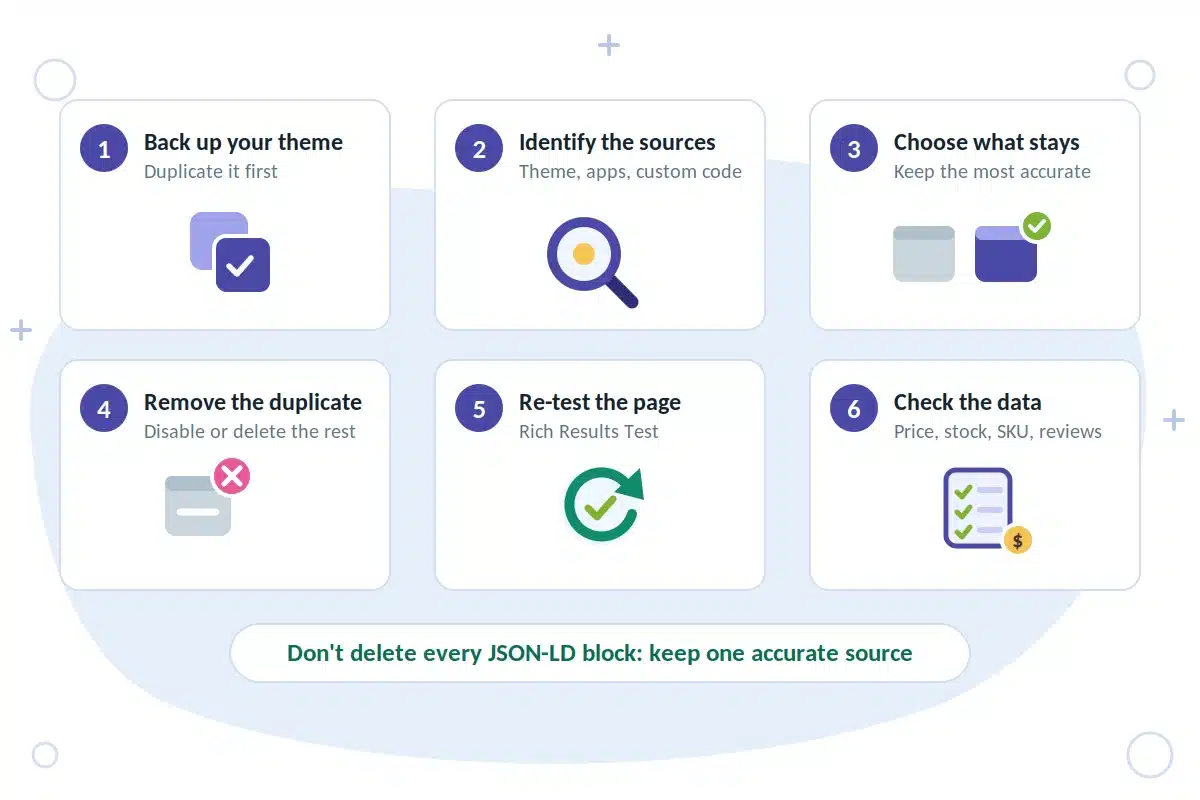
Step 1: Back up your theme
Before changing theme code, duplicate the theme. Shopify recommends this so you have a backup if something breaks. In the admin, go to Online Store, Themes, and duplicate your live theme.
Step 2: Identify the sources
Determine whether each Product block comes from your theme, an SEO app, a review app, custom Liquid, or developer code.
Step 3: Decide which implementation should remain
Don’t simply delete every JSON-LD block. Keep the implementation that accurately and comprehensively represents the product, and remove or disable the overlapping ones where appropriate. Review apps often contribute rating data you may want to keep, so confirm what each source provides before turning anything off.
Step 4: Remove the duplicate source
Depending on where it comes from:
- Remove the custom code
- Disable the overlapping app feature
- Adjust the theme implementation
- Ask the app provider how to turn off its schema output
If you’re not comfortable editing Liquid, our Shopify web design services team can make theme changes safely.
Step 5: Re-test the live product page
Run the updated URL through a structured data testing tool and confirm only the intended Product markup remains.
Step 6: Check the product data
Confirm that price, availability, SKU, GTIN, reviews, and the product URL are all still accurate.
Shopify Product Schema and Product Variants
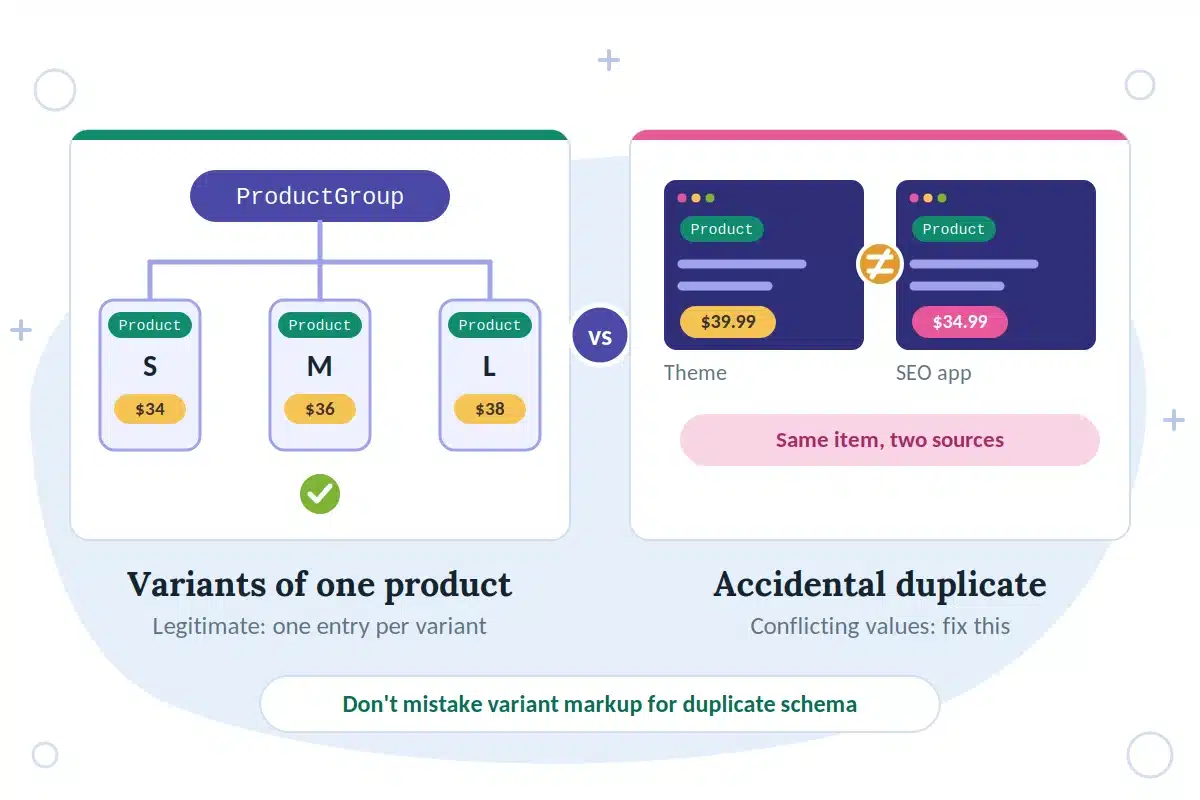
Shopify products can have multiple variants. Google’s current guidance uses a ProductGroup together with individual Product entries to represent variants, and it expects appropriate identifiers and a clear relationship between the group and its variants. Stores with large variant catalogs often rely on ecommerce optimization services to keep that data tidy.
Several Product entries on a page can be correct when they describe different variants of one product group. The red flag is two separate implementations describing the same item with different values.
Example: Duplicate vs. Correct Product Schema
Conflicting prices can also leak into shopping ads, so catching them early protects the spend behind your ecommerce PPC services campaigns.
The problem: Two separate implementations each describe the same product, “Example Shirt,” but report different prices.
| Source | Product name | Price in markup |
|---|---|---|
| Theme block | Example Shirt | 39.99 |
| SEO app block | Example Shirt | 34.99 |
The visible page shows only one price, so one of these blocks is wrong. This is a problem because Google receives two conflicting answers about the same product, and it may ignore the markup or flag a mismatch.
The corrected setup: One consistent implementation describes the product, with a single price that matches the page.
| Source | Product name | Price in markup |
|---|---|---|
| One chosen implementation | Example Shirt | Matches the visible price |
Where the shirt has several sizes or colors, the correct structure is a product group with one entry per variant, each with its own accurate price and availability. That’s legitimate variant markup, not duplication.
How to Validate the Fix
Use all three checks below. To confirm the cleanup helps real shoppers too, track results with Google Analytics services.
- Google Rich Results Test: Check the live page and the Product information it detects.
- Schema Markup Validator: Inspect the Schema.org graph and entities.
- Google Search Console: Monitor the relevant Product reports after Google processes the change. Google provides separate Merchant listings and Product snippets reports, depending on the page type and search feature.
Allow time for recrawling, since Search Console updates only after Google revisits your pages. For a full testing guide, see How to Validate Shopify Structured Data.
What If Duplicate Product Schema Comes Back?
Duplicates often return after a change, so make checking part of your routine and fold it into your broader SEO strategy.
- Review new app installations: Check whether a new SEO or review app adds schema.
- Recheck after theme changes: A theme change can alter your existing structured data output.
- Don’t install multiple schema generators without checking: More structured data isn’t automatically better.
- Monitor important product templates: Test representative products after major changes.
Centralize Your Product Schema with JSON-LD →
Frequently Asked Questions
1. Why does Shopify have duplicate Product schema?
Usually because more than one source generates it: the theme, an SEO app, a review app, custom code, or a second SEO app.
2. How do I find duplicate JSON-LD in Shopify?
View the page source, search for application/ld+json, and look for more than one Product or ProductGroup block.
3. Is duplicate Product schema bad for SEO?
Not automatically. The concern is conflicting or misleading information, which can lead Google to ignore the markup. Once it’s clean, our ecommerce marketing services can help you build on the visibility.
4. How do I remove duplicate Product schema from Shopify?
Back up your theme, identify each source, decide which implementation to keep, and remove or disable the others. Then re-test. An app like JSON-LD for SEO can serve as the single remaining source.
5. Can Shopify themes and SEO apps both add Product schema?
Yes. That’s the most common cause of duplicates, so check your theme’s output before installing an app.
6. How do I validate Product schema after fixing duplicates?
Use the Rich Results Test and Schema Markup Validator on the live page, then monitor Search Console as Google recrawls.
How JSON-LD for SEO Can Help Prevent Schema Conflicts
Automated Shopify structured data
The practical reason to use an app is centralizing structured data in one place. Instead of manually maintaining Product JSON-LD across several templates, a structured data app can generate the markup from your catalog as it changes.
JSON-LD for SEO by DiscoverMyBusiness automates product schema and variants, dynamic product reviews, articles, breadcrumbs, pages, videos, FAQs, business information, and Merchant Center-related structured data. It supports 20+ review apps and Shopify Markets and international domains. Once your markup is consistent, conversion rate optimization helps turn the added trust and visibility into orders.
If you install it, turn off overlapping schema from your theme or other apps first, so you’re back to a single source. The aim is consistent, maintained markup, not a promise of SEO gains.
How to Install JSON-LD for SEO in Shopify (Video Tutorial)
Prefer to watch? This video walks through how to install JSON-LD for SEO from the Shopify App Store so your Product schema comes from a single maintained source.
Key Takeaways
- More than one block isn’t always a problem: Product, Organization, BreadcrumbList, and Review blocks can legitimately appear together
- Conflicts are the real issue: Different prices, availability, identifiers, review counts, or URLs for the same product can mislead search engines
- Find the source first: Check your theme, SEO apps, review apps, custom code, and your installation timeline
- Keep one implementation: Back up your theme, keep the most accurate and complete source, and remove or disable the rest
- Variants aren’t duplicates: A ProductGroup with variant Product entries is correct, so re-test and monitor after every change
(877) 522-7738
Blogs
Enterprise SEO: How Large Websites Can Scale Rankings Effectively
Large websites don’t win by fixing pages one at a time. Learn how enterprise SEO scales rankings through crawl control, template fixes, safe content scaling and AI search readiness.
How to Customize Sales Popups on Shopify to Match Your Brand
Learn how to customize sales popups on Shopify to match your brand, from colors, fonts, and position to message text, timing, and mobile testing.
How Shopify Sales Notifications Help Build Social Proof and Increase Sales
Learn how Shopify sales notifications build social proof, reduce shopper hesitation, and support sales, plus best practices and how to add them to your store.
Franchise SEO Challenges and How Multi-Location Brands Can Overcome Them
Franchise SEO is mostly a coordination problem. See the 10 challenges multi-location brands face, from duplicate location pages and listing drift to profile ownership and AI search, and how to fix each one at scale.
Google Ads Benchmarks 2026: What the Numbers Actually Mean for Your Account
Google Ads Search averages for 2026 are a 6.64% CTR, $5.42 CPC, 8.18% conversion rate and $66.69 cost per lead. Learn how to find your break-even CPL and which metric is holding your account back.
Best Shopify Sales Popup Apps to Boost Customer Trust and Conversions
Compare seven Shopify sales popup apps on features, customization, pricing, and ease of use, and learn how to pick one that builds trust without guesswork.
Franchise vs Enterprise Digital Marketing: Key Differences & Best Practices
Franchise and enterprise marketing both manage many locations under one brand, but they run on different rules. See who controls the budget, brand and data in each model, and the best practices that work for both.
How to Add a Shopify Sales Popup: Step-by-Step Guide
Learn how to add a Shopify sales popup in seven steps. Pick an app, set display rules, test on mobile, and track whether it works, with no coding needed.
Google Partner Rewards Store Not Working? We Hit a Redirect Loop, and Here’s What to Do
Stuck in a Google Partner Rewards Store redirect loop? Discover the exact causes behind the login bug and practical troubleshooting steps to redeem your partner points.
GloriaFood Is Shutting Down: Your 7-Step Plan and a Replacement to Try
With Oracle discontinuing GloriaFood, restaurants must plan ahead: explore a 7-step migration blueprint, data export tips, and top online ordering replacements.
Best Shopify Image Optimization Apps: How to Choose the Right Tool for Your Store
Learn what to look for in a Shopify image optimization app, the main types of tools, how to compare apps fairly, and the mistakes to avoid when choosing the right one.
Shopify Image Optimization Checklist: What to Do Before and After Uploading Product Photos
Use this Shopify image optimization checklist to prepare product photos before you upload, finish the job after, avoid common mistakes, and handle large catalogs in bulk.
Beehiiv Newsletter Platform: Pricing, Features, and Monetization Tools
Explore the beehiiv newsletter platform to streamline your communication and engage with your audience effectively.
Shopify Core Web Vitals and Images: How to Find and Fix Image-Related Speed Issues
Learn how images affect Shopify Core Web Vitals, how to find image-related speed issues, the most common mistakes, and how to fix them, including for large product catalogs.
Shopify Fake Cart Bot Attack: What Stopped 500+ Fake Carts an Hour (and a Script We Can’t Rule Out)
A client’s Shopify store was hit with 500+ fake carts an hour, and captchas, rate limits and bot apps didn’t stop it. Here’s why the traffic bypassed our security, the one fix that worked, and a third-party script lead we’re still tracing.
Getting information about your case and your options is your FIRST move. Get a FREE case evaluation now…
Find Yourself a Marketing Expert Near You!
(877) 522-7738