
GloriaFood Is Shutting Down: Your 7-Step Plan and a Replacement to Try
TL;DR:
- What’s happening: Oracle is retiring GloriaFood on April 30, 2027, according to the notice inside the platform. As a result, online ordering built on it needs a new home, and Oracle reportedly offers no direct replacement.
- A replacement to evaluate: HighLevel Restaurants combines online ordering, menus, pickup, delivery, QR table ordering, and reservations in one workspace. Its 30-day free trial with free live training also makes it an easy way to start.
- What to do: Audit, export, compare, rebuild, test, and switch. The checklist below walks you through each step.
GloriaFood Is Going Away. What Users Need to Know
If your restaurant takes orders through GloriaFood, or you built that button into your clients’ websites, you have a deadline. It is about six months away. Because online ordering directly produces revenue, losing it hurts.
The good news is that you still have time. The risk is waiting until the final weeks, when thousands of other restaurants are swapping links at the same moment. This guide first confirms what has been announced, then gives you a migration checklist and compares the main alternatives, including HighLevel Restaurants.
Is GloriaFood Shutting Down in 2027?
Yes. According to the notice inside the GloriaFood platform, the offering will be retired on April 30, 2027. The message also says a written notice and FAQ will be sent to the email tied to your restaurant or partner account. Here is what has been reported:
- Retirement date: April 30, 2027 is the Last Date of Service for the product line
- Owner: Oracle completed its acquisition of GloriaFood on June 25, 2021
- Affected services: The whole product line, including Oracle Restaurants eStore partner agreements
- Replacement: Oracle reportedly offers no direct replacement and also will not recommend third-party vendors
- Reason: Partner emails, as quoted by industry blogs, say the business no longer fits Oracle’s strategic vision, although Oracle has published no detailed explanation
What Does the GloriaFood Shutdown Mean for Restaurants?
After the end date, treat anything that depends on GloriaFood as unavailable. The consequences, however, take work.
Online ordering and website integration
Ordering widgets, social links, and Google listings that run through GloriaFood stop being reliable. For example, customers who tap an old “Order Online” button may land on a dead page, which means a lost order.
Menus, modifiers, and restaurant information
A new platform rarely accepts a one-click import. Plan on recreating menus, photos, prices, modifiers, opening hours, and delivery zones. Because export options vary, confirm them now.
Pickup, delivery, and payment workflows
Because fulfillment rules, delivery fees, tax settings, and payment connections all need rebuilding and testing, even small mistakes show up as failed checkouts. Give this step real time.
Customer experience and repeat business
When you use GloriaFood promotions, customer lists, or review requests, those tools stop with the platform. So export whatever data you are permitted to, and store it somewhere you control.
Migration considerations for agencies
Agencies that used GloriaFood as the standard ordering layer now have a stack to replace for every client, and white-label partners lose the product they resold. Therefore, standardize on one or two replacements and migrate one location at a time.
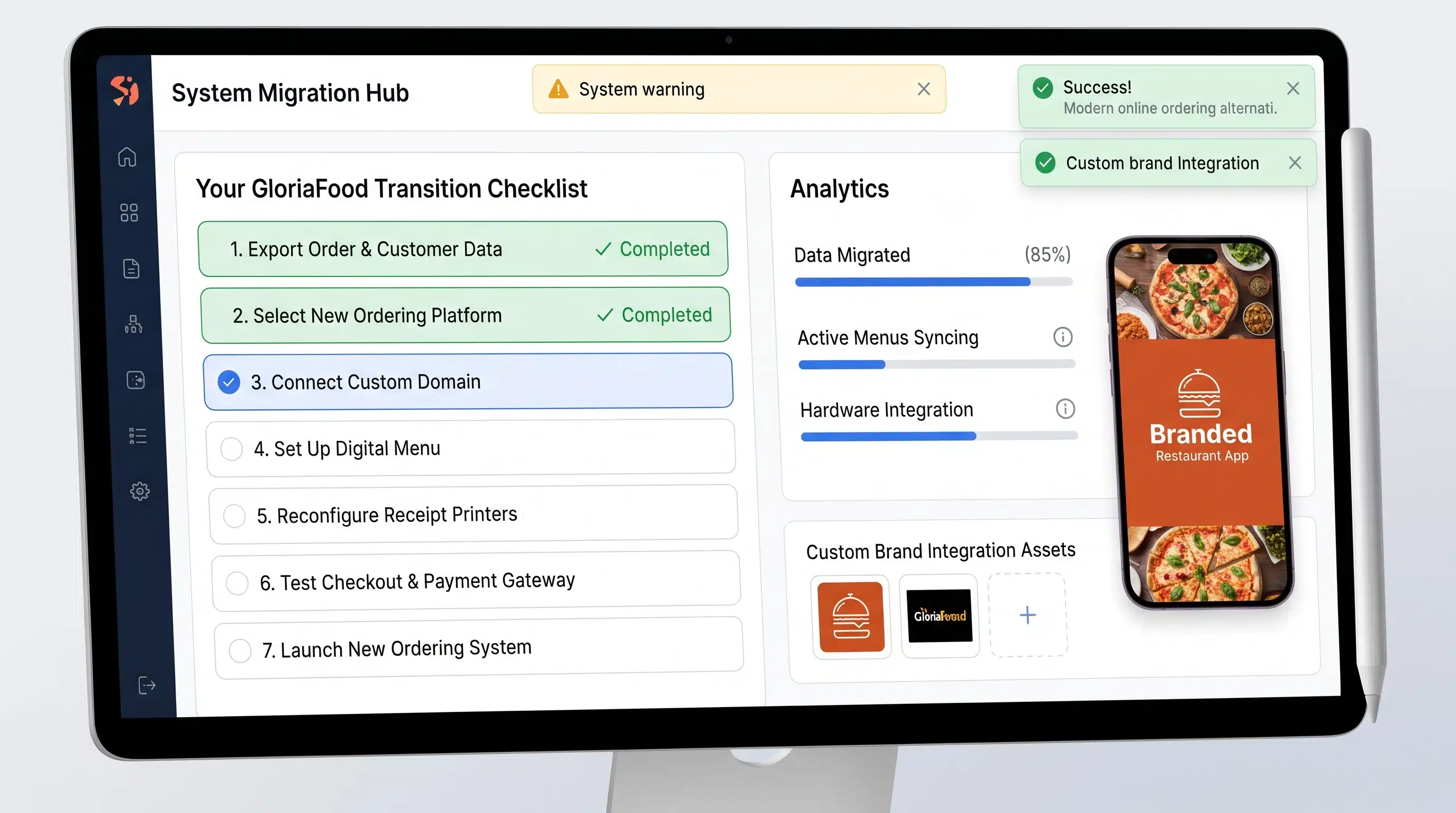
What Should You Do Before GloriaFood Shuts Down?
Use this checklist for one restaurant. Agencies can then run it once per client.
- Audit everything that depends on GloriaFood. List every website, social link, Google Business Profile link, QR code, and integration pointing to your ordering page.
- Export your data and back up your menu. Download menus, customer records, and order history wherever allowed, then save copies in your own storage.
- Compare replacement platforms. Then look at ordering features, reservations, payment fees, POS fit, total cost, and support.
- Rebuild the menu and payment setup. Recreate items and modifiers, then configure delivery zones, pickup times, payments, taxes, and notifications.
- Test on desktop and mobile. Place real test orders for pickup and delivery, while using every payment method you accept.
- Tell your customers and update your links. Announce the change by email, social posts, and signage, then replace every old link and QR code.
- Switch over only after testing. Keep GloriaFood running as a fallback until the new flow works during a real service.
This is also a good moment to refresh the site around the menu. A custom website design can also make your new ordering page easier to find, and SEO keeps the new page ranking once links change.
Looking for a GloriaFood Alternative?
Explore restaurant management software that brings online ordering, menus, reservations, and customer management together. HighLevel Restaurants offers a connected platform for restaurant operations, helping you manage essential workflows in one place.
- Online ordering and menus
- Reservations and floor plans
- 30-day free trial
Get Started With GoHighLevel: 30-Day Free Trial →
Communication surcharges may apply during the trial, and subscription and usage fees may apply afterward.
Best GloriaFood Alternatives for Restaurants
The best choice depends on what your restaurant needs. Some owners want a restaurant-specific ordering platform, while others prefer a point-of-sale (POS) system with ordering built in. This table compares HighLevel Restaurants with four commonly named options:
| Platform | Ordering and menus | Reservations and tables | Pickup and delivery | Website integration | Marketing and customers | Pricing and fees |
|---|---|---|---|---|---|---|
| HighLevel Restaurants | Online ordering, menus with modifiers, order management | Reservations and interactive floor plan | Pickup, delivery, dine-in, QR table ordering | Own ordering experience, plus websites and funnels | CRM, texting, email, automation, reviews | Subscription plus usage-based fees |
| CloudWaitress | Branded ordering site, menu builder | Online reservations | Pickup, delivery, QR ordering | Ordering site on your own domain | Promo codes and reports | Free up to 100 orders a month, paid plans from about $39, no commissions |
| Restolabs | Commission-free ordering, multilingual menus | Not highlighted | Pickup, delivery integrations, QR ordering | SEO website and branded apps | Loyalty, promos, email and SMS | Flat monthly plans per store, no commission |
| Orderable (WordPress plugin) | Ordering inside WordPress and WooCommerce | Not included | Pickup, delivery, time slots, QR ordering on Pro | Runs inside your WordPress site | Limited, with reminder emails | Free core, Pro at $149 a year, plus gateway fees |
| Square for Restaurants | Free ordering page, menu management | Not in the core plan | Pickup, delivery, QR ordering, no commissions | Square Online site builder | Marketing and loyalty as paid add-ons | Free plan, paid tiers, online card fees apply |
Toast and Lightspeed also bundle online ordering, so compare their processing fees and contract terms closely.
Why Consider HighLevel Restaurants as a GloriaFood Alternative?
GoHighLevel is best known as a CRM and marketing platform. However, HighLevel Restaurants is a restaurant-specific workspace built around orders, reservations, menus, and online presence. As a result, the HighLevel Restaurants workspace keeps every channel in one place.
Online Ordering, Menus, and Order Management
Give customers your own online ordering experience, so they order directly from you. Build menus with categories and item options, then manage every order in one workspace.
Pickup, Delivery, and Dine-In Ordering
Offer pickup and delivery with customizable hours and fulfillment rules. Guests dining in can also scan a table-specific QR code and order from their phones. As a result, every order type flows into one place.
Reservations and Interactive Floor Plans
Manage guest bookings in the same workspace as your orders. Build custom table layouts with the interactive floor plan, then connect each reservation to a specific table for easier seating.
Customer Management and Reputation
Orders and guests sit inside HighLevel’s CRM, so contacts, inquiries, and catering requests live in one list. Reputation tools help collect reviews, and combined with online reputation management and local SEO services, they help diners find your new ordering page.
Marketing Automation and Customer Follow-Ups
Email, SMS, and workflows support promotions, repeat-order reminders, and win-back messages. Workflow Maps also adds a visual map of your automations, so you can trace a guest’s journey and spot broken steps early. Because text and email marketing is subject to consent rules, collect permission properly. A structured email marketing program keeps the messaging consistent, and lead generation services can bring in catering inquiries. To reach new diners, Google Ads and social media advertising can point local searchers at your new ordering page, and analytics shows which channels produce orders.
HighLevel has also announced loyalty and rewards, an AI reservation agent, and unified guest profiles as coming soon. They are not available yet, so base your decision on what the platform offers today. For a closer look at how it works day to day, read our guide, HighLevel for Restaurant Owners.
Ready to Modernize Your Restaurant Operations?
Discover how HighLevel Restaurants combines ordering, reservations, menus, and customer management in a connected workspace. Explore the platform to see whether it fits your restaurant’s needs.
- Pickup, delivery, and QR ordering
- Free live training
- 30-day free trial
Start Your 30-Day Free Trial + Free Training →
Communication surcharges may apply during the trial, and subscription and usage fees may apply afterward.
HighLevel for Agencies Managing Restaurant Clients
If you serve restaurants, HighLevel also helps you run the work behind the software.
Manage Restaurant Marketing and Automation
Use the CRM to organize each restaurant’s customers. Then use Workflow Maps to see how every automation connects and troubleshoot problems before they affect orders.
Keep Client Projects Organized
Project Management tracks implementation work in one workspace, so you can assign owners, set deadlines and priorities, break each launch into subtasks, and keep every task connected to the client’s CRM record.
Customize the Workspace for Different Clients
Custom Navs lets eligible users rename, reorder, and hide navigation items, then save the layout as a reusable template across sub-accounts. As a result, each client sees the tools that matter most.
Build a Recurring Revenue Offering
HighLevel’s agency and SaaS capabilities, including sub-accounts and SaaS Mode, let you package restaurant software, automation, and AI into a recurring-revenue service. This also gives former GloriaFood white-label partners a way to keep selling ordering software. If you serve restaurant clients, you can explore HighLevel’s business opportunities with the 30-day free trial and see how it fits your agency’s offering. Our own team also builds custom automations through AI development services, and a documented digital marketing strategy helps decide what to standardize across clients.
How to Choose the Right GloriaFood Replacement
Don’t pick the first name on a list. Instead, compare each option on the same factors, and confirm your own requirements before you switch:
- Ordering features and customer experience: Menus, modifiers, checkout, and every order type
- POS and payment compatibility: Works with your POS and payment methods, so checkout stays smooth
- Menu migration and data portability: What you can import and export
- Marketing and CRM functionality: Promotions, email, SMS, and reviews
- Pricing, support, and scalability: Subscription, setup, and processing fees
- Ease of setup and ongoing management: How fast you go live, while daily use stays simple
Get Started: HighLevel Bootcamp and Restaurant Launchpad
Two guided paths help you get started, but they do different jobs. The Bootcamp teaches you the HighLevel platform, while the Launchpad sets up your restaurant.
The free live Bootcamp
The free live Bootcamp with a 30-day free trial is a click-by-click Zoom class led by a HighLevel coach. You set up six quick wins: text marketing, missed-call text-back, the mobile app, social media integrations, Google Business chat, and reputation and review management. It is built for fresh launches, so you leave with a working HighLevel setup. Sessions run weekdays at 11 AM CT, last about an hour, and are not recorded, so plan to attend live.
Signing up asks for billing details. You can cancel without paying the subscription cost, but communication surcharges may apply during the trial, and fees may apply afterward.
The restaurant Launchpad
Meanwhile, HighLevel Restaurants has its own guided Launchpad, with step-by-step guidance from initial setup to your first live order. In short, the Bootcamp gets you comfortable with HighLevel, and the Launchpad gets your restaurant taking orders.
Final Thoughts: Prepare for the GloriaFood Shutdown
Overall, GloriaFood’s retirement on April 30, 2027 is a firm deadline, and migrating early gives you time to test. HighLevel Restaurants is a promising option to evaluate, with ordering, menus, reservations, pickup, delivery, and QR ordering in one workspace. However, the best choice depends on your restaurant’s requirements, so compare it with the alternatives above. Its 30-day free trial with free live training is also an easy way to see how it fits. And once orders move, conversion rate optimization helps the new ordering page turn more visits into orders. For more help across channels, see our full range of digital marketing services.
Key Takeaways
- Start early: Check your dashboard and account email, then begin the audit and export steps now
- Evaluate HighLevel Restaurants: It covers ordering, menus, reservations, pickup, delivery, and QR ordering, while a CRM supports marketing
- Test before you switch: Keep GloriaFood as a fallback until real orders work on the new setup
Frequently Asked Questions
1. When is GloriaFood shutting down?
GloriaFood is scheduled to be retired on April 30, 2027, according to the notice inside the platform. Also confirm the date in your dashboard.
2. What happens to restaurants using GloriaFood?
Ordering widgets, links, and customer tools should be treated as unavailable after that date. Therefore, rebuild your menu, payments, and links elsewhere before then.
3. What is the best GloriaFood alternative?
There is no single best option. It depends on whether you need an ordering platform, a POS, a plugin, or one connected platform such as HighLevel Restaurants.
4. Can HighLevel replace GloriaFood?
For many restaurants, it can. HighLevel Restaurants offers online ordering, pickup, delivery, dine-in and QR ordering, menu management, and reservations. However, compare it with your own requirements first.
5. Does HighLevel support online ordering and reservations?
Yes. HighLevel Restaurants includes online ordering, plus reservations with an interactive floor plan that connects bookings to specific tables.
6. Can agencies use HighLevel to manage restaurant clients?
Yes. Agencies can use sub-accounts, the CRM, Workflow Maps, and Project Management to run client work, and SaaS Mode to package software as a service. Try it through the free live Bootcamp and 30-day trial.
7. How should restaurants prepare for migration?
Audit what depends on GloriaFood, export your data, and back up your menu. Then compare platforms, rebuild, test, and tell customers before you switch.
(877) 522-7738
Blogs
Enterprise SEO: How Large Websites Can Scale Rankings Effectively
Large websites don’t win by fixing pages one at a time. Learn how enterprise SEO scales rankings through crawl control, template fixes, safe content scaling and AI search readiness.
How to Customize Sales Popups on Shopify to Match Your Brand
Learn how to customize sales popups on Shopify to match your brand, from colors, fonts, and position to message text, timing, and mobile testing.
How Shopify Sales Notifications Help Build Social Proof and Increase Sales
Learn how Shopify sales notifications build social proof, reduce shopper hesitation, and support sales, plus best practices and how to add them to your store.
Franchise SEO Challenges and How Multi-Location Brands Can Overcome Them
Franchise SEO is mostly a coordination problem. See the 10 challenges multi-location brands face, from duplicate location pages and listing drift to profile ownership and AI search, and how to fix each one at scale.
Google Ads Benchmarks 2026: What the Numbers Actually Mean for Your Account
Google Ads Search averages for 2026 are a 6.64% CTR, $5.42 CPC, 8.18% conversion rate and $66.69 cost per lead. Learn how to find your break-even CPL and which metric is holding your account back.
Best Shopify Sales Popup Apps to Boost Customer Trust and Conversions
Compare seven Shopify sales popup apps on features, customization, pricing, and ease of use, and learn how to pick one that builds trust without guesswork.
Franchise vs Enterprise Digital Marketing: Key Differences & Best Practices
Franchise and enterprise marketing both manage many locations under one brand, but they run on different rules. See who controls the budget, brand and data in each model, and the best practices that work for both.
How to Add a Shopify Sales Popup: Step-by-Step Guide
Learn how to add a Shopify sales popup in seven steps. Pick an app, set display rules, test on mobile, and track whether it works, with no coding needed.
Google Partner Rewards Store Not Working? We Hit a Redirect Loop, and Here’s What to Do
Stuck in a Google Partner Rewards Store redirect loop? Discover the exact causes behind the login bug and practical troubleshooting steps to redeem your partner points.
Best Shopify Image Optimization Apps: How to Choose the Right Tool for Your Store
Learn what to look for in a Shopify image optimization app, the main types of tools, how to compare apps fairly, and the mistakes to avoid when choosing the right one.
Shopify Image Optimization Checklist: What to Do Before and After Uploading Product Photos
Use this Shopify image optimization checklist to prepare product photos before you upload, finish the job after, avoid common mistakes, and handle large catalogs in bulk.
Beehiiv Newsletter Platform: Pricing, Features, and Monetization Tools
Explore the beehiiv newsletter platform to streamline your communication and engage with your audience effectively.
Shopify Core Web Vitals and Images: How to Find and Fix Image-Related Speed Issues
Learn how images affect Shopify Core Web Vitals, how to find image-related speed issues, the most common mistakes, and how to fix them, including for large product catalogs.
Shopify Fake Cart Bot Attack: What Stopped 500+ Fake Carts an Hour (and a Script We Can’t Rule Out)
A client’s Shopify store was hit with 500+ fake carts an hour, and captchas, rate limits and bot apps didn’t stop it. Here’s why the traffic bypassed our security, the one fix that worked, and a third-party script lead we’re still tracing.
JPEG vs. PNG vs. WebP: Which Image Format Is Best for Shopify Stores?
Compare JPEG, PNG, and WebP for Shopify stores, see which format suits each image type, and learn if WebP speeds up your store and how to optimize images without losing quality.
Getting information about your case and your options is your FIRST move. Get a FREE case evaluation now…
Find Yourself a Marketing Expert Near You!
(877) 522-7738