
GoHighLevel Pricing 2026: What You’ll Actually Pay Per Month.
TL;DR:
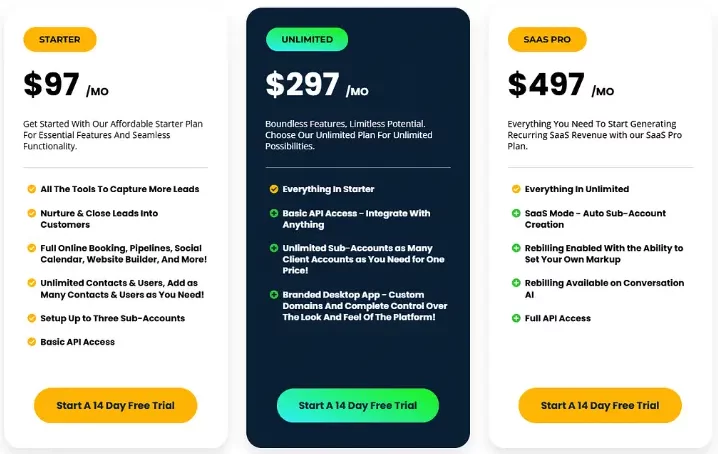
- GoHighLevel pricing: Plans start at $97/month, with Unlimited at $297 and Agency Pro at $497.
- What you actually pay: Your plan price is only the starting point. SMS, email, calls, phone numbers, A2P fees, and AI can add to your monthly bill.
- Calculate your real cost: Enter your usage to see your estimated monthly and annual GoHighLevel cost, including usage-based fees.
- For agencies: See which plan fits your needs and how much usage you can potentially rebill to clients.
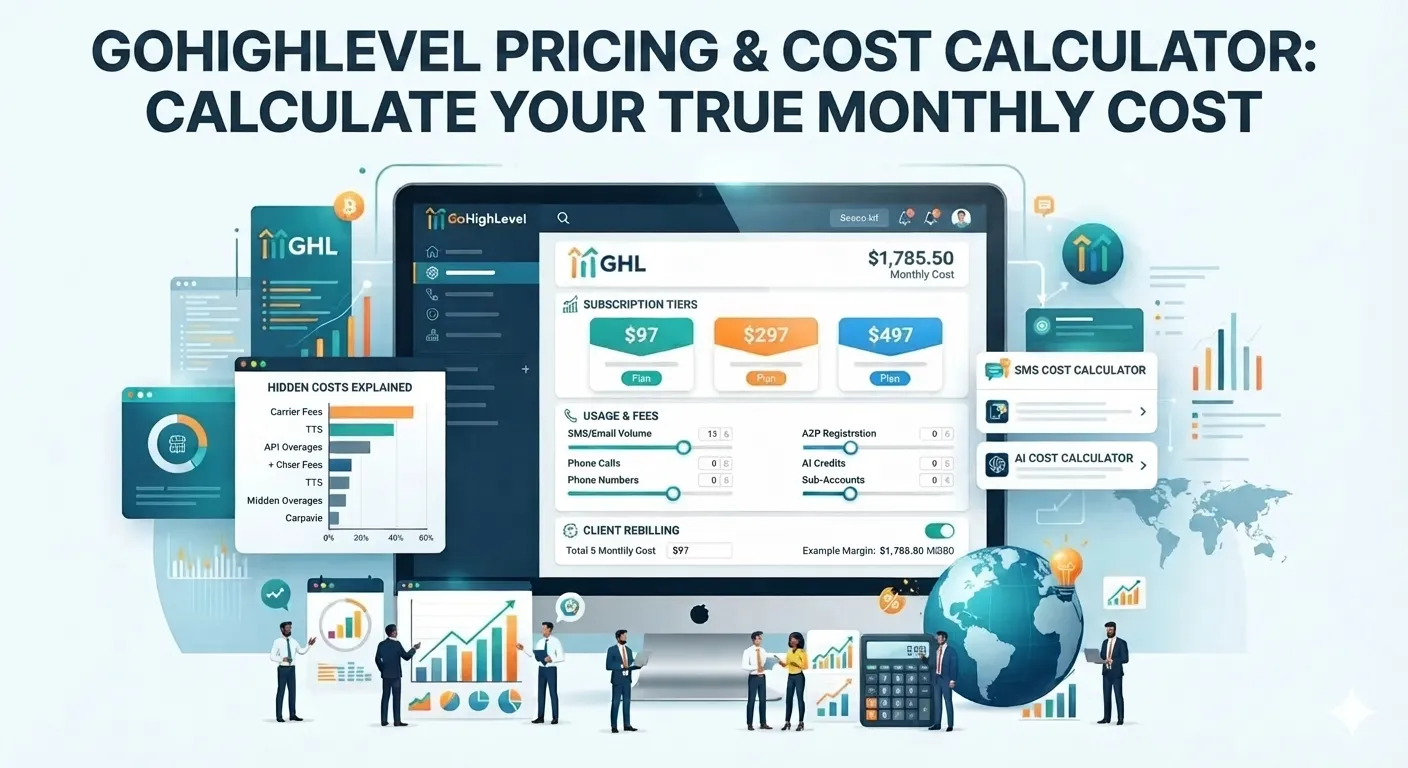
HighLevel advertises $97, $297 and $497. Those numbers buy you the core GoHighLevel features and nothing else. Every text, every email, every phone minute, every AI response and every phone number bills separately from a wallet that tops itself up automatically, which is why most people don't notice the spend until they go looking for it.
Enter your actual usage below to see the whole number.
| Where it goes | Monthly | Annual |
|---|
Run these numbers inside a live account
Estimates get you to a budget. The billing dashboard gets you to the truth: it shows live usage per sub-account against exactly the rates used here. Worth seeing before you commit to a plan tier.
Start an extended 30-day free trial →Go Deeper on Any Line Item
Each of these breaks one cost down properly: the traps, the rate tables, and the levers that actually move the number.
What Your Plan Price Doesn't Cover
The $97, $297 and $497 tiers buy platform access. Everything that touches the outside world bills on top:
- SMS and MMS: per segment, both directions
- Email: per send
- Phone calls: per minute, both directions
- Phone numbers: monthly rental, per number
- A2P 10DLC: registration plus a recurring campaign fee
- AI: Voice AI, Conversation AI, Reviews AI, Content AI
- Premium workflow actions: certain automation steps bill per execution
None of this is hidden exactly; it's all documented. But it's documented in a different place from the pricing page, which is why the gap between "GoHighLevel costs $297" and what leaves your bank account each month catches so many agencies off guard.
Why Nobody Notices the Usage Bill
Usage draws from a wallet that auto-recharges when it runs low. Nothing breaks. No service interrupts. No email tells you that this month cost more than last month.
Compare that to a bill you have to pay manually: you'd look at it. The auto-recharge is genuinely convenient, and it's also the reason usage costs drift upward unnoticed for months at a time.
The practical fix is a calendar reminder. Open the billing dashboard on the same day each month, look at usage by sub-account, and check whether anything moved. Ten minutes, monthly, is the whole discipline.
Which Plan Tier You Actually Need
| Tier | Price | Choose it when |
|---|---|---|
| GoHighLevel Starter Plan | $97/mo | You're running your own business on it, or up to a small handful of sub-accounts. No white-labelling |
| GoHighLevel Unlimited Plan | $297/mo | You're an agency with multiple clients and need unlimited sub-accounts plus branding |
| GoHighLevel Agency Pro / SaaS Plan | $497/mo | You want to resell HighLevel as your own software: SaaS mode, rebilling, and usage margin |
The jump from $297 to $497 is the one people agonise over. Here's the way to settle it: the extra $200 a month buys you the ability to charge clients for the platform and mark up their usage. If you have even three clients you could bill $200/month each for a branded CRM, the tier pays for itself several times over. If you're delivering services and the CRM is just your internal tool, it doesn't.
The Five Costs That Surprise People
The plan price is only part of what you pay to use GoHighLevel. Usage-based charges can add up quickly, especially when you're handling high message volumes, phone calls, or AI conversations. These are five costs that are easy to overlook when estimating your monthly HighLevel spend.
- Inbound counts. Received texts and inbound calls bill at the same rate as outbound. Two-way conversations cost roughly double what a broadcast does.
- Carrier fees on every segment. US carriers add a pass-through charge on top of HighLevel's rate, typically pushing real SMS cost 30 to 60 percent above the advertised number.
- One emoji, several times the cost. A single emoji re-encodes the message and drops the segment limit from 160 characters to 70. A 300-character message goes from 2 segments to 5.
- AI is priced per sub-account. Ten locations on AI Employee Unlimited is $970/month in AI fees alone, before your plan and before usage.
- Outbound Voice AI isn't covered by the $97 AI plan. That tier covers inbound. Outbound minutes bill pay-per-use regardless.
Individually, these charges may seem small, but they can make a noticeable difference over the course of a month. Knowing how inbound usage, carrier fees, message segments, AI pricing, and Voice AI charges work helps you estimate your true GoHighLevel cost and avoid unexpected wallet charges.
Rebilling: Usage as Revenue
Everything on this page is a cost right up until you're on Agency Pro. In SaaS mode, usage becomes something you mark up and bill to clients: the same texts and minutes, priced at your number instead of HighLevel's.
A 2× markup is common and rarely questioned, because clients are comparing your bundled price against buying a CRM plus a texting platform plus a call system separately. Set the markup in the calculator above to see what your current volume would produce.
The difference between an expense and a business model
Rebilling recovers your usage costs. Selling the whole platform white-labelled as your own software is a different proposition entirely: recurring subscription revenue rather than retainers, with usage margin sitting on top of it.
See how white-label SaaS works →Full Rate Table
These are the rates the calculator uses. HighLevel changes usage pricing periodically. Several rates changed in 2026. Confirm before committing budget.
| Item | Rate | Notes |
|---|---|---|
| Plan, Starter | $97 / mo | Platform only |
| Plan, Unlimited | $297 / mo | Unlimited sub-accounts, branding |
| Plan, Agency Pro / SaaS | $497 / mo | SaaS mode, rebilling, usage margin |
| SMS, US/Canada | $0.0079 / segment | Outbound and inbound billed alike |
| Carrier pass-through | ~$0.0040 / segment | Varies $0.0035–$0.0050 by carrier |
| ~$0.000675 each | About $0.68 per 1,000 sends | |
| Calls, inbound | ~$0.012 / min | |
| Calls, outbound | ~$0.017 / min | |
| Local phone number | $1.15 / mo | Per number |
| A2P campaign fee | up to ~$11 / mo | Per active campaign, recurring |
| Voice AI, engine | $0.045 / min | Plus TTS, tokens and telephony |
| Voice AI, TTS | $0.015 to $0.170 / min | Standard through to ElevenLabs V3 |
| AI Employee Growth | $50 / mo | Per sub-account |
| AI Employee Unlimited | $97 / mo | Per sub-account. Inbound voice only |
Frequently Asked Questions
How much does GoHighLevel really cost per month?
Your plan is $97, $297 or $497. On top of that, usage bills separately: SMS, email, calls, phone numbers, A2P fees and AI. A small agency running five sub-accounts with modest messaging typically lands 30 to 60 percent above the plan price. Heavy texting or AI use can double it. Use the calculator above with your own volumes rather than relying on an average.
Are there hidden fees in GoHighLevel?
Not hidden exactly, everything is documented. But usage costs live in different documentation from the pricing page, and they draw from an auto-recharging wallet that never interrupts service. The result is that the spend is easy to miss even though nothing is concealed. The five that catch people most often are inbound charges, carrier fees, emoji segment inflation, per-sub-account AI pricing, and outbound Voice AI on the $97 AI plan.
Is SMS included in my GoHighLevel plan?
No. All three tiers cover platform access only. Texting runs through LC Phone and bills per segment, in both directions, plus carrier pass-through fees and A2P campaign charges for US business messaging.
Should I get the $297 or the $497 plan?
The extra $200 buys the ability to resell HighLevel as your own software: SaaS mode, client billing and usage rebilling. If you have three or more clients you could charge around $200/month each for a branded CRM, it pays for itself immediately. If the CRM is your internal tool and you deliver services, $297 is the right tier.
Can I charge clients for their usage?
Yes, on Agency Pro. You set a markup per sub-account and HighLevel bills your clients at your rate rather than theirs. A 2× markup is common. At agency scale this frequently covers the entire subscription and then some.
Why is my GoHighLevel bill higher than I expected?
Most often one of three things. Inbound messages and calls bill at the same rate as outbound, so two-way conversation costs roughly double a broadcast. Carrier fees add 30 to 60 percent on top of the advertised SMS rate. Or messages are splitting into multiple segments, since anything over 160 characters, or containing a single emoji, costs more than one text.
How do I check what I'm actually spending?
The agency billing dashboard shows wallet activity and usage by sub-account. Because the wallet auto-recharges, nothing prompts you to look, so put a monthly reminder in your calendar and check it on the same day each month. Ten minutes is enough to catch a drift before it becomes a habit.
Does GoHighLevel charge extra for AI?
Yes, and it's priced per sub-account rather than per agency. AI Employee Growth is $50 per enabled location and Unlimited is $97, so ten sub-accounts on Unlimited is $970 monthly before your plan or any other usage. Pay-per-use is also available and is cheaper below the crossover point, which depends heavily on your voice selection.
Ready to See Your Real GoHighLevel Number?
Run your actual volumes through the calculator above, then confirm them against live usage in a trial account.
Start an extended 30-day free trial →
(877) 522-7738
Blogs
Enterprise SEO: How Large Websites Can Scale Rankings Effectively
Large websites don’t win by fixing pages one at a time. Learn how enterprise SEO scales rankings through crawl control, template fixes, safe content scaling and AI search readiness.
How to Customize Sales Popups on Shopify to Match Your Brand
Learn how to customize sales popups on Shopify to match your brand, from colors, fonts, and position to message text, timing, and mobile testing.
How Shopify Sales Notifications Help Build Social Proof and Increase Sales
Learn how Shopify sales notifications build social proof, reduce shopper hesitation, and support sales, plus best practices and how to add them to your store.
Franchise SEO Challenges and How Multi-Location Brands Can Overcome Them
Franchise SEO is mostly a coordination problem. See the 10 challenges multi-location brands face, from duplicate location pages and listing drift to profile ownership and AI search, and how to fix each one at scale.
Google Ads Benchmarks 2026: What the Numbers Actually Mean for Your Account
Google Ads Search averages for 2026 are a 6.64% CTR, $5.42 CPC, 8.18% conversion rate and $66.69 cost per lead. Learn how to find your break-even CPL and which metric is holding your account back.
Best Shopify Sales Popup Apps to Boost Customer Trust and Conversions
Compare seven Shopify sales popup apps on features, customization, pricing, and ease of use, and learn how to pick one that builds trust without guesswork.
Franchise vs Enterprise Digital Marketing: Key Differences & Best Practices
Franchise and enterprise marketing both manage many locations under one brand, but they run on different rules. See who controls the budget, brand and data in each model, and the best practices that work for both.
How to Add a Shopify Sales Popup: Step-by-Step Guide
Learn how to add a Shopify sales popup in seven steps. Pick an app, set display rules, test on mobile, and track whether it works, with no coding needed.
Google Partner Rewards Store Not Working? We Hit a Redirect Loop, and Here’s What to Do
Stuck in a Google Partner Rewards Store redirect loop? Discover the exact causes behind the login bug and practical troubleshooting steps to redeem your partner points.
GloriaFood Is Shutting Down: Your 7-Step Plan and a Replacement to Try
With Oracle discontinuing GloriaFood, restaurants must plan ahead: explore a 7-step migration blueprint, data export tips, and top online ordering replacements.
Best Shopify Image Optimization Apps: How to Choose the Right Tool for Your Store
Learn what to look for in a Shopify image optimization app, the main types of tools, how to compare apps fairly, and the mistakes to avoid when choosing the right one.
Shopify Image Optimization Checklist: What to Do Before and After Uploading Product Photos
Use this Shopify image optimization checklist to prepare product photos before you upload, finish the job after, avoid common mistakes, and handle large catalogs in bulk.
Beehiiv Newsletter Platform: Pricing, Features, and Monetization Tools
Explore the beehiiv newsletter platform to streamline your communication and engage with your audience effectively.
Shopify Core Web Vitals and Images: How to Find and Fix Image-Related Speed Issues
Learn how images affect Shopify Core Web Vitals, how to find image-related speed issues, the most common mistakes, and how to fix them, including for large product catalogs.
Shopify Fake Cart Bot Attack: What Stopped 500+ Fake Carts an Hour (and a Script We Can’t Rule Out)
A client’s Shopify store was hit with 500+ fake carts an hour, and captchas, rate limits and bot apps didn’t stop it. Here’s why the traffic bypassed our security, the one fix that worked, and a third-party script lead we’re still tracing.
Getting information about your case and your options is your FIRST move. Get a FREE case evaluation now...
Find Yourself a Marketing Expert Near You!
(877) 522-7738