
Google Partner Rewards Store Not Working? We Hit a Redirect Loop, and Here’s What to Do
TL;DR:
- We hit the problem ourselves. As a Google Partner agency, when we try to open the Partner Rewards store it redirects us to the Google Partners rewards dashboard, which sends us back, and we end up in a loop.
- It looks like an issue on Google’s side, and a published review from March 2026 describes a similar login redirect glitch. We have no official statement from Google, so we are not calling it an outage.
- Our advice: contact Google Partners support now, before your quarter’s points deadline, and keep screenshots of the loop.
- Points come from quarterly goals tied to ad spend and to adopting Google Ads products. You redeem them in the Partner Store.
- Prizes depend on your region, and one reviewer found many non-gift-card prizes poor value per point.
- Before you give up on it, check you are signed in with the email tied to your Google Ads manager account, try a single-account browser session, and give a redesign rollout a few days.
Agencies in the Google Partners program have been asking the same question lately: why does the Partner Rewards store look broken? We are a Google Partner agency ourselves, and we ran into it: the store redirects to the rewards dashboard and the dashboard sends you straight back. Here is what we saw, what the published sources say, and what to try before your points run out.
If you run Google Ads for clients, or you are deciding whether to hire someone who does, our Google Ads management and PPC services pages explain how we work. New to the channel? Start with our plain-English guide to PPC.
Schedule a Free Strategy Call →
What Google Partner Rewards Is
Google Partner Rewards is a program for agencies and advertisers who manage Google Ads. According to Google’s own program page, it offers quarterly goals and access to tools, features and insights. You sign in to the rewards portal with the email tied to your Google Ads manager account.
One reviewer compared it to an arcade ticket counter: you bring in advertisers or grow their spend, earn points, and spend those points on prizes. The comparison is fair, and it also hints at the catch. The prizes are the visible part, but the goals behind them are about ad spend and product adoption.
How You Earn and Redeem Points
Per Google’s program page, there are two kinds of goals:
- Advertising Goals, linked to ad spend on new and existing accounts.
- Product Excellence Goals, linked to adopting Google Ads products, such as the newer automation covered in our AI Max guide.
Progress shows on a rewards dashboard. Goals are set quarterly, and points are redeemed for prizes in the Partner Store. Google’s page lists examples such as apparel, Pixel devices, Pixel Buds, notebooks and a backpack, and notes that availability depends on your region and that program terms apply. The page does not describe point expiry, so check the terms in your portal.
What Changed in 2026
In late January 2026, PPC News Feed reported that Google had rolled out a redesigned Partners Rewards website, with an updated interface meant to improve navigation and clarity. The report was first spotted by a partner on LinkedIn, and it noted the update was rolling out gradually, so some partners would not see it yet.
That detail matters if your store looks different from a colleague’s, or from the screenshots you find online. Two people at the same agency can see different versions of the site during a staged rollout.
Is the Store Down? What We Saw and What We Don’t Know
Here is what happened on our side. When we open the Partner Rewards store, it redirects to the Google Partners rewards dashboard. The dashboard then points us back to the store, and we cycle between the two without ever reaching the prize catalog. We kept a screenshot of the dashboard and the loop.
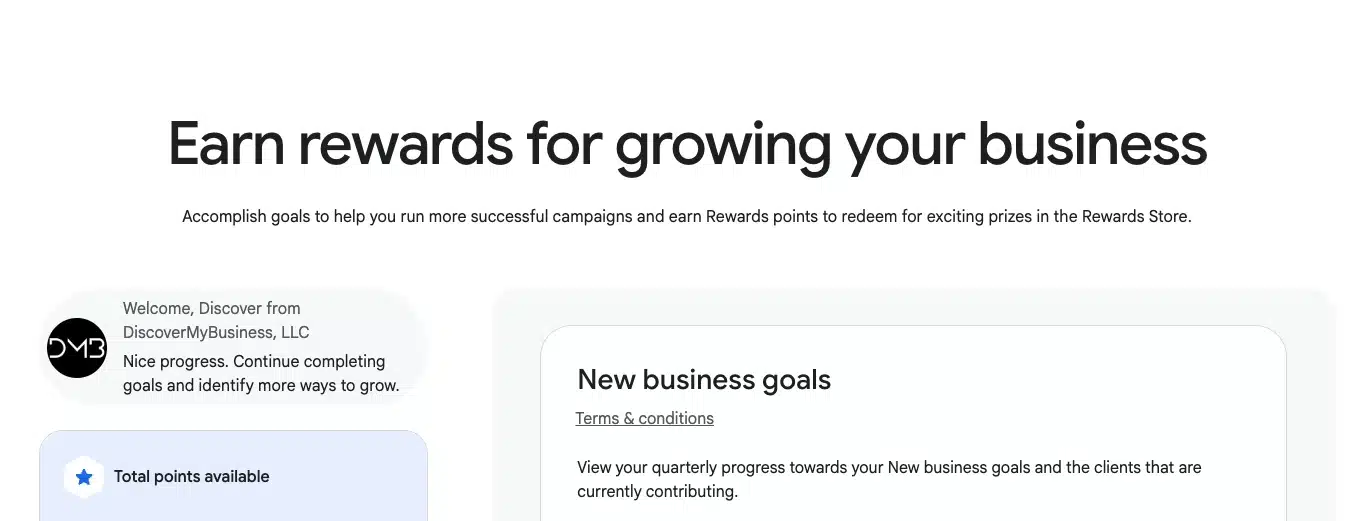
Because the loop sits between two Google pages and not in anything on our end, it looks like a Google issue. We want to be straight about the limits of that: it is our own observation, we have no official explanation from Google, and we are not claiming the whole program is down.
| Question | What we can say |
|---|---|
| Did we hit the problem ourselves? | Yes. The store redirects to the rewards dashboard and back, so we never reach the catalog. |
| Can we confirm a wider outage? | No. The store site blocks automated access, so we could not test it beyond our own accounts, and Google has not published a status notice we are aware of. |
| Has anyone reported login problems? | Yes. A March 2026 review from StraightForward Interactive describes a login glitch in the redirect, where you may need to sign in with your Google ID repeatedly before reaching the prize store. |
| Is there a reason the site might look different or incomplete? | Possibly. The January 2026 report says the redesign is rolling out gradually. |
| Can gift cards cause confusion? | Possibly. The same review says gift cards are fulfilled through a third-party service, where the card options depend on the country you choose, and some well-known retailers’ cards are not available to partners. |
So the honest summary is: there are credible reports of friction, plausible explanations, and no official statement we can point to. If you can see the store fine, that is useful information too.
What to Do If the Store Won’t Open
If you have a loop like ours, the most useful step is to contact Google Partners support now, before your quarter’s points deadline. Check the terms in your rewards portal for when points must be redeemed, because Google’s program page does not spell out expiry. Send support screenshots of the loop, the time it happened, your browser, and your manager account email.
While you wait, these general troubleshooting steps are worth a try. They are not confirmed fixes, and a loop between two Google pages may not respond to any of them:
- Use the right email. Sign in with the email tied to your Google Ads manager account, not a personal or client login.
- Sign in to one Google account only. Multiple signed-in accounts can cause redirect loops. Use a private window or a fresh browser profile.
- Start from the rewards page, not an old bookmark, so you land on the current version.
- Clear cookies for Google domains, or try another browser, then sign in once and wait for the redirect to finish.
- Check your region. Prizes and gift card options vary by country, so a catalog may look empty or different from what a colleague elsewhere sees.
- Give a rollout time. If a redesign is staged, access can change from day to day.
- Still stuck? Contact Google Partners support from your Google Ads account and include screenshots, your browser, and the time of the failure.
New to Google Ads? Ask us about promotional credits.
We are a Google Partner, and we have promotional credits available for businesses starting with Google Ads, with offers running monthly through November and December. Eligibility and terms are set by Google, so we will walk you through whether your business qualifies.
Rewards are a nice extra. What moves your business is how your ad account is run. We’ll review your campaigns, tracking and spend and tell you what to fix first.
What the Prizes Are Worth
A March 2026 StraightForward Interactive review listed prizes and point costs. Treat these as a snapshot, since catalogs and costs change and vary by region:
| Points | Prize (as listed in that review) |
|---|---|
| 290 | Google Partners-branded pen |
| 300 | $25 Amazon gift card |
| 600 | $50 Amazon gift card |
| 660 | Google-branded tote bag |
| 680 | Google trucker hat |
| 3,000 | $250 Amazon gift card |
The reviewer’s opinion was that gift cards give the best value, and that many other items cost nearly as many points as a $25 card for much less value, for example a branded pen at 290 points against 300 for the gift card. That is one person’s assessment, but the arithmetic is easy to check for yourself.
The bigger point: points are a bonus for work you would do anyway. Don’t let a prize catalog drive decisions about client budgets. Spend should follow what is right for the client, which starts with knowing what a realistic budget looks like and tracking the right results through proper analytics and a correct conversion setup.
Quick Refresher: What It Takes to Be a Google Partner
Per Google’s help page, the requirements are checked daily and fall into three groups:
- Performance: a minimum optimization score of 70% on the Google Partners registered manager account.
- Spend: $10,000 USD in ad spend over 90 days across managed accounts.
- Certifications: at least 50% of account strategists certified in Google Ads (capped at 100 users), plus at least one certification in each product area with $500 USD or more in 90-day spend.
Premier Partner adds a ranking in the top 3% of participating companies in your country, based on client growth, retention, product diversification and annual spend. Google says it may not be available in every country. Partners can display the Google Partners badge.
Questions People Ask
What does a Google Partner do?
A Google Partner is an agency or company that manages Google Ads for clients and has met Google’s requirements for performance, ad spend and certified staff. In practice they build and run campaigns, handle tracking and reporting, and optimize budgets. The badge signals those requirements were met. It does not guarantee results for your business, so still ask about their process and see examples.
How do I claim $500 Google Ads?
The “$500” offers are promotional ad credits for new advertisers, and the exact amount and terms vary by offer and country. Per Google’s help page: the account generally must be less than 14 days old when you redeem, have a valid payment method, and not belong to a business that has advertised with Google Ads before. You typically spend a set amount (the page uses $500 as an example) within a time frame, and after that the credit can take up to 35 days to process. Credit applies to future spend only, and cannot cover the spend requirement itself. Redeem or check status on the Promotions page in your account. Read the terms for your country before relying on any offer. We cover this in our Google Ads promo guide.
What are the Google Partner websites?
There are a few places partners use. The Google Ads help center explains how to become a Partner or Premier Partner. The Google Partner Rewards program page describes the quarterly goals. The Partner Store (partnerstores.withgoogle.com) is where points are redeemed. Skillshop is where certifications are completed. Which ones you can access depends on your account and region.
How do I earn points in Google Partner Rewards?
By completing quarterly Advertising Goals (ad spend on new and existing accounts) and Product Excellence Goals (adopting Google Ads products), tracked on the rewards dashboard.
How can I earn money from Google?
There are several routes, each with its own eligibility rules. You can run ads for clients as a freelancer or agency. You can publish content and earn through ad programs such as AdSense or the YouTube Partner Program once you meet their thresholds. You can sell apps through Google Play. Partner Rewards gift cards are a small bonus for agencies, not an income source. Be wary of anyone promising easy money from Google; check the official program pages for current terms.
Why does the Partner Rewards store keep asking me to log in?
One published review describes a redirect glitch that can require repeated sign-ins before the store loads. Try a single signed-in Google account in a private window, use the email tied to your manager account, and start from the rewards page. If it persists, contact Google Partners support.
Is the Google Partner Rewards store shut down?
We have no evidence that it is. In our case it redirects to the rewards dashboard and loops back, which looks like a Google-side issue. Published sources also describe a gradual redesign rollout and some login friction. We have not seen an official statement from Google, and we would link to one if it appears. If you are stuck, contact Google Partners support before your points deadline.
Do I need a Google Partner to run Google Ads well?
Not necessarily. Partner status shows a baseline of spend, certification and account health. What matters more is whether the team understands your margins, tracks the right conversions, and reports on profit. See our post on common PPC mistakes for what a good audit looks at.
Key Takeaways
- We hit a redirect loop between the Partner Rewards store and the rewards dashboard. It looks like a Google-side issue, tied to a gradual redesign rollout and a previously reported login redirect glitch. We could not confirm a wider outage.
- Contact Google Partners support before your points deadline, with screenshots.
- Points come from quarterly goals tied to ad spend and product adoption, and prizes vary by region.
- If the store won’t load: use your manager-account email, a single Google account in a private window, and start from the rewards page.
- Prize value is uneven. Gift cards looked like the best value in one review.
- Partner status is a baseline, not a guarantee. Judge an agency by its process and results.
- Check Google’s current help pages for exact requirements and promo terms, since they change.
Need Help With Your Google Ads Account?
Whether you are choosing an agency or auditing your own campaigns, we can look at your tracking, budget and structure and give you a clear list of what to fix. We also cover search engine marketing, conversion rate optimization, lead generation and marketing strategy, and for online stores, these e-commerce PPC mistakes are a good place to start.
Schedule a Free Strategy Call →
Sources
- PPC News Feed: Google Partners Rewards website gets an overhaul (Jan 2026)
- StraightForward Interactive: Google Partner Rewards program prizes (Mar 2026)
- Google: Partner Rewards program page
- Google Ads Help: How to become a Google Partner or Premier Partner
- Google Ads Help: About Google Ads promotional offers
(877) 522-7738
Blogs
Enterprise SEO: How Large Websites Can Scale Rankings Effectively
Large websites don’t win by fixing pages one at a time. Learn how enterprise SEO scales rankings through crawl control, template fixes, safe content scaling and AI search readiness.
How to Customize Sales Popups on Shopify to Match Your Brand
Learn how to customize sales popups on Shopify to match your brand, from colors, fonts, and position to message text, timing, and mobile testing.
How Shopify Sales Notifications Help Build Social Proof and Increase Sales
Learn how Shopify sales notifications build social proof, reduce shopper hesitation, and support sales, plus best practices and how to add them to your store.
Franchise SEO Challenges and How Multi-Location Brands Can Overcome Them
Franchise SEO is mostly a coordination problem. See the 10 challenges multi-location brands face, from duplicate location pages and listing drift to profile ownership and AI search, and how to fix each one at scale.
Google Ads Benchmarks 2026: What the Numbers Actually Mean for Your Account
Google Ads Search averages for 2026 are a 6.64% CTR, $5.42 CPC, 8.18% conversion rate and $66.69 cost per lead. Learn how to find your break-even CPL and which metric is holding your account back.
Best Shopify Sales Popup Apps to Boost Customer Trust and Conversions
Compare seven Shopify sales popup apps on features, customization, pricing, and ease of use, and learn how to pick one that builds trust without guesswork.
Franchise vs Enterprise Digital Marketing: Key Differences & Best Practices
Franchise and enterprise marketing both manage many locations under one brand, but they run on different rules. See who controls the budget, brand and data in each model, and the best practices that work for both.
How to Add a Shopify Sales Popup: Step-by-Step Guide
Learn how to add a Shopify sales popup in seven steps. Pick an app, set display rules, test on mobile, and track whether it works, with no coding needed.
GloriaFood Is Shutting Down: Your 7-Step Plan and a Replacement to Try
With Oracle discontinuing GloriaFood, restaurants must plan ahead: explore a 7-step migration blueprint, data export tips, and top online ordering replacements.
Best Shopify Image Optimization Apps: How to Choose the Right Tool for Your Store
Learn what to look for in a Shopify image optimization app, the main types of tools, how to compare apps fairly, and the mistakes to avoid when choosing the right one.
Shopify Image Optimization Checklist: What to Do Before and After Uploading Product Photos
Use this Shopify image optimization checklist to prepare product photos before you upload, finish the job after, avoid common mistakes, and handle large catalogs in bulk.
Beehiiv Newsletter Platform: Pricing, Features, and Monetization Tools
Explore the beehiiv newsletter platform to streamline your communication and engage with your audience effectively.
Shopify Core Web Vitals and Images: How to Find and Fix Image-Related Speed Issues
Learn how images affect Shopify Core Web Vitals, how to find image-related speed issues, the most common mistakes, and how to fix them, including for large product catalogs.
Shopify Fake Cart Bot Attack: What Stopped 500+ Fake Carts an Hour (and a Script We Can’t Rule Out)
A client’s Shopify store was hit with 500+ fake carts an hour, and captchas, rate limits and bot apps didn’t stop it. Here’s why the traffic bypassed our security, the one fix that worked, and a third-party script lead we’re still tracing.
JPEG vs. PNG vs. WebP: Which Image Format Is Best for Shopify Stores?
Compare JPEG, PNG, and WebP for Shopify stores, see which format suits each image type, and learn if WebP speeds up your store and how to optimize images without losing quality.
Getting information about your case and your options is your FIRST move. Get a FREE case evaluation now…
Find Yourself a Marketing Expert Near You!
(877) 522-7738