
HighLevel for Restaurants: A Complete Guide for Restaurant Owners
See what HighLevel for Restaurants offers, how to set it up, and whether it fits your restaurant.
TL;DR:
- What it is: HighLevel for restaurants centers on HighLevel Restaurants, a workspace inside GoHighLevel that covers online ordering, digital menus, reservations, pickup, delivery, and QR table ordering.
- What you get: Orders, bookings, and guest messages live in one place, so your team checks fewer tools during service and follows up with guests more easily.
- How to start: Join the free live Bootcamp with a 30-day free trial to learn the platform, then use the guided restaurant Launchpad to go live.
- Best fit: Restaurants that want ordering, reservations, and marketing connected instead of spread across separate tools.
Running a restaurant is hard enough without a pile of disconnected software. Orders arrive through one platform, reservations through another, and customer messages land in a third. Meanwhile, menus drift out of date on at least one of them, and guests who enjoy the meal never hear from you again.
HighLevel Restaurants pulls these jobs into one workspace: online ordering, digital menus, reservations, order management, and customer communication. This guide to HighLevel for restaurants first explains what it is, then walks through its features and shows how it supports repeat business. It also helps you decide whether it fits your restaurant.

What Is HighLevel Restaurants?
GoHighLevel is a CRM and marketing automation platform. HighLevel for Restaurants adds a restaurant-focused workspace to it, so the operational side of your restaurant and the customer-marketing side live together. The workspace covers four areas:
- Online ordering and digital menus: Direct ordering, with menus you control
- Reservations and table management: Bookings connected to your seating layout
- Pickup, delivery, and dine-in ordering: Every way guests get their food, including QR table ordering
- Customer management and reputation tools: Guest information and reviews in one place
Behind the workspace also sits HighLevel’s broader toolset, including the full list of GoHighLevel features set for messaging, websites, and automation.
Key Features of HighLevel for Restaurants
This is where the platform earns your attention, so here is what each feature means for a working restaurant.
Online Ordering for Your Restaurant
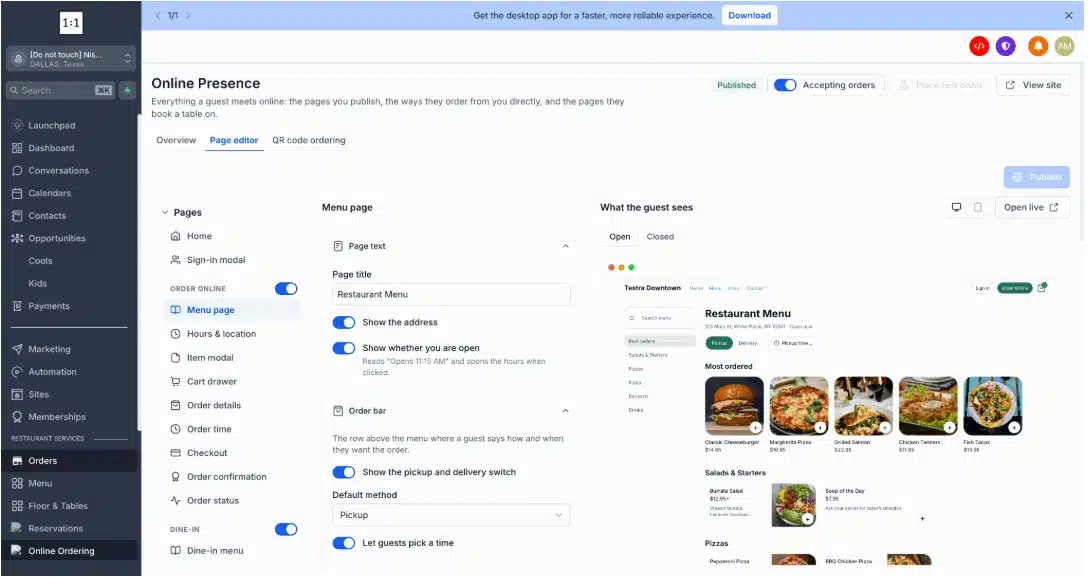
Customers order through your own ordering experience, not only through third-party apps. For guests, that means a clear path from menu to checkout, while for you it means a channel you control. Test the full journey on a phone, because that is where most ordering happens.
Digital Menu Management
Organize items into categories, add item modifiers, and then update menu details as things change. Accurate menus remove confusion at the moment a guest decides what to order, so your staff spend less time fixing mistakes.
Pickup and Delivery Management
Pickup and delivery run on different rules, so HighLevel lets you set custom hours, availability, and fulfillment rules for each. For example, you can offer shorter delivery hours during a busy dinner service and keep pickup open at quieter times.
Dine-In and QR Code Table Ordering
Guests scan a table-specific QR code, browse the menu on their phones, and then order from their seats. That is convenient for diners, and it can also simplify parts of your service flow. Start with a few tables, then expand once you see how guests and staff respond.
Reservations and Interactive Floor Plans
Build custom table layouts, then connect each reservation to a specific table. As a result, you can see what is booked, which tables are assigned, and how seating is likely to fill, all in one view instead of a paper book plus a booking inbox.
Order Management in One Workspace
Because dine-in, pickup, and delivery orders arrive in one centralized workspace, your team checks fewer places during a rush, and orders are less likely to get missed.
Customer Reviews and Reputation Management
Reviews affect trust and local discovery. Reputation tools help you collect and manage them, so asking for feedback becomes a routine step. Combined with online reputation management, a steady flow of recent reviews supports how your restaurant appears when people search nearby.
Want to Simplify Your Restaurant Operations?
Explore HighLevel Restaurants to see how online ordering, menus, reservations, and customer management can work together in one platform. Find out whether its features fit your restaurant’s needs.
- Online ordering and menus
- Reservations and QR ordering
- 30-day free trial
How HighLevel Helps Restaurants Attract and Retain Customers
Operations get customers through the door once, but bringing them back is where HighLevel’s CRM and messaging tools support the restaurant workspace.
Build Stronger Customer Relationships
The GoHighLevel CRM tools keep guest information in one place: who ordered, who booked, who asked a question, and when. Instead of treating every guest the same, you keep context together and communicate more thoughtfully.
Automate Customer Follow-Ups
Email and SMS campaigns announce specials, share updates, and invite guests back, while HighLevel marketing automation keeps those messages consistent without anyone writing each one by hand. Because texting and email are subject to consent rules, collect permission properly and follow the laws where you operate.
Encourage Repeat Orders and Visits
For example, a seasonal menu, a slow-night offer, or a reminder that online ordering is open gives past guests a reason to return. HighLevel has also announced loyalty and rewards, an AI reservation agent, and unified guest profiles as coming soon. They are not available yet, so plan today’s campaigns around the tools you can use now.
Strengthen Your Online Reputation
Review management works best alongside a strong local presence, such as an accurate Google profile and a clear website. As a result, pairing reputation tools with local SEO services helps nearby diners find you and trust what they see.
Benefits of Using HighLevel Restaurants
Here is what the features add up to in practical terms:
- Fewer disconnected workflows: Ordering, reservations, and customer management sit in one platform
- A more convenient ordering experience: Guests get online and QR-based ways to browse and order
- Better visibility into customers: Guest information and marketing activity stay organized
- More consistent communication: Follow-ups and promotions are easier to keep going
- A more organized reservation process: Bookings and table layouts live in the same workspace as orders
Consolidation does not automatically lower costs or raise revenue, so judge it by your own numbers. Add up what you pay today for ordering, reservations, and marketing tools, then weigh that against GoHighLevel pricing and plans.
Is HighLevel Restaurants Right for Your Business?
The answer depends on how your restaurant operates. Here is how it fits different situations.
Independent Restaurants and Cafés
Smaller establishments have limited time and a thin tool budget, so having ordering, menus, reservations, and customer communication in one workspace means fewer platforms to learn and pay for. Because HighLevel also works as GoHighLevel for local businesses, your marketing can grow with you.
Restaurants Offering Pickup and Delivery
If pickup and delivery drive your sales, the main draw is setting availability and fulfillment rules while giving customers a clear ordering experience. Test the whole order flow, including notifications, before you launch.
Restaurants With Dine-In Service
QR table ordering and organized reservations also suit sit-down restaurants. Start in one section of the dining room, then expand once the process runs smoothly.
How to Get Started With HighLevel Restaurants
A straightforward path looks like this:
- Review your needs. List the ordering, reservation, menu, payment, and marketing tools you use now, and note what each costs.
- Set up your restaurant workspace. Follow the guided onboarding, then enter your business details.
- Build your digital menu. Add categories, items, prices, and modifiers.
- Configure ordering. Set up pickup, delivery, dine-in, and reservation workflows, as well as fulfillment rules.
- Set up customer management. Configure the CRM and marketing features that matter most to you.
- Test before launch. Check menus, ordering, payments, and notifications, then review the mobile experience.
- Promote your ordering experience. Update your website and online profiles once everything works.
Launchpad and Bootcamp: Two Guided Paths
The guided Launchpad is built for setting up your restaurant and working toward your first live order, so it fits steps 2 through 6. The free live Bootcamp, however, is a general introduction to HighLevel.
The free live Bootcamp with a 30-day free trial is a click-by-click Zoom class led by a HighLevel coach, built for fresh launches. Specifically, you set up six quick wins: text marketing, missed-call text-back, the mobile app, social media integrations, Google Business chat, and reputation and review management. Sessions run weekdays at 11 AM CT, last about an hour, and are not recorded, so plan to attend live on a laptop or desktop.
Ready to Set Up Your Restaurant’s Online Experience?
Join the free live Bootcamp to learn the platform, then use the guided Launchpad to configure restaurant ordering, menus, and customer workflows.
- 30-day free trial
- Live click-by-click training
- Guided restaurant Launchpad
HighLevel Restaurants vs. Traditional Restaurant Software
Traditional restaurant software, such as a dedicated POS, is built around in-restaurant operations, while HighLevel Restaurants comes from a broader platform that also includes customer management and marketing. This table shows how they differ:
| Area | HighLevel Restaurants | Dedicated POS or restaurant system |
|---|---|---|
| Online ordering | Your own ordering experience with digital menus and modifiers | Often built in, with fees set by the vendor |
| Reservations | Bookings connected to an interactive floor plan | Varies by vendor, sometimes an add-on |
| Customer marketing | CRM, email, SMS, automation, and reviews | Often limited or sold as add-ons |
| Hardware and inventory | Not a focus of the restaurant workspace | Core strength, including terminals, kitchen displays, and accounting integrations |
| Best for | Restaurants that want ordering and marketing connected | Restaurants that need specialized in-store hardware and controls |
However, a dedicated POS may suit you better if you need specialized inventory controls, accounting integrations, or established hardware. HighLevel’s broader feature set suits restaurants that want connected operations and marketing in one place, so many owners decide based on which need is more pressing.
Final Thoughts: Is HighLevel Worth Considering for Your Restaurant?
Overall, HighLevel Restaurants is worth evaluating if you want ordering, reservations, menus, and customer management in one connected platform. Its strength, in fact, is bringing the guest-facing side of your business together with the marketing tools that keep customers coming back. Before you decide, test the ordering experience from a guest’s point of view and map your POS and payment needs. Then see how it feels with the HighLevel 30-day free trial.
Key Takeaways
- One workspace: Ordering, menus, reservations, pickup, delivery, and QR ordering sit together, so your team checks fewer tools
- Customers stay connected: CRM, messaging, and reviews help you bring guests back, so repeat business is easier to build
- Two guided paths: The Bootcamp teaches the platform, while the Launchpad sets up your restaurant
Frequently Asked Questions
1. What is HighLevel Restaurants?
It is HighLevel’s restaurant-focused workspace for online ordering, digital menus, reservations, and order management, alongside HighLevel’s broader CRM and marketing tools.
2. Can HighLevel Restaurants accept online orders?
Yes. It includes online ordering, plus pickup and delivery with customizable hours, availability, and fulfillment rules.
3. Does HighLevel Restaurants support QR code ordering?
Yes. Dine-in guests can scan a table-specific QR code, browse the menu, and order from their phones.
4. Can restaurants manage reservations with HighLevel?
Yes. It supports reservation management and an interactive floor plan that connects bookings to your table layout.
5. Can HighLevel help restaurants get more repeat customers?
CRM, messaging, automation, and reputation tools support retention and engagement. However, results depend on your offers, messaging, and consistency, so no outcome is guaranteed.
6. Is HighLevel Restaurants suitable for small restaurants?
It can be. Ordering, reservations, and customer management in one workspace mean fewer tools to learn, so it suits small teams with limited time.
7. Does HighLevel Restaurants replace a POS system?
It is built around ordering, reservations, menus, and customer management. However, if you rely on specialized POS hardware, inventory controls, or accounting integrations, keep those needs in mind as you plan.
(877) 522-7738
Blogs
Enterprise SEO: How Large Websites Can Scale Rankings Effectively
Large websites don’t win by fixing pages one at a time. Learn how enterprise SEO scales rankings through crawl control, template fixes, safe content scaling and AI search readiness.
How to Customize Sales Popups on Shopify to Match Your Brand
Learn how to customize sales popups on Shopify to match your brand, from colors, fonts, and position to message text, timing, and mobile testing.
How Shopify Sales Notifications Help Build Social Proof and Increase Sales
Learn how Shopify sales notifications build social proof, reduce shopper hesitation, and support sales, plus best practices and how to add them to your store.
Franchise SEO Challenges and How Multi-Location Brands Can Overcome Them
Franchise SEO is mostly a coordination problem. See the 10 challenges multi-location brands face, from duplicate location pages and listing drift to profile ownership and AI search, and how to fix each one at scale.
Google Ads Benchmarks 2026: What the Numbers Actually Mean for Your Account
Google Ads Search averages for 2026 are a 6.64% CTR, $5.42 CPC, 8.18% conversion rate and $66.69 cost per lead. Learn how to find your break-even CPL and which metric is holding your account back.
Best Shopify Sales Popup Apps to Boost Customer Trust and Conversions
Compare seven Shopify sales popup apps on features, customization, pricing, and ease of use, and learn how to pick one that builds trust without guesswork.
Franchise vs Enterprise Digital Marketing: Key Differences & Best Practices
Franchise and enterprise marketing both manage many locations under one brand, but they run on different rules. See who controls the budget, brand and data in each model, and the best practices that work for both.
How to Add a Shopify Sales Popup: Step-by-Step Guide
Learn how to add a Shopify sales popup in seven steps. Pick an app, set display rules, test on mobile, and track whether it works, with no coding needed.
Google Partner Rewards Store Not Working? We Hit a Redirect Loop, and Here’s What to Do
Stuck in a Google Partner Rewards Store redirect loop? Discover the exact causes behind the login bug and practical troubleshooting steps to redeem your partner points.
GloriaFood Is Shutting Down: Your 7-Step Plan and a Replacement to Try
With Oracle discontinuing GloriaFood, restaurants must plan ahead: explore a 7-step migration blueprint, data export tips, and top online ordering replacements.
Best Shopify Image Optimization Apps: How to Choose the Right Tool for Your Store
Learn what to look for in a Shopify image optimization app, the main types of tools, how to compare apps fairly, and the mistakes to avoid when choosing the right one.
Shopify Image Optimization Checklist: What to Do Before and After Uploading Product Photos
Use this Shopify image optimization checklist to prepare product photos before you upload, finish the job after, avoid common mistakes, and handle large catalogs in bulk.
Beehiiv Newsletter Platform: Pricing, Features, and Monetization Tools
Explore the beehiiv newsletter platform to streamline your communication and engage with your audience effectively.
Shopify Core Web Vitals and Images: How to Find and Fix Image-Related Speed Issues
Learn how images affect Shopify Core Web Vitals, how to find image-related speed issues, the most common mistakes, and how to fix them, including for large product catalogs.
Shopify Fake Cart Bot Attack: What Stopped 500+ Fake Carts an Hour (and a Script We Can’t Rule Out)
A client’s Shopify store was hit with 500+ fake carts an hour, and captchas, rate limits and bot apps didn’t stop it. Here’s why the traffic bypassed our security, the one fix that worked, and a third-party script lead we’re still tracing.
Free Consultation
Getting information about your case and your options is your FIRST move. Get a FREE case evaluation now…
Find Yourself a Marketing Expert Near You!
(877) 522-7738