
JPEG vs. PNG vs. WebP: Which Image Format Is Best for Shopify Stores?
TL;DR:
- What it is: JPEG, PNG, and WebP each suit different Shopify images. As a result, the format you choose affects quality, file size, and how your store behaves.
- What to use: Use JPEG for most product photos, PNG for transparency and sharp graphics, and WebP where smaller files help. Also remember that Shopify can serve WebP to compatible browsers automatically.
- What it can’t do: Changing formats alone, however, rarely transforms a slow store. Instead, sensible dimensions and consistent compression usually matter more.
- How to scale it: For compression and repetitive image work across a large catalog, SEO Image Optimizer by DMB can help. Also, its free plan covers up to 500 images.
The format you save an image in decides three things at once: how good it looks, how large the file is, and how it behaves on your store. Pick the wrong one and you can end up with a blurry product photo, a logo with an ugly white box around it, or a page weighed down by files that are bigger than they need to be.
For most Shopify stores, the choice comes down to three formats: JPEG, PNG, and WebP. Each is good at something different, and Shopify’s own image delivery adds a twist that changes how much manual converting you really need to do.
This guide compares the three side by side, shows which format suits which kind of image, explains whether WebP actually speeds up a store, and covers how to optimize images without losing quality. By the end, you should be able to choose a format for any image on your site with confidence.
Why Image Format Matters for Shopify Stores
Format affects more than the file type. Four factors show why it matters. Getting them right is also part of good technical SEO services work for stores.
- File size and loading: Different formats store the same picture in different ways, so the same photo can be a much larger or smaller file depending on the format. Larger files take longer to download.
- Clarity and customer experience: Shoppers judge products by their photos. Therefore, a format that smears fine detail or adds artifacts hurts that first impression.
- Mobile browsing: Phones often have slower connections, so file size shows up more there.
- Format is only one factor: Image dimensions, compression level, hosting, themes, apps, and scripts all affect performance too, so changing formats alone rarely transforms a slow store.
JPEG vs. PNG vs. WebP: What’s the Difference?
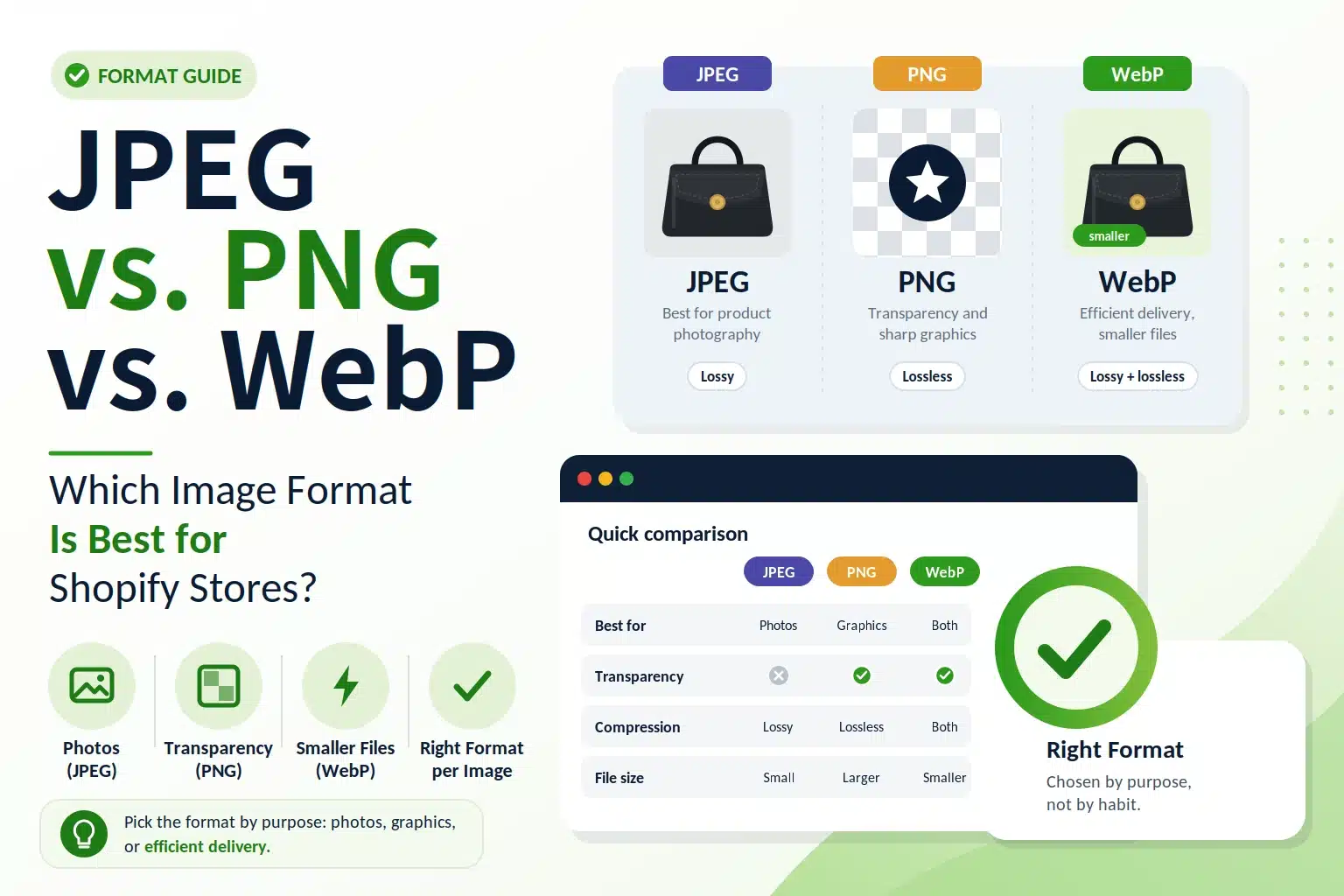
JPEG: best for most product photography
JPEG is built for photographs and detailed product images. It uses lossy compression, so it discards some detail the eye is unlikely to notice in exchange for much smaller files. Also, you can usually dial the quality up or down to balance sharpness and size. However, it doesn’t support transparent backgrounds. Great JPEG results also start with a great photo, which is where product photography services help.
PNG: best for transparency and sharp graphics
PNG supports transparent backgrounds and keeps edges crisp, so it is a good fit for logos, icons, and graphics. It uses lossless compression. As a result, photos saved as PNG are often much larger than the same photo as a JPEG.
WebP: a flexible format for smaller images
WebP supports both lossy and lossless compression, plus transparency. As a result, it can often produce smaller files than JPEG or PNG at comparable visual quality. It’s widely supported by modern browsers. However, you should still check how images are delivered and displayed across your workflow, such as in email or marketplaces where support varies.
JPEG vs. PNG vs. WebP: Quick Comparison
Use this table as a quick reference. Our Shopify web design services team can also apply it to your theme.
| Feature | JPEG | PNG | WebP |
|---|---|---|---|
| Best use | Product photography | Logos and transparent graphics | Photos and many web graphics |
| File size | Usually small | Often larger for photos | Often smaller at similar quality |
| Transparency | No | Yes | Yes |
| Compression | Lossy | Lossless | Lossy and lossless |
| Shopify use case | Standard product photos | Transparent assets | Performance-focused image delivery |
Which Image Format Should You Use for Different Shopify Images?
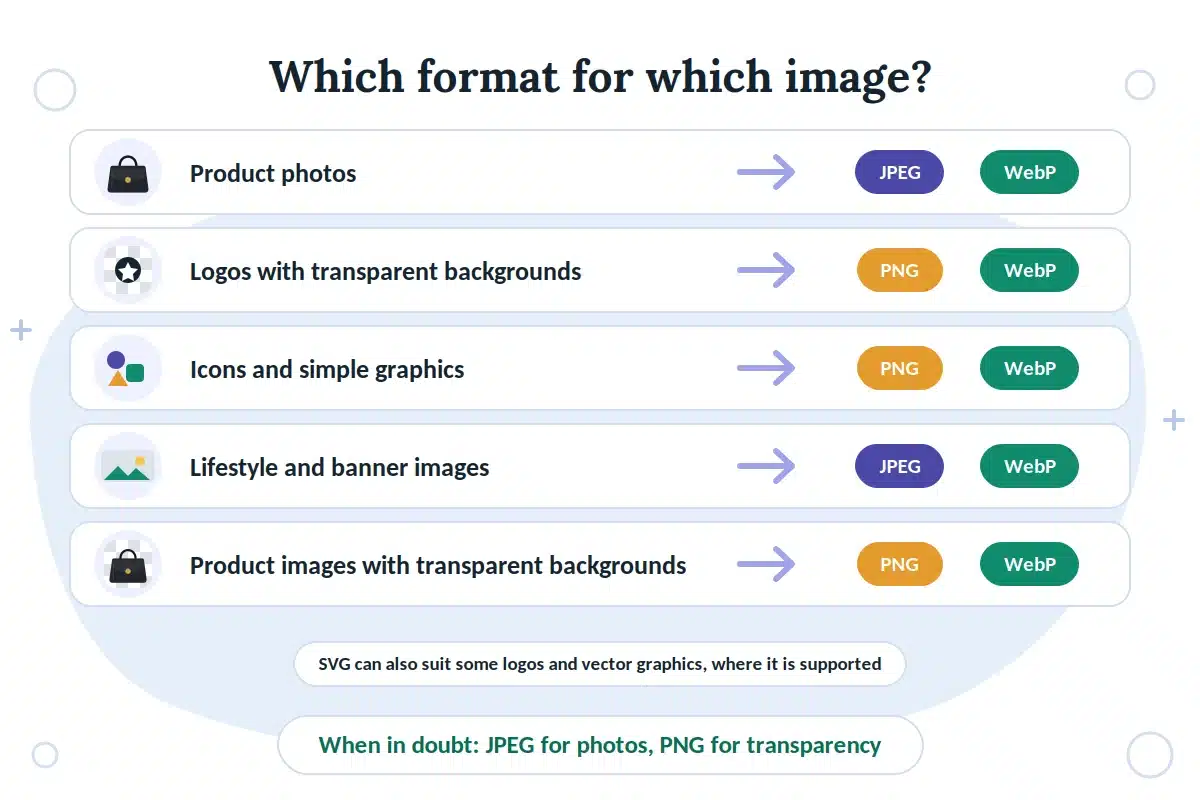
The right format depends on the job each image does, so here is a simple guide:
- Product photos: JPEG or WebP
- Logos with transparent backgrounds: PNG or WebP
- Icons and simple graphics: PNG or WebP, depending on quality and transparency needs
- Lifestyle and banner images: JPEG or WebP
- Product images with transparent backgrounds: PNG or WebP
SVG can also be a good choice for certain logos and vector graphics, since it scales cleanly at any size. However, support depends on where you’re using it. Shopify’s product media generally uses raster formats, so check whether SVG works in your specific workflow before relying on it.
When in doubt, start with a well-compressed JPEG for photos and PNG for transparency. Those are safe, universal choices. A store-wide review from our ecommerce optimization services team can then confirm the rest.
Does WebP Improve Shopify Store Speed?
It can help. Because WebP files are often smaller than JPEG or PNG at similar quality, they can reduce download time and the amount of data transferred. That matters most for mobile shoppers, as well as for image-heavy pages like collections and product galleries.
However, converting every image to WebP won’t automatically fix a slow store, and it doesn’t guarantee better search rankings. Speed also depends on dimensions, compression, scripts, apps, and theme code.
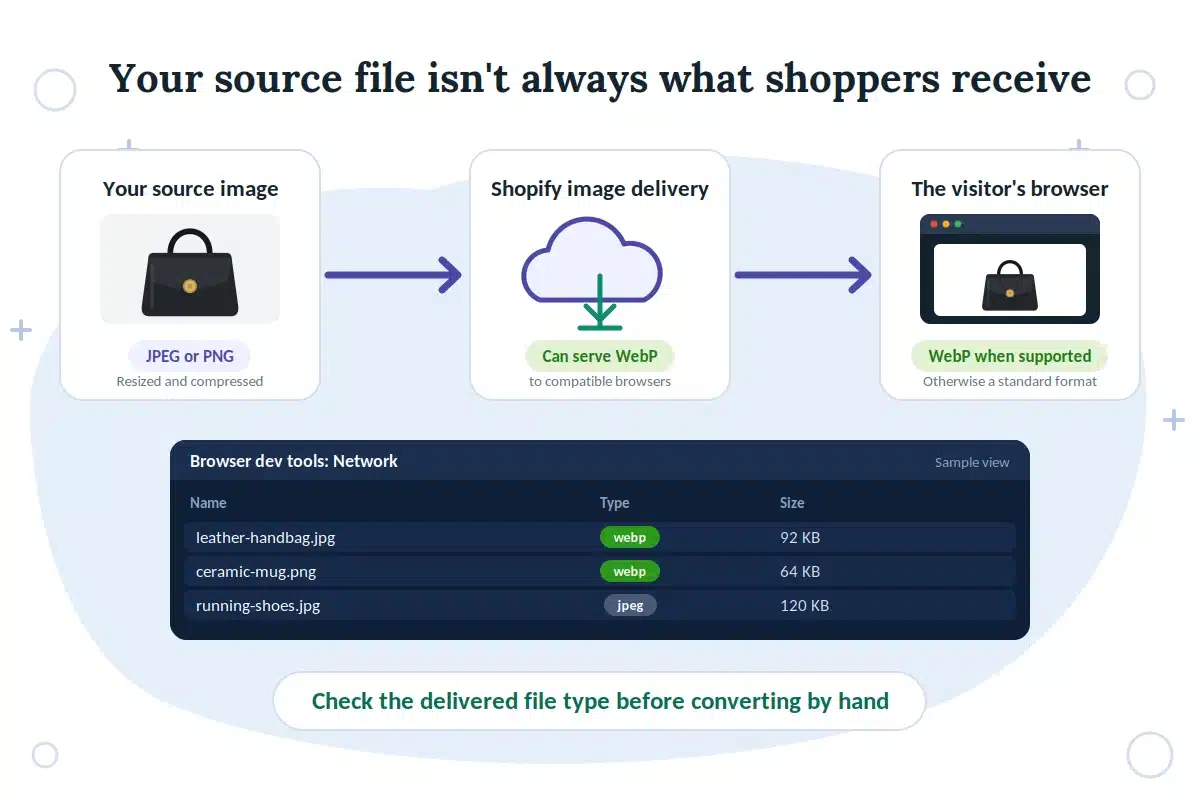
There’s another reason not to rush into converting everything. Shopify’s image delivery can also serve optimized formats, including WebP, to browsers that support them. As a result, the images your visitors receive may already be in a modern format. Before you spend time converting, check what’s actually being delivered.
Open a product page and inspect an image in your browser’s developer tools. Then look at the file type it received. A deeper check, such as our SEO audit services, can then cover every template.
How to Optimize Images for Shopify Without Losing Quality
Follow these six steps. Each one protects quality while keeping files light.
- Resize before uploading. Shopify’s guidance says 2048 × 2048 px usually looks best for square product images. Therefore, anything much larger just adds weight.
- Compress with care. Reduce file size, then zoom in on edges, textures, and text to check quality.
- Choose the format by purpose. Use JPEG for photos, PNG for transparency and graphics, and WebP when it helps.
- Avoid unnecessarily large source files. A 10 MB original rarely improves what shoppers see, so skip the extra weight.
- Check desktop and mobile. Look at quality and loading on a real phone as well as a computer. Also, a theme built with responsive web design in mind makes this easier.
- Consider an optimization app. It can then handle compression and repetitive tasks across a large catalog.
Frequently Asked Questions
1. Is WebP better than JPEG for Shopify product images?
WebP often gives smaller files at similar quality, so it can be more efficient. However, JPEG is still a solid, universally supported choice for product photos. The best approach is usually a well-compressed source image, since Shopify can handle delivery.
2. Does Shopify support WebP images?
Yes. Shopify accepts WebP uploads, while its image delivery can serve WebP to browsers that support it. Also check Shopify’s current media documentation for supported formats and size limits, since these can change.
3. Should I use PNG or JPEG for product photos?
Use JPEG for most product photos, since it’s much smaller for photographs. Use PNG when you need a transparent background or crisp graphics, such as a logo or an icon.
4. Does changing image format improve Shopify SEO?
Not directly. A more efficient format can help pages load faster, so it supports a better experience. However, format alone doesn’t guarantee better rankings. Descriptive alt text, filenames, and good page content matter too. So our Shopify SEO services team can review all three.
5. Should I convert all Shopify images to WebP?
Not necessarily. Because Shopify can serve optimized formats automatically, converting everything by hand may add little. Check which format is actually delivered first. Then focus on resizing and compression, which usually matter more.
Simplify Shopify Image Optimization
In short, JPEG is a strong choice for photos, PNG is useful for transparency and sharp graphics, and WebP is often a good fit for efficient web delivery. Whichever you use, the biggest gains usually come from sensible dimensions and consistent compression.
SEO Image Optimizer by DMB is a Shopify app that helps with that work. Its listing describes image compression to reduce file sizes without a visible drop in quality. It also lists automated alt text, SEO-friendly renaming, bulk processing, and automation for new uploads.
The listing doesn’t mention converting formats. Therefore, think of it as a tool for compressing and organizing your images, while Shopify’s own delivery handles format serving. Ongoing website maintenance services can also keep that routine on schedule.
Key Takeaways
- JPEG for photos: It gives small files, but it doesn’t support transparency
- PNG for transparency: It keeps edges crisp, although photos saved as PNG are often much larger
- WebP where it helps: It is often smaller at similar quality, while Shopify can also serve it automatically
- Check before converting: Inspect what’s actually delivered, then focus on dimensions and compression
- Keep expectations realistic: Format alone can’t guarantee speed scores or rankings, so test your results
(877) 522-7738
Blogs
Enterprise SEO: How Large Websites Can Scale Rankings Effectively
Large websites don’t win by fixing pages one at a time. Learn how enterprise SEO scales rankings through crawl control, template fixes, safe content scaling and AI search readiness.
How to Customize Sales Popups on Shopify to Match Your Brand
Learn how to customize sales popups on Shopify to match your brand, from colors, fonts, and position to message text, timing, and mobile testing.
How Shopify Sales Notifications Help Build Social Proof and Increase Sales
Learn how Shopify sales notifications build social proof, reduce shopper hesitation, and support sales, plus best practices and how to add them to your store.
Franchise SEO Challenges and How Multi-Location Brands Can Overcome Them
Franchise SEO is mostly a coordination problem. See the 10 challenges multi-location brands face, from duplicate location pages and listing drift to profile ownership and AI search, and how to fix each one at scale.
Google Ads Benchmarks 2026: What the Numbers Actually Mean for Your Account
Google Ads Search averages for 2026 are a 6.64% CTR, $5.42 CPC, 8.18% conversion rate and $66.69 cost per lead. Learn how to find your break-even CPL and which metric is holding your account back.
Best Shopify Sales Popup Apps to Boost Customer Trust and Conversions
Compare seven Shopify sales popup apps on features, customization, pricing, and ease of use, and learn how to pick one that builds trust without guesswork.
Franchise vs Enterprise Digital Marketing: Key Differences & Best Practices
Franchise and enterprise marketing both manage many locations under one brand, but they run on different rules. See who controls the budget, brand and data in each model, and the best practices that work for both.
How to Add a Shopify Sales Popup: Step-by-Step Guide
Learn how to add a Shopify sales popup in seven steps. Pick an app, set display rules, test on mobile, and track whether it works, with no coding needed.
Google Partner Rewards Store Not Working? We Hit a Redirect Loop, and Here’s What to Do
Stuck in a Google Partner Rewards Store redirect loop? Discover the exact causes behind the login bug and practical troubleshooting steps to redeem your partner points.
GloriaFood Is Shutting Down: Your 7-Step Plan and a Replacement to Try
With Oracle discontinuing GloriaFood, restaurants must plan ahead: explore a 7-step migration blueprint, data export tips, and top online ordering replacements.
Best Shopify Image Optimization Apps: How to Choose the Right Tool for Your Store
Learn what to look for in a Shopify image optimization app, the main types of tools, how to compare apps fairly, and the mistakes to avoid when choosing the right one.
Shopify Image Optimization Checklist: What to Do Before and After Uploading Product Photos
Use this Shopify image optimization checklist to prepare product photos before you upload, finish the job after, avoid common mistakes, and handle large catalogs in bulk.
Beehiiv Newsletter Platform: Pricing, Features, and Monetization Tools
Explore the beehiiv newsletter platform to streamline your communication and engage with your audience effectively.
Shopify Core Web Vitals and Images: How to Find and Fix Image-Related Speed Issues
Learn how images affect Shopify Core Web Vitals, how to find image-related speed issues, the most common mistakes, and how to fix them, including for large product catalogs.
Shopify Fake Cart Bot Attack: What Stopped 500+ Fake Carts an Hour (and a Script We Can’t Rule Out)
A client’s Shopify store was hit with 500+ fake carts an hour, and captchas, rate limits and bot apps didn’t stop it. Here’s why the traffic bypassed our security, the one fix that worked, and a third-party script lead we’re still tracing.
Getting information about your case and your options is your FIRST move. Get a FREE case evaluation now…
Find Yourself a Marketing Expert Near You!
(877) 522-7738