
Sentaro | AI-Powered Email Security for Modern Businesses
TL;DR:
Sentaro is an AI-powered email security platform that protects businesses from phishing, spoofing, impersonation, and other email-based threats in real time. It integrates seamlessly with Gmail and Outlook, providing clear risk labels and advanced threat detection to help organizations secure communication and prevent cyberattacks with minimal setup and maximum visibility.
Sentaro is an AI-powered email security platform designed to protect organizations from advanced threats such as phishing, spoofing, impersonation, and business email compromise. It works seamlessly with Gmail and Outlook to deliver real-time email risk analysis and automatically labels messages as safe, suspicious, or malicious. Built for modern businesses, Sentaro helps security teams gain better visibility and control over email threats while ensuring smooth integration with existing workflows. With its focus on accuracy, simplicity, and enterprise-grade protection, Sentaro enables organizations to secure communications and reduce the risk of email-based attacks.

Table of Contents
- What Is Sentaro and What Does It Do?
- Sentaro Features: Advanced Tools for Real-Time Threat Detection and Inbox Safety
- How to Use Sentaro: A Simple Guide to Deploying AI Email Security Across Your Organization
- Sentaro Pricing: Flexible Plans Designed for Scalable Enterprise Security Needs
- Sentaro: AI-Powered Email Security Built for Modern Organizations
- Why AI Email Security Matters for Business Protection
- Sentaro: Advanced Threat Protection with Intelligent Risk Detection
- Why Advanced Threat Detection Is Essential
- Sentaro: Seamless Integration with Gmail and Outlook for Easy Deployment
- Why Integration Simplicity Matters
- Sentaro: Enterprise-Grade Email Security with Scalable Controls
- Why Scalable Security Is Important for Businesses
- Sentaro Alternatives: Comparing Leading AI Email Security and Threat Protection Platforms
- Sentaro Is It Worth It: Evaluating Its Value for Modern Email Security and Business Protection
- Frequently Asked Questions
What Is Sentaro and What Does It Do?
Sentaro is an AI-powered email security and threat protection platform for organizations to detect and prevent advanced email-based attacks such as phishing, spoofing, impersonation, and business email compromise. It works directly with commonly used email systems like Gmail and Outlook to provide real-time protection without disrupting existing workflows.
Here’s what Sentaro does:
- Detects Email Threats in Real Time: Sentaro analyzes incoming emails instantly to identify phishing attempts, suspicious behavior, and malicious content before users can be harmed.
- Protects Against Phishing and Spoofing: It uses advanced detection models to block impersonation attacks, domain spoofing, and fraudulent emails designed to trick employees.
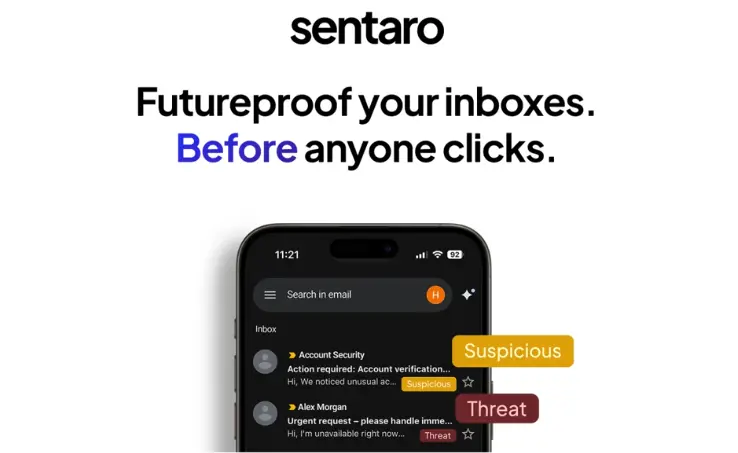
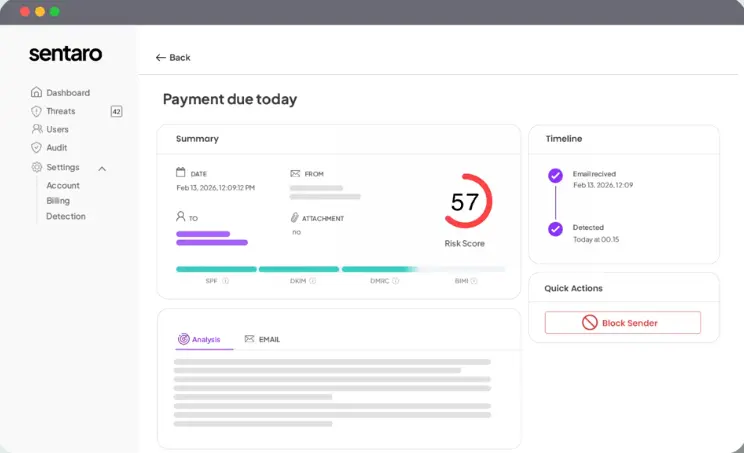
- Provides Clear Risk Labels in Inbox: Emails are categorized as Safe, Suspicious, or Threat, helping users quickly understand which messages are trustworthy.
- Works Seamlessly with Gmail and Outlook: Sentaro integrates directly into existing email platforms so organizations do not need to change their workflow or install complex systems.
- Enables Organization-Wide Deployment: Security can be rolled out across all employees, ensuring consistent protection throughout the entire organization.
- Supports Enterprise Security Controls: Advanced admin features, policies, and compliance tools help organizations manage email security at scale.
- Improves Security Visibility: Sentaro gives organizations better insight into email risks, helping security teams respond faster and more effectively.
Sentaro Features: Advanced Tools for Real-Time Threat Detection and Inbox Safety
Sentaro cybersecurity features are designed to protect organizations from email-based threats and improve overall security visibility.
- Real-Time Email Risk Analysis: Continuously scans and evaluates incoming emails to detect potential threats instantly before they reach users.
- Phishing, Spoofing & Impersonation Detection: Identifies and blocks malicious attempts that try to impersonate trusted contacts or domains.
- Inbox Risk Labeling System: Clearly labels emails as Safe, Suspicious, or Threat, making it easy for users to make quick decisions.
- Gmail & Outlook Integration: Works directly inside widely used email platforms without requiring workflow changes.
- Organization-Wide Security Deployment: Allows centralized protection across all users in a company for consistent security coverage.
- Advanced Admin Controls (Enterprise): Provides security teams with policy management, monitoring tools, and configuration flexibility.
- API and Integration Support: Enables connection with existing security tools and internal systems for extended functionality.
How to Use Sentaro: A Simple Guide to Deploying AI Email Security Across Your Organization
Using Sentaro is simple and designed for quick deployment across organizations with minimal setup effort.
Here is a step-by-step guide:
- Deploy Sentaro Across Your Organization: Start by integrating Sentaro with your organization’s email system such as Gmail or Outlook to enable protection for all users.
- Connect Email Accounts: Link employee email accounts so Sentaro can begin analyzing incoming messages in real time.
- Enable Real-Time Protection: Once activated, Sentaro automatically scans emails for phishing, spoofing, and suspicious behavior.
- Monitor Inbox Risk Labels: Users can immediately see whether an email is marked as Safe, Suspicious, or Threat, helping them make secure decisions.
- Configure Admin Security Policies (Enterprise): Security teams can set rules, customize detection policies, and manage access controls based on organizational needs.
- Review Threat Insights and Reports: Admins can monitor email threats, identify patterns, and improve security strategies using system insights.
- Scale Across Teams Easily: Sentaro can be expanded across departments or entire organizations without disrupting existing workflows.
Sentaro Pricing: Flexible Plans Designed for Scalable Enterprise Security Needs
Sentaro pricing plans are designed to support organizations of different sizes, from individual users to large enterprises with advanced security and compliance requirements. Below is a detailed breakdown of Sentaro’s pricing structure:
Professional Plan
billed annually
The Professional plan is designed for organizations that want to understand and reduce their email security risks. It provides real-time protection and visibility into potential threats, helping teams stay secure and informed.
It includes key features such as real-time email risk analysis, which helps identify and assess threats as they arrive. It also provides clear threat, suspicious, and safe labels directly in the inbox so users can quickly recognize risky messages. The plan includes phishing, spoofing, and impersonation detection to protect against common email-based attacks. It works seamlessly with Gmail and Outlook, making it easy to integrate into existing workflows. Additionally, it supports organization-wide deployment so companies can apply consistent protection across all users.
Enterprise Plan
The Enterprise plan is built for organizations with advanced security needs and strict compliance requirements. It includes everything offered in the Professional plan, along with additional tools for greater control, scalability, and integration.
- SSO and SCIM support for secure and streamlined user access management.
- Advanced admin controls allow organizations to configure and manage security policies in detail.
- API access is included for custom integrations and automation.
- Custom security policies tailored to organizational requirements.
- Dedicated support ensures priority assistance when needed.
- Compliance and audit support helps organizations meet regulatory and governance standards.
Each pricing plan is structured to meet different levels of security requirements, from essential email protection to fully customized enterprise-grade security solutions.
Limited-Time Offer: Use code SUMMER when signing up through Sentaro to get 3 months free and experience AI-powered email security with no upfront cost.
Sentaro: AI-Powered Email Security Built for Modern Organizations
Why AI Email Security Matters for Business Protection
Sentaro AI Email Security focuses on protecting organizations from modern email-based threats such as phishing, spoofing, impersonation, and business email compromise. As cyberattacks become increasingly sophisticated, Sentaro AI Email Security enables businesses to detect risks in real time and prevent harmful emails from reaching employees. This proactive approach helps organizations maintain secure communication, reduce the risk of data breaches, and strengthen their overall cybersecurity posture.
Real-Time Threat Detection with Smart Analysis
Sentaro uses AI-driven analysis to evaluate incoming emails in real time. It identifies suspicious behavior, malicious links, and impersonation attempts before they can cause damage. This proactive approach allows security teams to respond quickly and reduce risk exposure across the organization.
Seamless Email Security Integration
Sentaro works directly with commonly used email platforms like Gmail and Outlook, ensuring smooth adoption without disrupting daily workflows. This allows companies to strengthen their email security without changing how employees already work.
Sentaro: Advanced Threat Protection with Intelligent Risk Detection
Why Advanced Threat Detection Is Essential
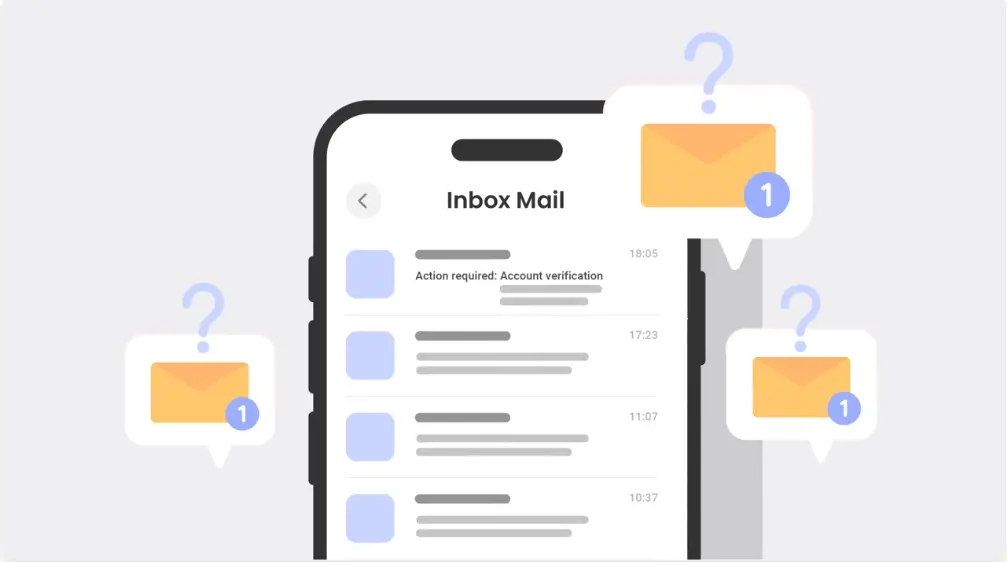
Sentaro Advanced Threat Protection provides strong protection against evolving cyber threats that traditional filters may miss. It is designed to detect sophisticated phishing campaigns and fraudulent emails that target employees and organizations.
AI-Based Phishing and Spoofing Protection
The platform uses intelligent detection systems to identify phishing attempts, spoofed domains, and impersonation attacks. This ensures that harmful messages are flagged or blocked before reaching the user’s inbox.
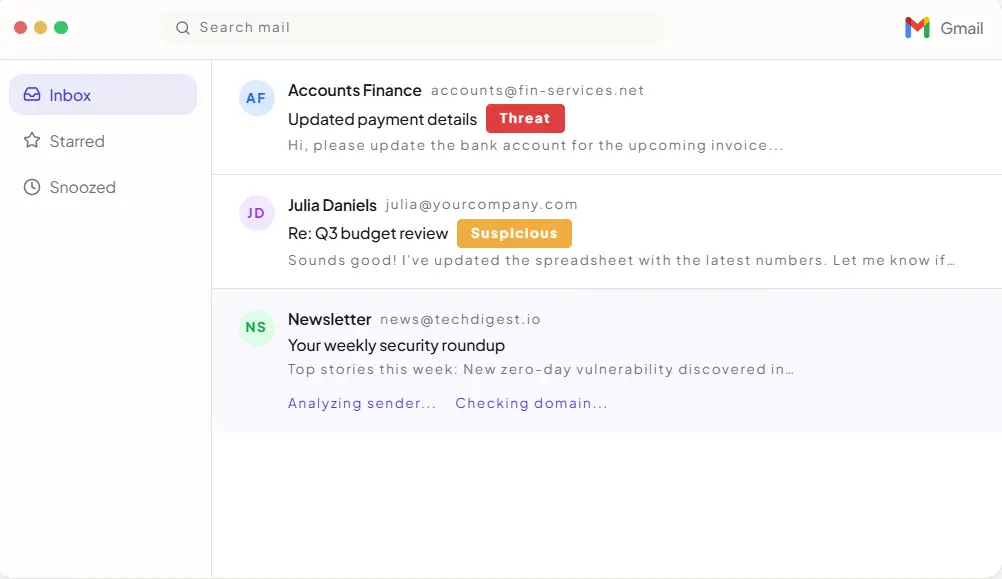
Clear Email Risk Classification
Sentaro categorizes emails into clear labels such as Safe, Suspicious, or Threat, helping users quickly understand the risk level of each message. This improves decision-making and reduces the chance of human error.
Sentaro: Seamless Integration with Gmail and Outlook for Easy Deployment
Why Integration Simplicity Matters
Sentaro Integrations are built to integrate smoothly into existing email systems without requiring complex setup or major infrastructure changes. This makes it easy for organizations to adopt stronger security quickly.
Works Inside Existing Email Workflows
The platform connects directly with Gmail and Outlook, allowing users to continue working within familiar environments while receiving enhanced protection in the background.
Organization-Wide Deployment Capability
Sentaro can be deployed across entire organizations, ensuring consistent email security policies and protection for all employees from a single system.
Sentaro: Enterprise-Grade Email Security with Scalable Controls
Why Scalable Security Is Important for Businesses
As organizations grow, managing email security becomes more complex. Sentaro Enterprise-Grade Email Security provides scalable tools that help security teams maintain control and visibility across large user bases.
Advanced Admin and Policy Controls
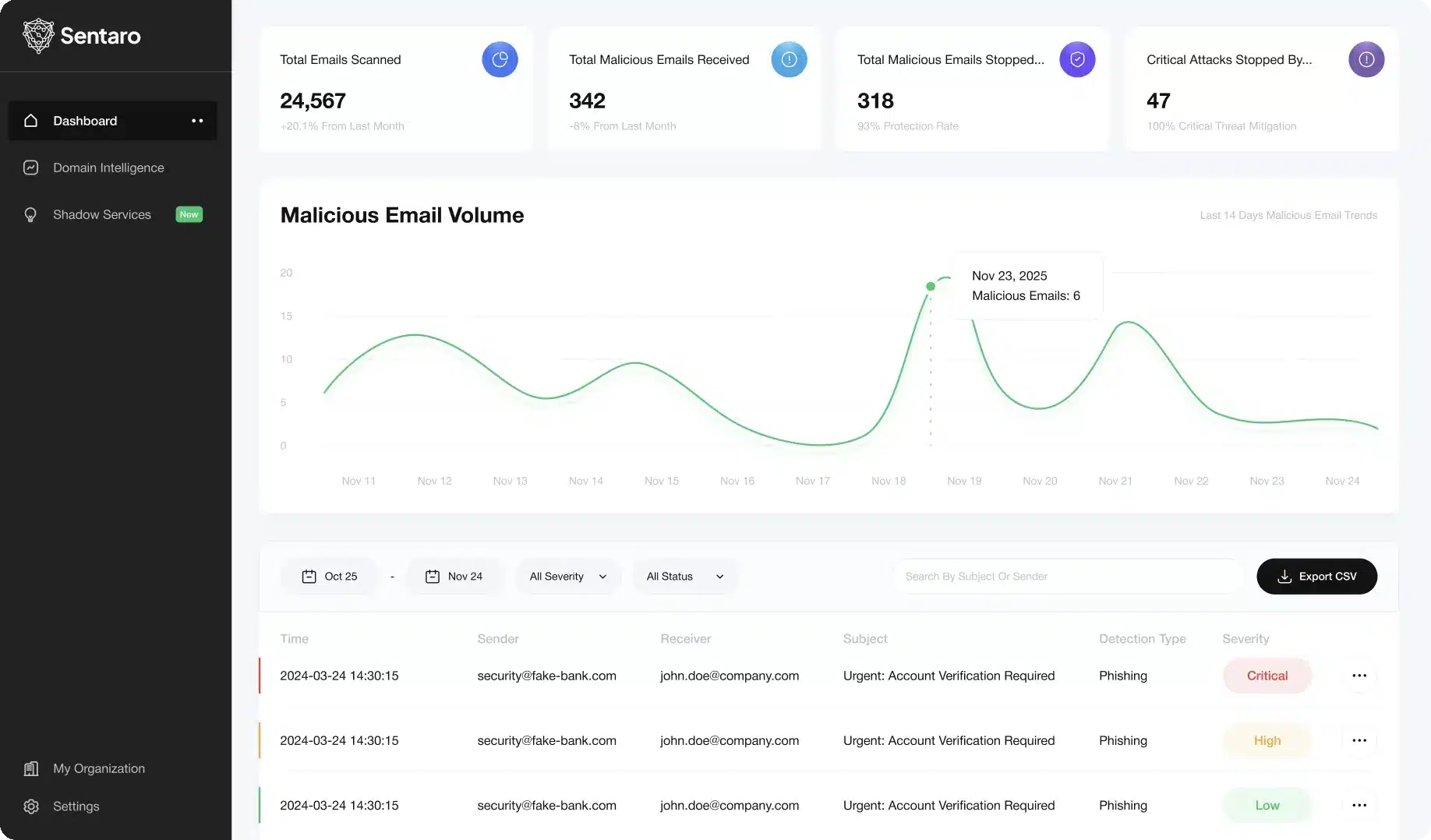
The platform offers enterprise-level controls that allow administrators to manage security rules, configure policies, and monitor email threats effectively.
Improved Visibility and Security Insights
Sentaro provides detailed insights into email threats, helping security teams understand attack patterns and improve long-term cybersecurity strategies.
Sentaro Alternatives: Comparing Leading AI Email Security and Threat Protection Platforms
When exploring AI-powered email security and phishing protection platforms, it is useful to compare Sentaro with other well-known cybersecurity solutions in the market. While each platform offers its own approach to threat detection and email protection, Sentaro stands out for its real-time AI analysis, seamless Gmail and Outlook integration, and clear risk-based email labeling.
Here’s how Sentaro compares with similar security solutions.
Sentaro vs Microsoft Defender for Office 365
Microsoft Defender for Office 365 is a widely used enterprise security solution that provides advanced phishing protection, safe attachments, and threat intelligence across Microsoft environments. While it is highly powerful within the Microsoft ecosystem, Sentaro focuses on lightweight deployment, real-time email risk analysis, and simplified integration with Gmail and Outlook for faster adoption.
Sentaro vs Proofpoint
Proofpoint is an enterprise-grade cybersecurity platform known for its strong threat intelligence, email protection, and compliance-focused security tools. It is widely used by large organizations with complex security requirements. Compared to Proofpoint, Sentaro emphasizes easier deployment, clearer inbox-level risk labeling, and streamlined AI-driven detection for faster decision-making.
Sentaro vs Mimecast
Mimecast offers a comprehensive email security suite that includes threat protection, archiving, and continuity services. It is designed for large-scale enterprise environments with advanced security needs. In contrast, Sentaro focuses more on real-time AI-based phishing and impersonation detection with a simpler, more direct user experience.
Sentaro vs Cloudflare Email Security
Cloudflare Email Security provides strong protection against phishing and malicious email content using its global threat intelligence network. It is part of a broader cybersecurity ecosystem. Sentaro differentiates itself by offering direct inbox integration with clear Safe, Suspicious, and Threat labels, making risk identification more user-friendly for employees and security teams.
Sentaro Is It Worth It: Evaluating Its Value for Modern Email Security and Business Protection
Sentaro is worth considering for organizations looking for a modern, AI-powered email security solution that is easy to deploy and use. It provides real-time protection against phishing, spoofing, impersonation, and business email compromise while integrating seamlessly with Gmail and Outlook.
Unlike traditional complex enterprise security tools, Sentaro focuses on simplicity, clarity, and actionable risk insights. Its ability to label emails clearly and detect threats in real time makes it especially valuable for teams that want strong protection without heavy configuration or operational complexity. For businesses prioritizing fast deployment and intelligent email defense, Sentaro offers a strong and efficient solution.
Key Takeaways
- Sentaro provides AI-driven real-time email threat detection
- It helps protect against phishing, spoofing, and impersonation attacks
- The platform integrates easily with Gmail and Outlook
- It simplifies email security with clear risk-based labeling
- It is designed for fast deployment and ease of use
Frequently Asked Questions
1. What is Sentaro best used for?
Sentaro is used for AI-powered email security, helping organizations detect and prevent phishing, spoofing, impersonation, and other email-based cyber threats in real time.
2. How does Sentaro protect emails?
Sentaro analyzes incoming emails using AI to detect suspicious behavior, malicious links, and impersonation attempts, then labels them based on risk level.
3. Does Sentaro work with Gmail and Outlook?
Yes, Sentaro integrates directly with Gmail and Outlook, allowing users to enhance email security without changing their existing workflow.
4. What makes Sentaro different from other email security tools?
Sentaro focuses on simplicity and real-time visibility, offering clear inbox labels like Safe, Suspicious, and Threat for faster user decision-making.
5. Is Sentaro suitable for enterprises?
Yes, Sentaro is designed for organizations of all sizes, including enterprise environments, with scalable deployment and admin controls.
6. Does Sentaro require complex setup?
No, Sentaro is built for quick integration and easy deployment, making it simple to implement across teams and organizations.
Ready to strengthen your organization’s email security? Explore Sentaro today and protect your business from phishing, spoofing, and advanced cyber threats with real-time AI-powered defense. Use code SUMMER when signing up through Sentaro to get 3 months free and experience AI-powered email security with no upfront cost.
Disclosure: We are independent Affiliates, not employees. We receive referral payments from this company. The opinions expressed here are our own and are not official statements of the company.
(877) 522-7738
Blogs
How to Claim Your Business on ChatGPT: Step-by-Step Guide
Learn how to claim your business on ChatGPT with this step-by-step guide to Business Hub, verification, Shopify setup, Business Agents, and insights.
Enterprise SEO: How Large Websites Can Scale Rankings Effectively
Large websites don’t win by fixing pages one at a time. Learn how enterprise SEO scales rankings through crawl control, template fixes, safe content scaling and AI search readiness.
How to Customize Sales Popups on Shopify to Match Your Brand
Learn how to customize sales popups on Shopify to match your brand, from colors, fonts, and position to message text, timing, and mobile testing.
How Shopify Sales Notifications Help Build Social Proof and Increase Sales
Learn how Shopify sales notifications build social proof, reduce shopper hesitation, and support sales, plus best practices and how to add them to your store.
Franchise SEO Challenges and How Multi-Location Brands Can Overcome Them
Franchise SEO is mostly a coordination problem. See the 10 challenges multi-location brands face, from duplicate location pages and listing drift to profile ownership and AI search, and how to fix each one at scale.
Google Ads Benchmarks 2026: What the Numbers Actually Mean for Your Account
Google Ads Search averages for 2026 are a 6.64% CTR, $5.42 CPC, 8.18% conversion rate and $66.69 cost per lead. Learn how to find your break-even CPL and which metric is holding your account back.
Best Shopify Sales Popup Apps to Boost Customer Trust and Conversions
Compare seven Shopify sales popup apps on features, customization, pricing, and ease of use, and learn how to pick one that builds trust without guesswork.
Franchise vs Enterprise Digital Marketing: Key Differences & Best Practices
Franchise and enterprise marketing both manage many locations under one brand, but they run on different rules. See who controls the budget, brand and data in each model, and the best practices that work for both.
How to Add a Shopify Sales Popup: Step-by-Step Guide
Learn how to add a Shopify sales popup in seven steps. Pick an app, set display rules, test on mobile, and track whether it works, with no coding needed.
Google Partner Rewards Store Not Working? We Hit a Redirect Loop, and Here’s What to Do
Stuck in a Google Partner Rewards Store redirect loop? Discover the exact causes behind the login bug and practical troubleshooting steps to redeem your partner points.
GloriaFood Is Shutting Down: Your 7-Step Plan and a Replacement to Try
With Oracle discontinuing GloriaFood, restaurants must plan ahead: explore a 7-step migration blueprint, data export tips, and top online ordering replacements.
Best Shopify Image Optimization Apps: How to Choose the Right Tool for Your Store
Learn what to look for in a Shopify image optimization app, the main types of tools, how to compare apps fairly, and the mistakes to avoid when choosing the right one.
Shopify Image Optimization Checklist: What to Do Before and After Uploading Product Photos
Use this Shopify image optimization checklist to prepare product photos before you upload, finish the job after, avoid common mistakes, and handle large catalogs in bulk.
Beehiiv Newsletter Platform: Pricing, Features, and Monetization Tools
Explore the beehiiv newsletter platform to streamline your communication and engage with your audience effectively.
Shopify Core Web Vitals and Images: How to Find and Fix Image-Related Speed Issues
Learn how images affect Shopify Core Web Vitals, how to find image-related speed issues, the most common mistakes, and how to fix them, including for large product catalogs.
Getting information about your case and your options is your FIRST move. Get a FREE case evaluation now…
Find Yourself a Marketing Expert Near You!
(877) 522-7738