
Shopify Fake Cart Bot Attack: What Stopped 500+ Fake Carts an Hour (and a Script We Can’t Rule Out)
TL;DR:
- A client’s Shopify store was hit with 500+ fake carts an hour. Captchas, rate limits, bot apps and country blocks did not stop it.
- The reason: the bots weren’t using the main domain. They were hitting a subdomain routed through Shopify’s own infrastructure, so none of the WAF rules in the client’s Cloudflare account applied.
- Shopify Support told us they couldn’t offer a backend block or custom rule for that traffic.
- The one thing that worked: requiring customers to log in to an account before checkout. It stops the damage, with a conversion trade-off.
- A follow-up lead: an audit turned up a third-party script reference linked to the 2024 Polyfill.io supply chain attack. We have not proven it caused the fake carts, and we say so below.
- Fake carts do more than clutter your admin. They pollute analytics and remarketing audiences and can distort ad spend decisions.
We manage ads and tracking for e-commerce brands, so when a client’s cart numbers jumped overnight we saw it quickly. The store was logging more than 500 fake carts an hour. We posted what we were seeing on r/shopify, got a lot of useful advice, and followed it. This post combines that thread and what came after: what we tried, why it failed, what finally worked, and a lead we are still tracing.
If your store sees a similar pattern, this should save you some of the trial and error. For help with the traffic and tracking side, our Google Analytics services and website maintenance services cover this kind of audit.
Schedule a Free Strategy Call →
What We Saw
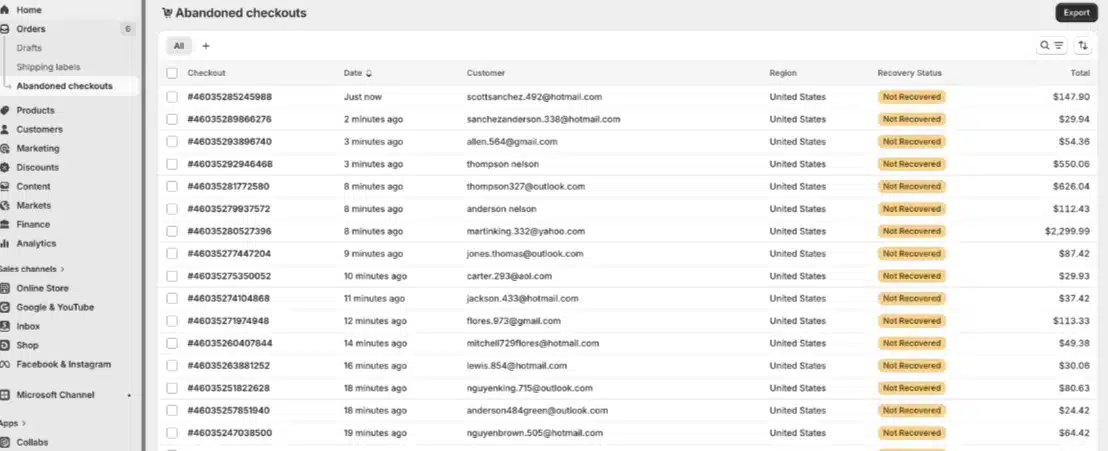
The store’s cart count spiked to more than 500 fake carts an hour. Many involved out-of-stock products, which suggested the bots were probing specific items. There were no matching real sessions, no real orders, and no obvious pattern in a single country or IP range that we could block.
Fake carts are a common sign of automated traffic. The usual motives include inventory hoarding, price and stock probing, and “card testing,” where attackers push small purchases through checkout to test stolen card numbers. We could not tell from the cart data alone which one we had.
Everything We Tried First
After the first Reddit thread, we implemented the standard defenses community members recommended:
| Defense | How we set it up | Result |
|---|---|---|
| Captcha | hCaptcha/reCAPTCHA on add-to-cart and checkout flows, not just forms | Bots kept getting through |
| Bot protection apps | Premium apps that block by behavior, not just IP | No meaningful change |
| Rate limiting | Aggressive add-to-cart limits in the client’s own Cloudflare, using Challenge mode, not only basic WAF rules | No effect on the fake carts |
| Geo and network blocks | Blocked suspicious countries and ASNs | No meaningful change |
| Hide targeted products | Disabled and hid all out-of-stock products | Carts continued |
Each of these is reasonable on its own. When all of them fail together, the problem is usually not the strength of the defense but where the traffic is entering.
Why It Didn’t Work: The Subdomain Bypass
The logs gave us the answer. The bots were not hitting the client’s main domain. They were sending traffic straight to a subdomain on the client’s domain that is routed to and managed by Shopify’s infrastructure, behind Shopify’s own Cloudflare setup.
That meant every WAF rule, rate limit and IP block in the client’s own Cloudflare account was irrelevant for those requests. Our rules sat in front of the main domain, and the traffic never went through it.
We escalated to Shopify Support, explaining that traffic was bypassing our security through that subdomain routing. We were told they could not offer a backend block or a custom WAF rule for it. We are reporting that as we experienced it. Support responses can vary, and if you have a different answer, we would like to hear it.
The Fix That Worked
The only change that stopped the fake carts was requiring customers to log in to an account before checkout. In the settings we used, this was under Settings > Checkout > Require customers to log in to their account before checkout. Shopify has changed how customer accounts work over time, so labels may differ on your store.
Why it works: scripted traffic can add items to a cart anonymously, but it has a much harder time creating and maintaining logged-in accounts at scale. Moving the gate to before checkout takes away the easy path.
Seeing odd cart or traffic numbers on your store?
We’ll review your analytics, tracking and traffic sources to separate real shoppers from bot traffic, and check what your ads and remarketing are being fed.
The Trade-Off of Requiring Accounts
This fix has a cost. Requiring an account adds friction for real shoppers, and many people abandon checkout when forced to register. So treat it as a decision, not a default:
- Use it as emergency containment while you investigate, and review the impact on real conversion rate.
- Watch checkout completion before and after. A drop in real orders may be worth it during an attack, and not worth it after.
- Consider easing back once you’ve found and closed the entry point, if your platform and risk profile allow.
Judge it with the same discipline as any conversion change; see our work on conversion rate optimization.
A Lead We’re Still Tracing: Polyfill.io
After the first fix, we kept auditing the store’s code. That audit turned up a third-party script reference tied to the 2024 Polyfill.io supply chain attack, and we could not explain why it was there.
Here is why that matters. Polyfill.io was a widely used service that delivered JavaScript compatibility code. According to reporting by The Register and The Hacker News, the domain and its GitHub account were sold in February 2024 to a company called Funnull, described as a China-based CDN operator. The original creator, Andrew Betts, said he had nothing to do with the sale and urged site owners to remove the library. In June 2024, security firm Sansec reported the domain was serving malicious code, affecting more than 100,000 websites.
The published reports describe code that:
- redirected mobile visitors to sports betting and other unwanted sites,
- was designed to avoid detection, and did not activate for admin users,
- was generated based on request headers and could run only on certain devices at certain times.
What we do and don’t know. We have not proven this script created the fake carts, and the public reporting does not describe fake-cart generation. We are including it because it was a third-party script we could not explain, and unexplained scripts are exactly what you should rule out when something strange happens on a storefront. If we can show a causal link, we will update this post.
The wider lesson is solid regardless. Any script your store loads from someone else’s domain is code running on your site, and if that domain changes hands, you inherit the new owner. A technical SEO and site audit is a good way to inventory what your pages load.
What Fake Carts Cost You Beyond the Clutter
- Polluted analytics. Fake sessions and add-to-carts distort conversion rate, funnel steps and attribution.
- Polluted remarketing audiences. If your cart or product-viewer audiences feed ads, you may be paying to retarget bots. Review your audiences in Google Ads and Meta, and see our social media advertising work for how paid social audiences are built.
- Misleading optimization signals. Automated bidding learns from the events you send. If add-to-cart or begin-checkout is a conversion, bot traffic can skew it. Check what counts, starting with how your conversion actions are set up. See e-commerce PPC mistakes and our list of common PPC mistakes, where broken tracking is a repeat offender.
- Inventory and operations. Carts can hold stock, trigger abandoned-cart emails, and eat staff time.
- Payment risk. If card testing is involved, you can face chargebacks, fees and processor attention.
If your ad accounts optimize on cart events, a clean measurement setup matters. Our Google Ads management and e-commerce PPC teams audit what each account is optimizing toward, and our plain-English guide to PPC explains how ad platforms learn from your events. The broader PPC management view is the same: clean data in, better decisions out.
Checklist: What to Check on Your Store
- Find where the traffic enters. Look at logs by hostname, not just your main domain. Check any subdomain routed to Shopify.
- Search your theme and apps for risky script references. In Online Store > Themes > Edit code, search for
polyfill.io,polyfill.comandbootcss, and list every external script your theme and apps load. - Remove what you can’t explain. Modern browsers rarely need the old polyfills. If you do need one, use a source you trust or host the file yourself.
- Test like a customer. Use a real phone on mobile data, logged out, not just your own admin session.
- Check what your ad platforms are learning. Review remarketing audiences and which events count as conversions.
- Contain, then review. If you require accounts at checkout, track real conversion rate and revisit the setting once the source is closed.
- Contact Shopify Support with logs. Include timestamps, hostnames and request details, and ask what options exist for the traffic you found.
- Look at your payments dashboard for small, repeated declined attempts, which can signal card testing.
Key Takeaways
- Strong defenses fail when they sit in front of the wrong door. Check where the traffic actually enters before adding more rules.
- Traffic to a Shopify-routed subdomain bypassed our Cloudflare rules entirely.
- Requiring customer accounts at checkout stopped the fake carts, at a cost to real shoppers’ convenience.
- The Polyfill.io reference is a lead, not a conclusion. Audit third-party scripts either way.
- Fake carts pollute analytics and ad audiences, so check what your accounts are learning.
- Share logs and specifics when you contact support. Vague reports get generic answers.
Frequently Asked Questions
1. Why is my Shopify store getting fake carts?
Common reasons include inventory hoarding, stock and price probing, and card testing by automated scripts. The cart data alone often cannot tell you which one, so check logs, payment attempts and where the requests enter.
2. Why didn’t captcha and bot protection apps stop it?
They protect the paths they sit in front of. In our case the traffic went to a Shopify-routed subdomain, so rules and challenges in the client’s own Cloudflare account never saw it. Where traffic enters determines which defenses can work.
3. Can I add my own WAF rules to a Shopify-managed subdomain?
In our case, Shopify Support said they couldn’t provide a backend block or custom rule for that traffic. Support answers can vary by plan and situation, so ask with specific logs.
4. Does requiring customer accounts hurt sales?
It can. Forced registration adds friction. Use it as containment, compare real checkout completion before and after, and revisit the setting once the entry point is closed.
5. What is the Polyfill.io supply chain attack?
Polyfill.io’s domain was sold in February 2024, and in June 2024 researchers reported it was serving malicious code to more than 100,000 sites. The reported behavior included redirecting mobile visitors and avoiding admins. It is a reminder to audit third-party scripts.
6. Did Polyfill.io cause the fake carts?
We don’t know. We found a lead and are tracing it, but we have not proven a link and public reports do not describe fake-cart generation. We will update this post if that changes.
7. Can fake carts affect my Google or Meta ads?
Yes. If cart events feed remarketing audiences or conversion goals, bot traffic can pollute them and distort bidding. Review which events you optimize on and clean your audiences.
8. How do I check my theme for risky scripts?
In Online Store > Themes > Edit code, search for polyfill.io, polyfill.com and bootcss, and review every external script your theme and apps load. Remove anything you can’t explain.
Want a Second Set of Eyes on Your Store’s Traffic and Tracking?
We’ll check where your traffic and cart events come from, what your ad accounts are learning, and which scripts your store loads. Book a free call and we’ll walk through it. You can also see our full range of digital marketing services and how a digital marketing strategy ties them together.
Schedule a Free Strategy Call →
Sources
(877) 522-7738
Blogs
Enterprise SEO: How Large Websites Can Scale Rankings Effectively
Large websites don’t win by fixing pages one at a time. Learn how enterprise SEO scales rankings through crawl control, template fixes, safe content scaling and AI search readiness.
How to Customize Sales Popups on Shopify to Match Your Brand
Learn how to customize sales popups on Shopify to match your brand, from colors, fonts, and position to message text, timing, and mobile testing.
How Shopify Sales Notifications Help Build Social Proof and Increase Sales
Learn how Shopify sales notifications build social proof, reduce shopper hesitation, and support sales, plus best practices and how to add them to your store.
Franchise SEO Challenges and How Multi-Location Brands Can Overcome Them
Franchise SEO is mostly a coordination problem. See the 10 challenges multi-location brands face, from duplicate location pages and listing drift to profile ownership and AI search, and how to fix each one at scale.
Google Ads Benchmarks 2026: What the Numbers Actually Mean for Your Account
Google Ads Search averages for 2026 are a 6.64% CTR, $5.42 CPC, 8.18% conversion rate and $66.69 cost per lead. Learn how to find your break-even CPL and which metric is holding your account back.
Best Shopify Sales Popup Apps to Boost Customer Trust and Conversions
Compare seven Shopify sales popup apps on features, customization, pricing, and ease of use, and learn how to pick one that builds trust without guesswork.
Franchise vs Enterprise Digital Marketing: Key Differences & Best Practices
Franchise and enterprise marketing both manage many locations under one brand, but they run on different rules. See who controls the budget, brand and data in each model, and the best practices that work for both.
How to Add a Shopify Sales Popup: Step-by-Step Guide
Learn how to add a Shopify sales popup in seven steps. Pick an app, set display rules, test on mobile, and track whether it works, with no coding needed.
Google Partner Rewards Store Not Working? We Hit a Redirect Loop, and Here’s What to Do
Stuck in a Google Partner Rewards Store redirect loop? Discover the exact causes behind the login bug and practical troubleshooting steps to redeem your partner points.
GloriaFood Is Shutting Down: Your 7-Step Plan and a Replacement to Try
With Oracle discontinuing GloriaFood, restaurants must plan ahead: explore a 7-step migration blueprint, data export tips, and top online ordering replacements.
Best Shopify Image Optimization Apps: How to Choose the Right Tool for Your Store
Learn what to look for in a Shopify image optimization app, the main types of tools, how to compare apps fairly, and the mistakes to avoid when choosing the right one.
Shopify Image Optimization Checklist: What to Do Before and After Uploading Product Photos
Use this Shopify image optimization checklist to prepare product photos before you upload, finish the job after, avoid common mistakes, and handle large catalogs in bulk.
Beehiiv Newsletter Platform: Pricing, Features, and Monetization Tools
Explore the beehiiv newsletter platform to streamline your communication and engage with your audience effectively.
Shopify Core Web Vitals and Images: How to Find and Fix Image-Related Speed Issues
Learn how images affect Shopify Core Web Vitals, how to find image-related speed issues, the most common mistakes, and how to fix them, including for large product catalogs.
JPEG vs. PNG vs. WebP: Which Image Format Is Best for Shopify Stores?
Compare JPEG, PNG, and WebP for Shopify stores, see which format suits each image type, and learn if WebP speeds up your store and how to optimize images without losing quality.
Getting information about your case and your options is your FIRST move. Get a FREE case evaluation now…
Find Yourself a Marketing Expert Near You!
(877) 522-7738