
Shopify Image Alt Text Best Practices: Examples, Mistakes, and SEO Tips
TL;DR:
- What it is: Alt text is a short written description of an image. Screen readers read it aloud, browsers show it when an image fails to load, and search engines use it as context.
- What to do: Describe each image accurately in one short sentence, so shoppers and search engines understand it. Also include a relevant keyword once, but only when it fits naturally.
- What to avoid: Skip keyword stuffing, generic text, and the same description on every image, because they add no value. However, leave alt text empty for purely decorative images.
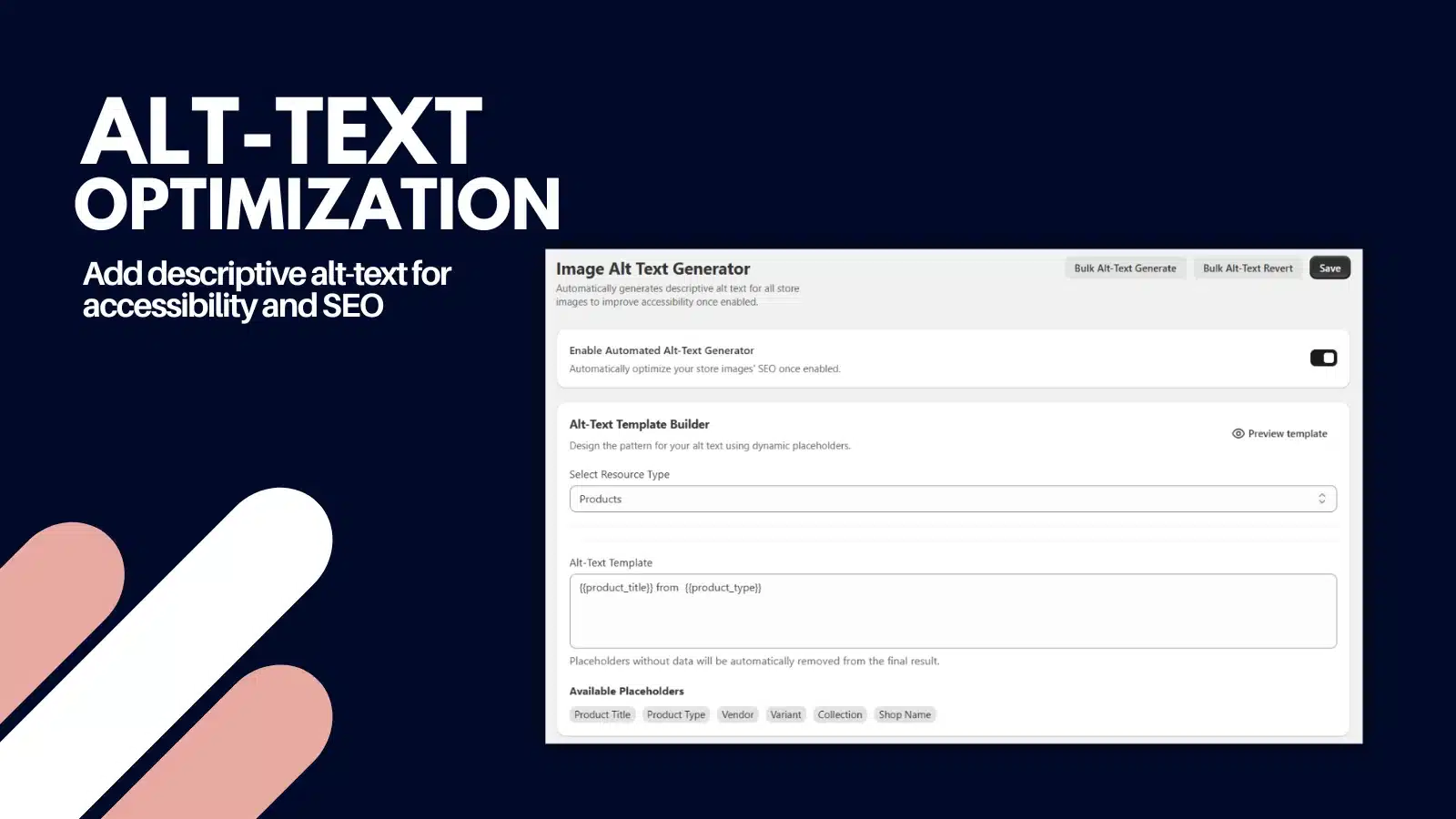
- How to scale it: For large catalogs, SEO Image Optimizer by DMB lists automated alt-text generation when catalogs get large. Also, its free plan covers up to 500 images.
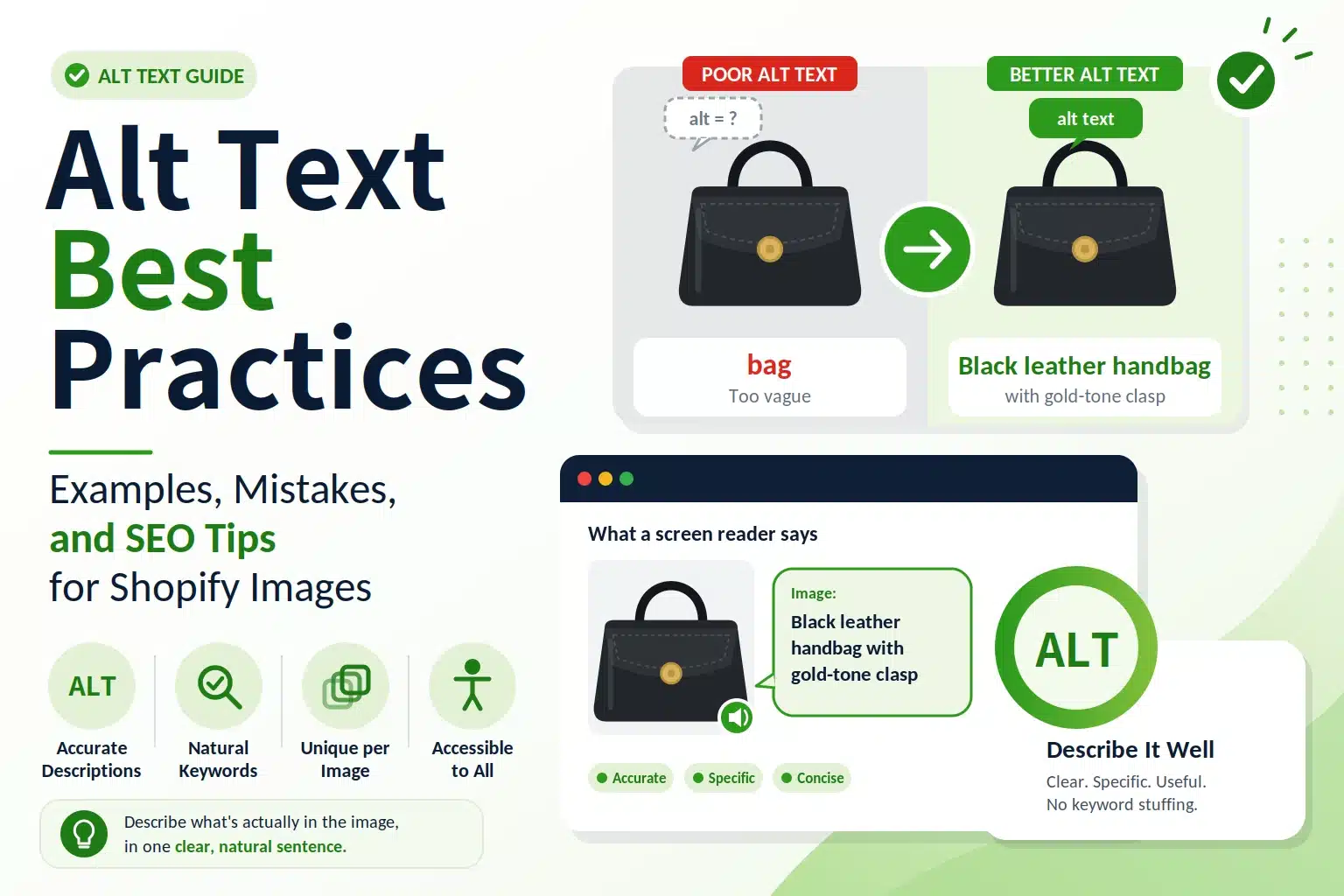
Image alt text is a short written description of an image. It’s invisible on most pages, but it does real work: screen readers read it aloud to people who can’t see the image, browsers show it when an image fails to load, and search engines use it as context about what the image shows.
For a Shopify store, that makes alt text a small detail with three payoffs. It makes your products accessible to more shoppers, it improves the experience when images don’t load, and it gives search engines extra information that can support image search.
This guide covers what alt text is, the best practices worth following, good and poor examples, common mistakes, how to add or edit alt text in Shopify, and how to keep it consistent across a large catalog. Alt text supports accessibility and discoverability, but it doesn’t guarantee higher rankings on its own.
What Is Image Alt Text and Why Does It Matter for Shopify SEO?
Alt text, short for alternative text, is a written description attached to an image. Think of it as what you’d say when you describe the photo to someone over the phone. It is also a core part of any accessibility review, such as our ADA compliance services.
For shoppers: Screen readers read alt text aloud, so people who are blind or have low vision can understand your product photos. It also appears in place of the image if it fails to load.
For search engines: Search engines can’t fully interpret a photo on their own, so alt text gives them a clear description. As a result, that context can help them understand the image and show it for relevant searches.
Shopify Image Alt Text Best Practices
Good alt text is plain, accurate, and short. Teams that already use SEO content writing services will also find that it comes naturally.
Describe the image accurately and specifically
Say what’s actually in the image, and include details that matter to a shopper, like color, material, or a distinctive feature. For example, “Black leather handbag with gold-tone clasp” beats “bag.”
Include relevant keywords naturally
When a product term fits the description, use it once, in a normal sentence. However, if it doesn’t fit naturally, leave it out.
Keep descriptions concise and useful
One short sentence is usually enough. There’s no hard rule from Google, but many people aim for roughly 125 characters or fewer. As a result, screen readers aren’t reading long passages.
Write unique alt text for meaningfully different images
Because a front view, a side view, and a detail shot each show something different, each deserves its own description.
Avoid keyword stuffing and filler
Skip phrases like “image of” or “picture of,” since screen readers already announce that it’s an image. Also, don’t pack in extra keywords.
Leave alt text empty for purely decorative images
When an image adds no information, such as a decorative divider, an empty alt attribute tells screen readers to skip it. However, don’t do this for product photos.
Shopify Product Image Alt Text Examples
Clear examples, therefore, make the rules easier to apply. Reviewing examples like these is also a quick win in any Shopify SEO services plan.
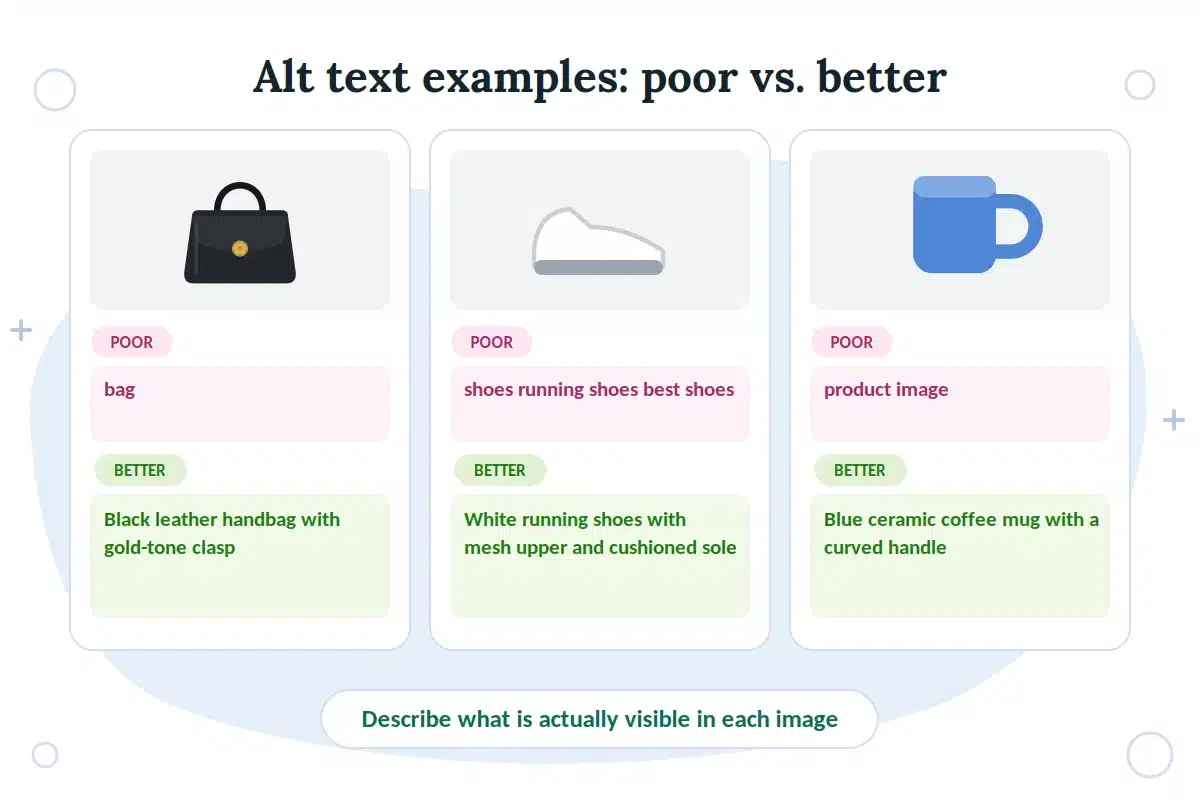
| Product image | Poor alt text | Better alt text |
|---|---|---|
| Black leather handbag | bag | Black leather handbag with gold-tone clasp |
| White running shoes | shoes running shoes best shoes | White running shoes with mesh upper and cushioned sole |
| Blue ceramic mug | product image | Blue ceramic coffee mug with a curved handle |
In each case, the better version describes what you can actually see in the image. Also, it’s specific and reads like a sentence. As a result, it would make sense to someone who couldn’t see the photo.
Common Shopify Alt Text Mistakes to Avoid
These six mistakes show up on most stores. Therefore, a routine review, such as our SEO audit services, helps catch them early.
- Keyword stuffing. Cramming several keywords into one description makes it hard to read, and therefore less useful.
- Generic text. “Product image” or “photo” tells nobody anything, so it wastes the field.
- Copying the same alt text across every image. Instead, different images should have different descriptions.
- Adding details that aren’t visible. Alt text should match the image rather than the product spec sheet.
- Forgetting other images. Gallery images, collection images, and theme images all need alt text, rather than just the main product photo.
- Using alt text to carry product information. Specs, sizing, and materials belong in your product description, because every shopper can read them there.
Frequently Asked Questions
1. What is alt text in Shopify and why does it matter?
Alt text is a short written description of an image. Screen readers read it aloud, and browsers show it when an image fails to load. Search engines also use it as context.
2. How do I add or edit alt text in Shopify?
In the Shopify admin, open a product, then select an image and add alt text. Describe what’s actually in the image in one clear sentence, with relevant details and no keyword stuffing.
3. How long should Shopify image alt text be?
There’s no official limit, but one short, clear sentence works best. Many people therefore keep it to roughly 125 characters or fewer. Include details a shopper would care about, but skip filler like “image of.”
4. Does alt text help Shopify SEO?
It can. Alt text gives search engines context about an image and helps screen reader users. As a result, it supports discoverability and accessibility. However, it’s one signal among many, so it doesn’t guarantee higher rankings. Our ecommerce SEO services team can review the rest of your image setup.
5. Should I include keywords in Shopify alt text?
Include a relevant product term once, when it fits naturally. However, don’t stuff keywords or repeat the same text on every image. Instead, give each different image its own description.
6. Can I add alt text to Shopify images in bulk?
Yes. Set consistent rules, then apply them in batches or with an app. SEO Image Optimizer by DMB lists automated alt-text generation among its features. Review a sample before you rely on it.
Final Thoughts: Keep Your Shopify Alt Text Consistent
Overall, good alt text is simple: describe what’s in the image, keep it short, and make it unique. In fact, accuracy matters more than keywords or length.
Start with your best sellers, then work through the rest of the catalog. Ongoing website maintenance services can also keep new uploads on the same standard.
When doing that by hand isn’t realistic, SEO Image Optimizer by DMB lists automated alt-text generation among its features, along with compression, renaming, and bulk processing. However, review a sample of any automated alt text before you rely on it.
Key Takeaways
- Describe what you can see: One short, accurate sentence beats a keyword list, because it helps real people
- Make it unique: Different images need different descriptions, so avoid copying one line everywhere
- Know the exceptions: Decorative images can have empty alt text, but product photos never should
- Avoid the common traps: Skip stuffing, generic text, hidden details, and spec-sheet information, so none of them dilute your descriptions
- Keep expectations realistic: Alt text is a supporting signal, so it can’t guarantee higher rankings on its own
(877) 522-7738
Blogs
Enterprise SEO: How Large Websites Can Scale Rankings Effectively
Large websites don’t win by fixing pages one at a time. Learn how enterprise SEO scales rankings through crawl control, template fixes, safe content scaling and AI search readiness.
How to Customize Sales Popups on Shopify to Match Your Brand
Learn how to customize sales popups on Shopify to match your brand, from colors, fonts, and position to message text, timing, and mobile testing.
How Shopify Sales Notifications Help Build Social Proof and Increase Sales
Learn how Shopify sales notifications build social proof, reduce shopper hesitation, and support sales, plus best practices and how to add them to your store.
Franchise SEO Challenges and How Multi-Location Brands Can Overcome Them
Franchise SEO is mostly a coordination problem. See the 10 challenges multi-location brands face, from duplicate location pages and listing drift to profile ownership and AI search, and how to fix each one at scale.
Google Ads Benchmarks 2026: What the Numbers Actually Mean for Your Account
Google Ads Search averages for 2026 are a 6.64% CTR, $5.42 CPC, 8.18% conversion rate and $66.69 cost per lead. Learn how to find your break-even CPL and which metric is holding your account back.
Best Shopify Sales Popup Apps to Boost Customer Trust and Conversions
Compare seven Shopify sales popup apps on features, customization, pricing, and ease of use, and learn how to pick one that builds trust without guesswork.
Franchise vs Enterprise Digital Marketing: Key Differences & Best Practices
Franchise and enterprise marketing both manage many locations under one brand, but they run on different rules. See who controls the budget, brand and data in each model, and the best practices that work for both.
How to Add a Shopify Sales Popup: Step-by-Step Guide
Learn how to add a Shopify sales popup in seven steps. Pick an app, set display rules, test on mobile, and track whether it works, with no coding needed.
Google Partner Rewards Store Not Working? We Hit a Redirect Loop, and Here’s What to Do
Stuck in a Google Partner Rewards Store redirect loop? Discover the exact causes behind the login bug and practical troubleshooting steps to redeem your partner points.
GloriaFood Is Shutting Down: Your 7-Step Plan and a Replacement to Try
With Oracle discontinuing GloriaFood, restaurants must plan ahead: explore a 7-step migration blueprint, data export tips, and top online ordering replacements.
Best Shopify Image Optimization Apps: How to Choose the Right Tool for Your Store
Learn what to look for in a Shopify image optimization app, the main types of tools, how to compare apps fairly, and the mistakes to avoid when choosing the right one.
Shopify Image Optimization Checklist: What to Do Before and After Uploading Product Photos
Use this Shopify image optimization checklist to prepare product photos before you upload, finish the job after, avoid common mistakes, and handle large catalogs in bulk.
Beehiiv Newsletter Platform: Pricing, Features, and Monetization Tools
Explore the beehiiv newsletter platform to streamline your communication and engage with your audience effectively.
Shopify Core Web Vitals and Images: How to Find and Fix Image-Related Speed Issues
Learn how images affect Shopify Core Web Vitals, how to find image-related speed issues, the most common mistakes, and how to fix them, including for large product catalogs.
Shopify Fake Cart Bot Attack: What Stopped 500+ Fake Carts an Hour (and a Script We Can’t Rule Out)
A client’s Shopify store was hit with 500+ fake carts an hour, and captchas, rate limits and bot apps didn’t stop it. Here’s why the traffic bypassed our security, the one fix that worked, and a third-party script lead we’re still tracing.
Getting information about your case and your options is your FIRST move. Get a FREE case evaluation now…
Find Yourself a Marketing Expert Near You!
(877) 522-7738