
Shopify Image SEO: How to Optimize Alt Text and File Names for Search
TL;DR:
- What it is: Shopify image SEO means giving search engines and shoppers clear clues about each image. In particular, the main clues are alt text, filenames, and the content around the image.
- What to do: Write one accurate, natural sentence of alt text for every image. Then rename files with a few descriptive, hyphenated words before you upload them.
- What it can’t do: Optimized alt text and filenames support discoverability and accessibility. However, they don’t guarantee image rankings or traffic.
- How to scale it: For large catalogs, SEO Image Optimizer by DMB automates alt text, renaming, and bulk processing. It also lists image compression among its features.
Search engines can’t look at a product photo and know it’s a black leather handbag. They rely on clues: the image’s alt text, its filename, and the content around it. Get those clues right and your images are easier to understand and easier to discover. Get them wrong, or leave them blank, and your photos say very little.
Alt text and filenames also matter beyond search. Alt text is what screen readers read aloud to shoppers who can’t see the image, so it’s a core part of an accessible store.
This guide covers Shopify image SEO in practical terms: what alt text and filenames do, how to write both well, the mistakes to avoid, and how to keep them consistent across a whole catalog.
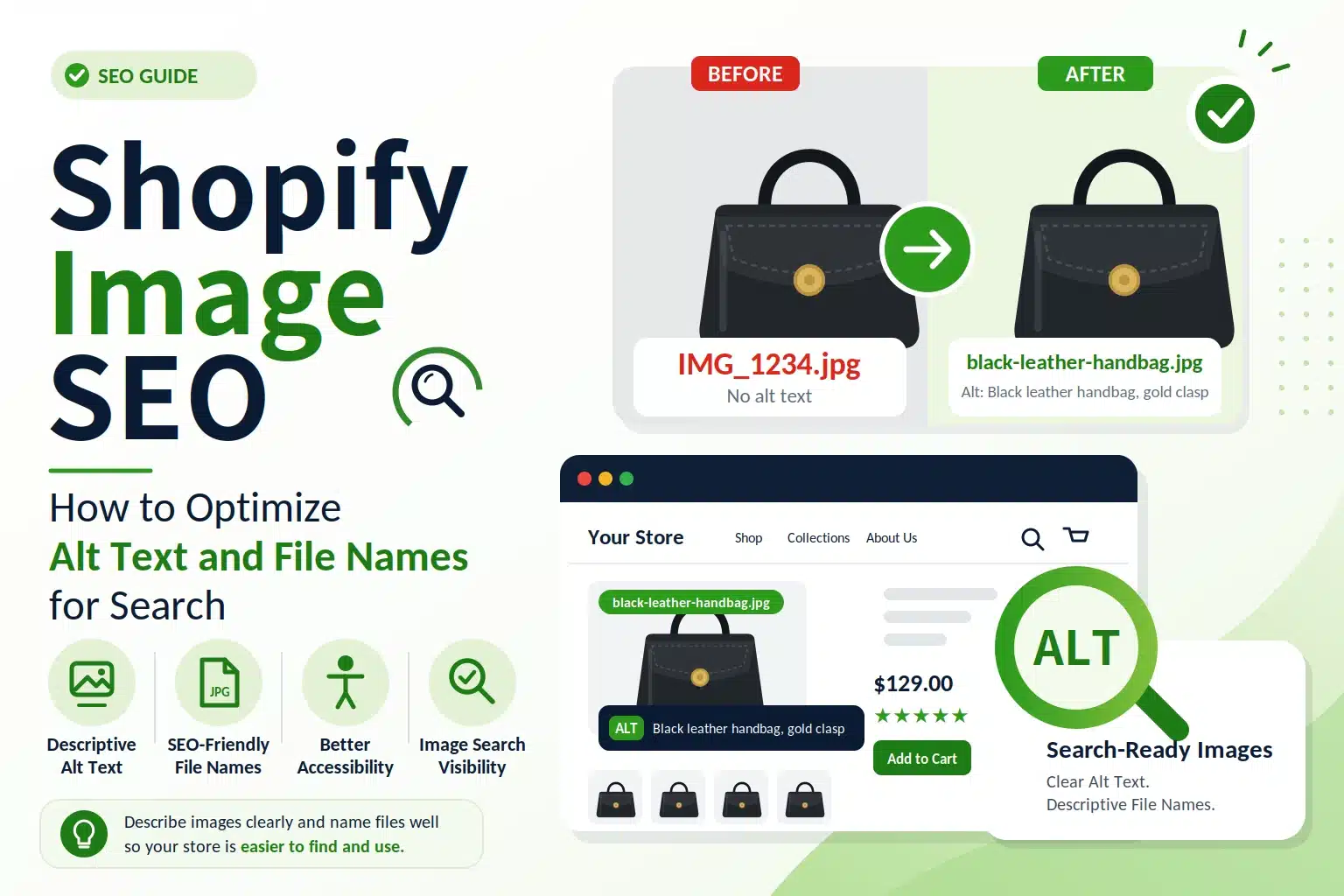
What Is Shopify Image SEO and Why Does It Matter?
Shopify image SEO is the practice of making your product, collection, and blog images easy for search engines and shoppers to understand. It is also a core part of any ecommerce SEO services plan.
How search engines interpret product images
Search engines analyze images to a degree, but text signals still do a lot of the work. Specifically, alt text, filenames, captions, and surrounding page content tell them what an image shows. They also show how the image relates to the page.
The role of alt text and filenames in image discovery
Alt text describes the image itself. The filename, in contrast, gives a smaller supporting hint. Together with a descriptive page title and product copy, they can help your images appear for relevant searches. However, they’re supporting signals, not guarantees.
How accessibility supports a better shopping experience
Screen reader users depend on alt text to understand what’s on the page, so writing it well makes your store usable for more people. As a result, it tends to improve clarity for everyone.
How to Write SEO-Friendly Alt Text for Shopify Images
Good alt text is plain, accurate, and short. Teams that already use SEO content writing services will also find that it comes naturally.
Describe the image clearly and accurately
Say what’s actually in the picture, as if you were describing it to someone who can’t see it. Also include details that matter to a shopper, like color, material, or a distinctive feature.
Include relevant keywords naturally
When a product term fits the description, use it once, in a natural sentence. However, don’t bend the sentence around a keyword.
Keep alt text specific, concise, and useful
One short sentence is usually enough. There’s no hard limit from Google, but many people aim for roughly 125 characters or fewer. As a result, screen readers aren’t reading long passages. Also skip filler like “image of” or “picture of.”
Avoid keyword stuffing and repetitive descriptions
Stringing keywords together makes alt text less helpful. So does reusing the same text on every image of a product. As a result, both hurt shoppers and search engines.
| Image | Recommended alt text |
|---|---|
| Black handbag | Black leather handbag with gold-tone clasp |
| Running shoes | White running shoes with breathable mesh uppers |
| Ceramic mug | Blue ceramic coffee mug with a curved handle |
How to Optimize Shopify Image File Names
Filenames are a smaller signal than alt text, but they are easy to get right. Consistent naming rules also fit naturally into a wider Shopify SEO services plan.
Replace generic names with descriptive filenames
Camera defaults like IMG_1234 tell search engines nothing. Therefore, rename files so the name says what’s in the image. Do it before you upload, since Shopify keeps the original filename.
Use relevant product terms and hyphens between words
Use the words a shopper would use for the product, in lowercase, separated by hyphens. Google recommends hyphens over underscores because it reads hyphens as word separators.
Keep filenames readable and consistent
Pick one pattern, such as product type, material, then color, and apply it everywhere. Consistent names also make your files easier to manage.
Avoid keyword stuffing and unnecessary words
Three or four descriptive words are plenty. Instead, skip filler like “final,” “copy,” or “new,” and don’t repeat the same keyword.
| Avoid | Better |
|---|---|
| IMG_1234.jpg | black-leather-handbag.jpg |
| DSC0098.png | blue-ceramic-coffee-mug.png |
| product-final-2.jpg | white-mesh-running-shoes.jpg |
Filenames are a supporting signal, not a guaranteed ranking factor. So keep them clear instead of clever.
Common Shopify Image SEO Mistakes to Avoid
Most image SEO problems fall into six groups. Therefore, a routine review, such as our SEO audit services, catches them early.
- Missing alt text: Images with no description give screen readers and search engines nothing to work with, so fix these first.
- Generic or automatic filenames: IMG_ and DSC names say nothing about the product, so they waste a free hint.
- Identical alt text on different images: Instead, each image should describe what it uniquely shows.
- Keyword stuffing: Cramming terms into filenames and alt text makes them harder to read, and therefore less useful.
- Inaccurate descriptions: Alt text should match the image rather than just the product title.
- Ignoring accessibility and mobile experience: Alt text is for real people too, while images should load well on a phone.
How to Optimize Alt Text and File Names Across Your Shopify Store
Update product, collection, and blog images
Product photos usually come first. However, collection images and blog images carry the same signals. Cover them all so your store sends consistent information. Our ecommerce optimization services can also help you decide where to start.
Audit existing images for missing or poor metadata
Start with the images that matter most, such as best sellers. Then look for blank alt text, generic filenames, and alt text copied across several images.
Create consistent naming and alt-text rules
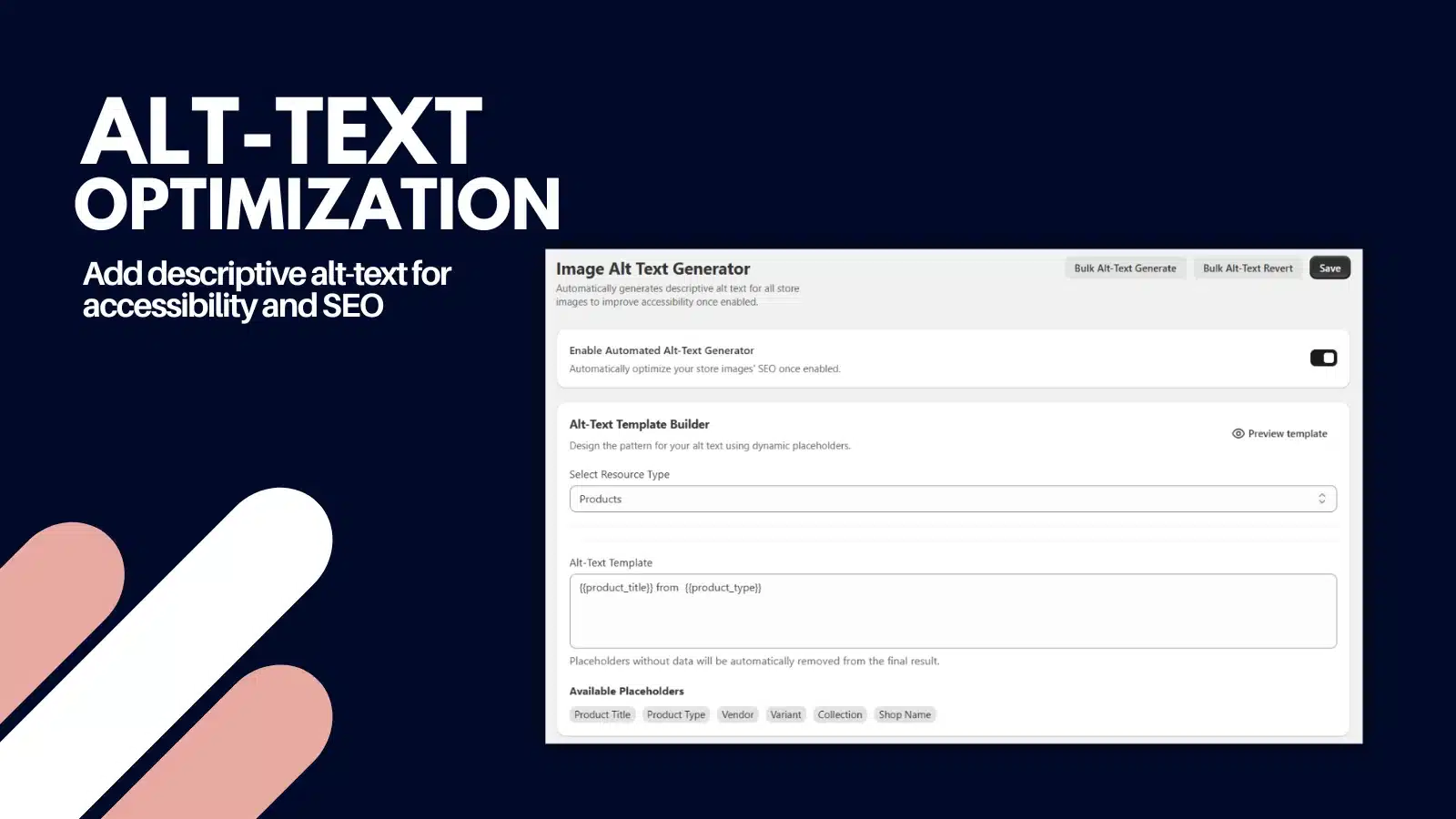
Write down a simple pattern for both. For example, filenames follow product type, material, then color. Alt text is one plain sentence describing the image. Rules also make bulk updates faster and keep quality steady across teams.
Automate repetitive work for large catalogs
When you’re past a few dozen products, editing every image by hand stops being realistic. SEO Image Optimizer by DMB is a Shopify app built for this. Its listing describes:
- Smart alt text: Auto-generates descriptive alt text, so accessibility and search both benefit
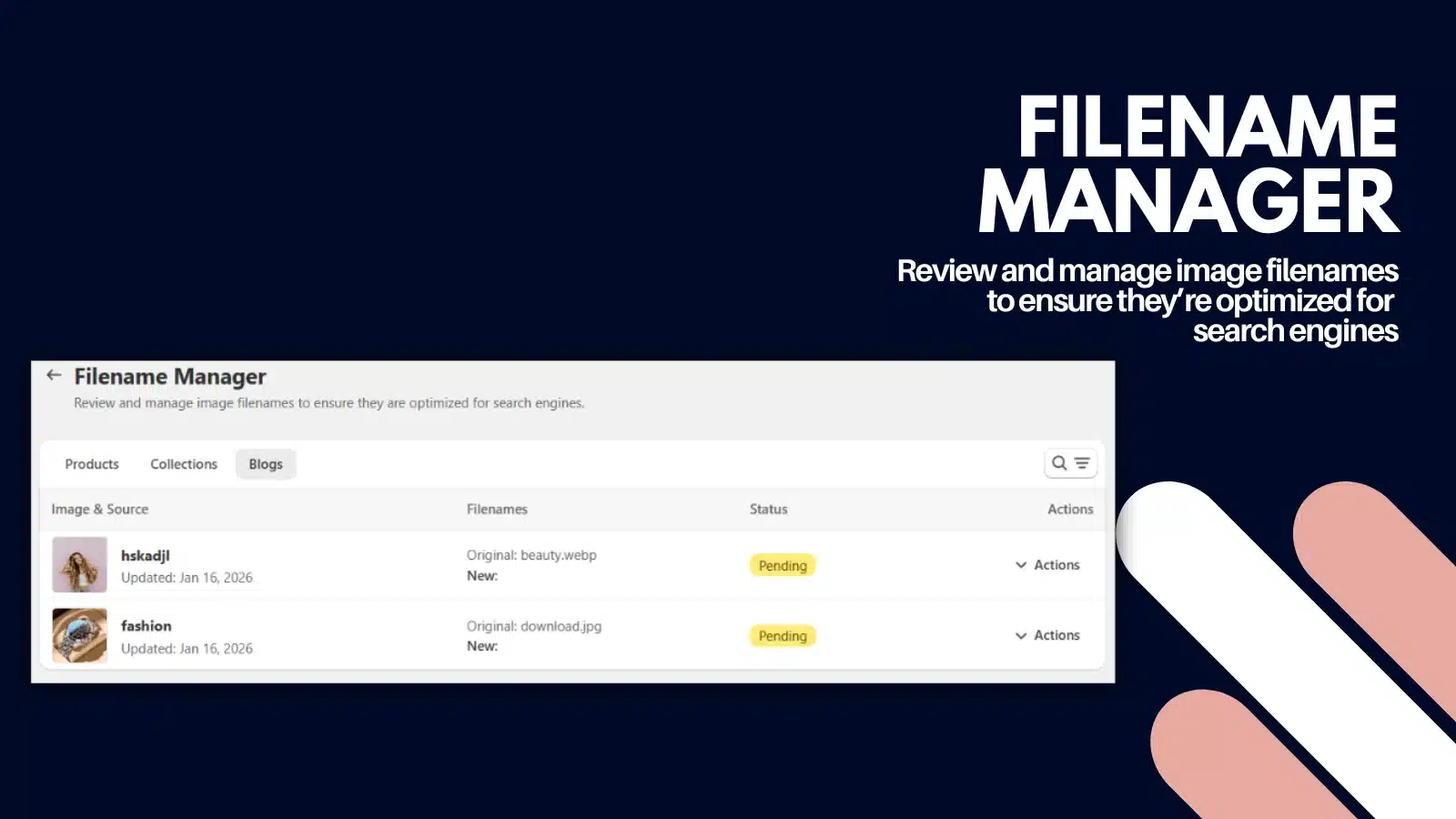
- SEO image renaming: Updates filenames while using custom templates and dynamic variables
- Auto-pilot: Processes your existing catalog in bulk, then syncs new uploads
- Image compression: Reduces file sizes, so page speed improves
Test any automated change on a small batch first. Then check the results on the live pages. The app’s listing doesn’t spell out every image type it covers, so confirm that your collection and blog images are included. Ongoing website maintenance services can also keep the routine running.
Watch: Automate Alt Text and Image Renaming in Shopify (Video Tutorial)
Prefer to see it in action? This walkthrough shows how to install SEO Image Optimizer by DMB and set up AI alt text generation and image renaming. It also covers global settings, automation, and image compression.
Explore SEO Image Optimizer by DMB Free on Shopify →
Frequently Asked Questions
1. Does alt text help Shopify SEO?
It can. Alt text gives search engines context about an image and helps screen reader users. As a result, it supports discoverability and accessibility. However, it’s one signal among many, so it won’t guarantee rankings by itself. Still, missing alt text is a missed opportunity.
2. How long should product image alt text be?
There’s no official limit, but one short, clear sentence works best. Many people therefore keep it to roughly 125 characters or fewer. Include the details a shopper would care about, but leave out filler like “image of.”
3. Do image filenames affect Google Image Search?
Descriptive filenames can give Google a small hint about what an image shows, so they support image search. However, they’re a supporting signal, not a guaranteed ranking factor. Also, our technical SEO services team can check the rest of your image setup.
4. Should every Shopify product image have different alt text?
Yes, where the images show different things. For example, a front view, a side view, and a detail shot each deserve their own description. In contrast, copying one line across all of them is less useful for shoppers and for search engines.
5. Can Shopify image alt text and filenames be optimized in bulk?
Yes. Set consistent rules, then apply them in batches or with an app. SEO Image Optimizer by DMB, for example, lists alt-text generation, template-based renaming, and bulk processing. Then test on a few products first and review the results.
Final Thoughts: Build a Stronger Shopify Image SEO Strategy
Accurate alt text and descriptive filenames are two of the simplest ways to make your Shopify images clearer to search engines and more accessible to shoppers. Neither is a magic switch. However, both are low-cost habits that pay off across a whole catalog.
Start by auditing your existing images for missing or generic metadata. Then set simple rules so every new upload follows the same standard. Tracking results with Google Analytics services also shows what is working.
When keeping that up by hand isn’t realistic, SEO Image Optimizer by DMB can help automate alt text, filename renaming, and bulk processing.
Key Takeaways
- Alt text comes first: One short, accurate sentence per image helps, because it serves screen reader users and search engines
- Filenames add a hint: Three or four descriptive, hyphenated words beat camera defaults like IMG_1234, so rename before uploading
- Avoid the common traps: Skip missing, identical, stuffed, or inaccurate descriptions, since they help nobody
- Set rules, then scale: Consistent patterns make bulk updates possible, so an app can handle the repetition
- Keep expectations realistic: These are supporting signals, so they can’t guarantee rankings or traffic
(877) 522-7738
Blogs
Enterprise SEO: How Large Websites Can Scale Rankings Effectively
Large websites don’t win by fixing pages one at a time. Learn how enterprise SEO scales rankings through crawl control, template fixes, safe content scaling and AI search readiness.
How to Customize Sales Popups on Shopify to Match Your Brand
Learn how to customize sales popups on Shopify to match your brand, from colors, fonts, and position to message text, timing, and mobile testing.
How Shopify Sales Notifications Help Build Social Proof and Increase Sales
Learn how Shopify sales notifications build social proof, reduce shopper hesitation, and support sales, plus best practices and how to add them to your store.
Franchise SEO Challenges and How Multi-Location Brands Can Overcome Them
Franchise SEO is mostly a coordination problem. See the 10 challenges multi-location brands face, from duplicate location pages and listing drift to profile ownership and AI search, and how to fix each one at scale.
Google Ads Benchmarks 2026: What the Numbers Actually Mean for Your Account
Google Ads Search averages for 2026 are a 6.64% CTR, $5.42 CPC, 8.18% conversion rate and $66.69 cost per lead. Learn how to find your break-even CPL and which metric is holding your account back.
Best Shopify Sales Popup Apps to Boost Customer Trust and Conversions
Compare seven Shopify sales popup apps on features, customization, pricing, and ease of use, and learn how to pick one that builds trust without guesswork.
Franchise vs Enterprise Digital Marketing: Key Differences & Best Practices
Franchise and enterprise marketing both manage many locations under one brand, but they run on different rules. See who controls the budget, brand and data in each model, and the best practices that work for both.
How to Add a Shopify Sales Popup: Step-by-Step Guide
Learn how to add a Shopify sales popup in seven steps. Pick an app, set display rules, test on mobile, and track whether it works, with no coding needed.
Google Partner Rewards Store Not Working? We Hit a Redirect Loop, and Here’s What to Do
Stuck in a Google Partner Rewards Store redirect loop? Discover the exact causes behind the login bug and practical troubleshooting steps to redeem your partner points.
GloriaFood Is Shutting Down: Your 7-Step Plan and a Replacement to Try
With Oracle discontinuing GloriaFood, restaurants must plan ahead: explore a 7-step migration blueprint, data export tips, and top online ordering replacements.
Best Shopify Image Optimization Apps: How to Choose the Right Tool for Your Store
Learn what to look for in a Shopify image optimization app, the main types of tools, how to compare apps fairly, and the mistakes to avoid when choosing the right one.
Shopify Image Optimization Checklist: What to Do Before and After Uploading Product Photos
Use this Shopify image optimization checklist to prepare product photos before you upload, finish the job after, avoid common mistakes, and handle large catalogs in bulk.
Beehiiv Newsletter Platform: Pricing, Features, and Monetization Tools
Explore the beehiiv newsletter platform to streamline your communication and engage with your audience effectively.
Shopify Core Web Vitals and Images: How to Find and Fix Image-Related Speed Issues
Learn how images affect Shopify Core Web Vitals, how to find image-related speed issues, the most common mistakes, and how to fix them, including for large product catalogs.
Shopify Fake Cart Bot Attack: What Stopped 500+ Fake Carts an Hour (and a Script We Can’t Rule Out)
A client’s Shopify store was hit with 500+ fake carts an hour, and captchas, rate limits and bot apps didn’t stop it. Here’s why the traffic bypassed our security, the one fix that worked, and a third-party script lead we’re still tracing.
Getting information about your case and your options is your FIRST move. Get a FREE case evaluation now…
Find Yourself a Marketing Expert Near You!
(877) 522-7738