
Shopify Review Schema: Ratings & Structured Data Guide
TL;DR:
- What it is: Shopify review schema is structured data that tells Google about the customer reviews and ratings on a product page, using Review for one customer's feedback and AggregateRating for the combined score.
- What it needs: Because Google requires markup to match reviews shoppers can actually see, ratings and counts must be accurate, visible, and tied to the specific product.
- What to watch: Review apps, your theme, and SEO apps can each output their own markup, so duplicates and mismatched numbers are the most common problems. An app like JSON-LD for SEO keeps ratings in sync with your live reviews.
- What it can't do: Review schema does not guarantee review stars or rich results. Google decides what to show.
Shopify review schema is structured data that tells Google about the customer reviews and ratings on a product page. Done correctly, it describes each product's feedback accurately. Done carelessly, it creates mismatches that can cause Google to ignore your markup.
Stores use it because reviews are a strong trust signal, and structured data is how a search engine can reliably read them. Two types do the work: Review describes one customer's review, and AggregateRating describes the combined rating across many. Both are nested inside your Product schema, so they're tied to a specific product.
This guide covers how review schema works on Shopify, what to include, how review apps affect it, Google's guidelines, and how to troubleshoot missing stars.
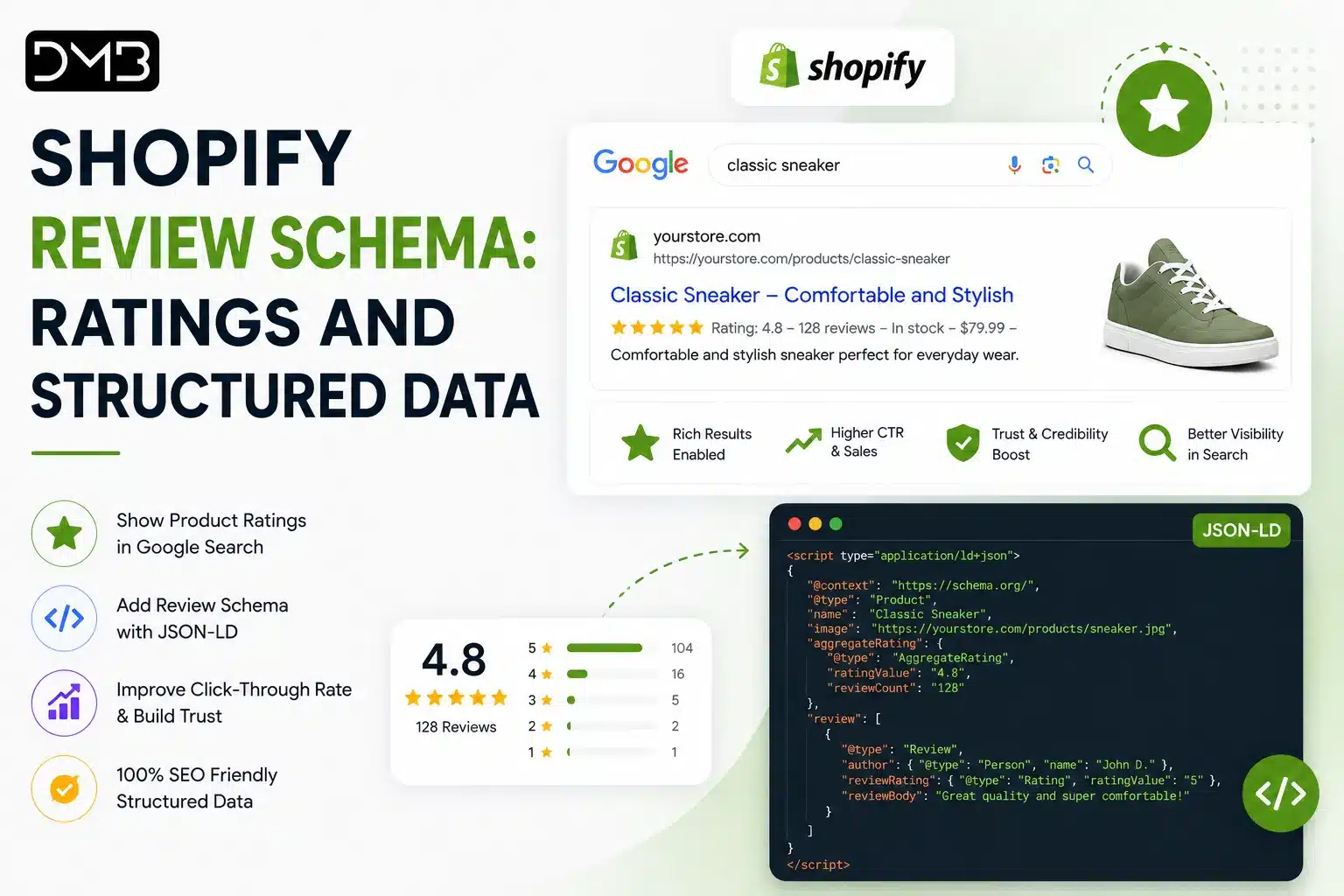
What Is Shopify Review Schema?
Shopify review schema is structured data that describes the customer feedback associated with a specific product. It works hand in hand with online reputation management, since the reviews you earn are the raw material for your markup. It comes in two main forms.
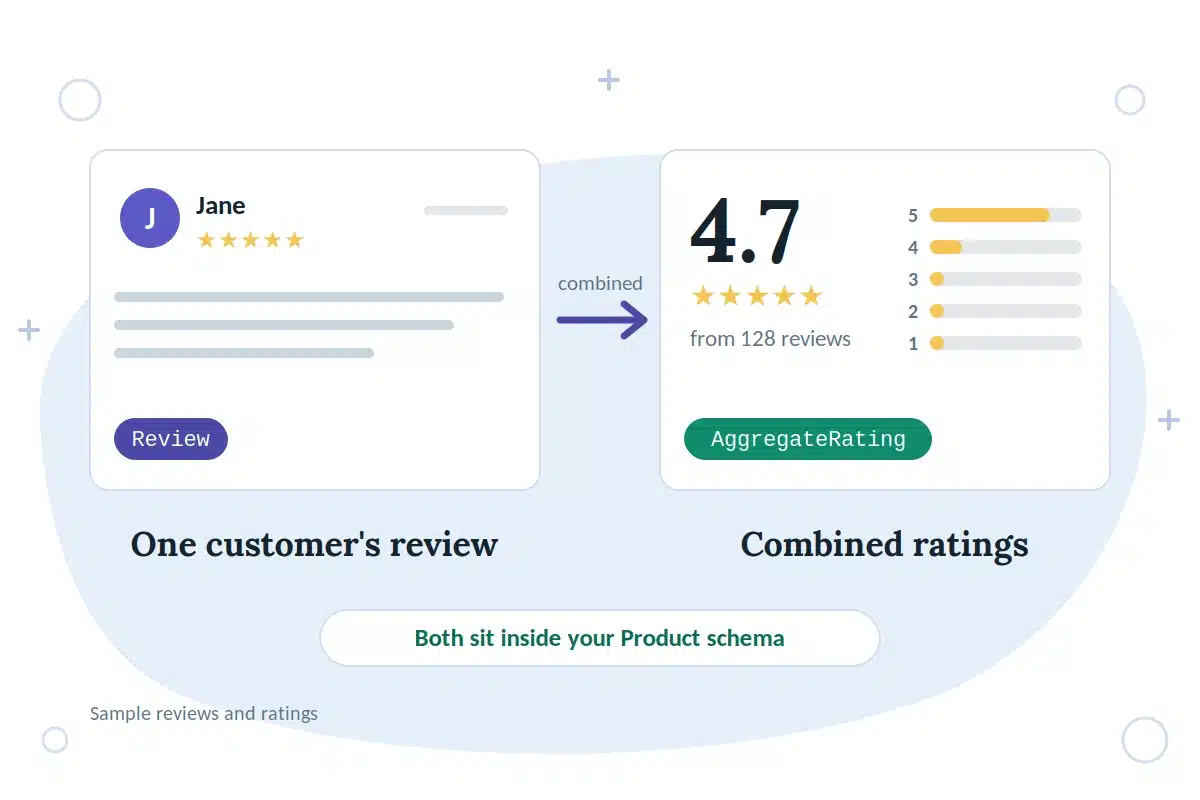
1. Review represents an individual customer review. Typical properties include the author, the rating the reviewer gave (reviewRating), the review text (reviewBody), and the publication date (datePublished).
2. AggregateRating represents the combined rating across multiple reviews. Important properties include ratingValue, ratingCount, reviewCount, bestRating, and worstRating. Google's documentation supports an AggregateRating nested within a Product.
Review vs. AggregateRating
| Schema | What it describes | Example |
|---|---|---|
| Review | One customer's review | A 5-star review from Jane |
| AggregateRating | Combined ratings and reviews | 4.7 out of 5 from 248 reviews |
They serve different purposes and aren't interchangeable. An aggregate rating summarizes; a review is one voice. Many stores mark up only the aggregate, and that's fine as long as the numbers are accurate.
How Review Schema Works on Shopify
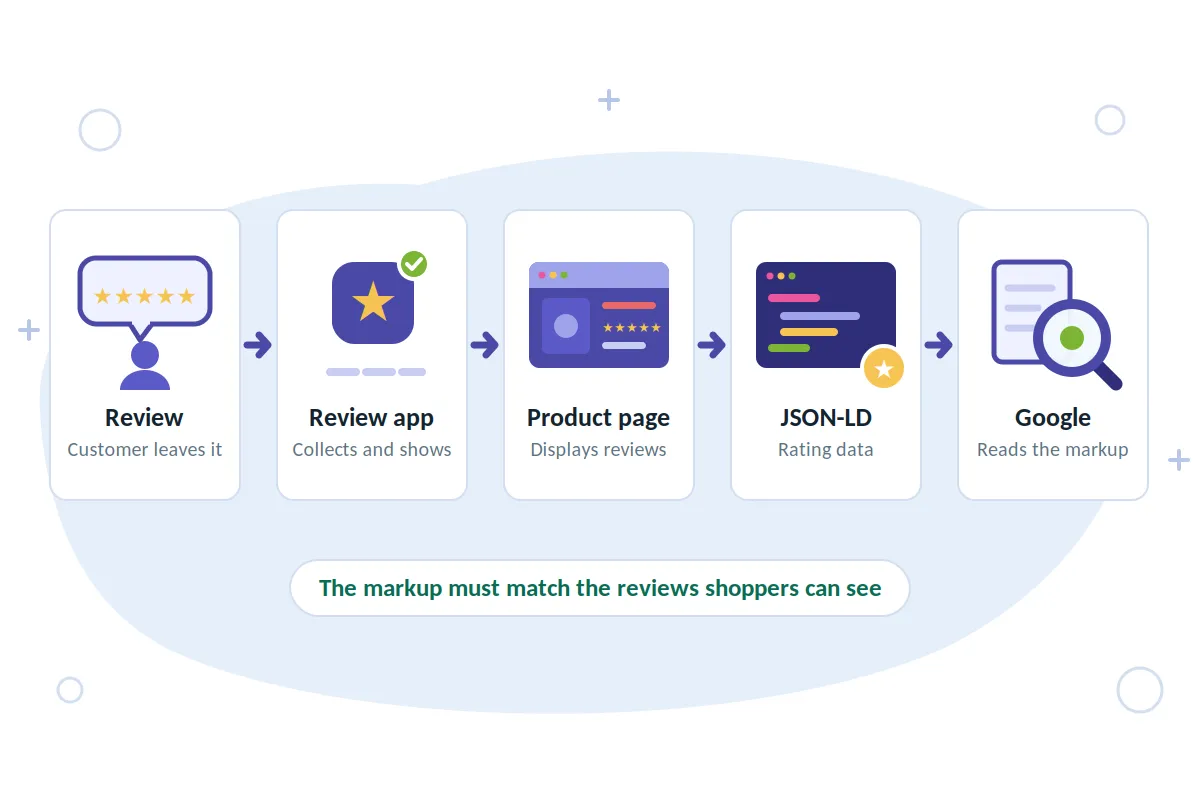
Review data travels through a short chain. Collecting and managing the reviews at the start of it is easier with dedicated reputation management software.
- Customer review: A shopper leaves a rating and comment.
- Review app: The app collects, stores, and moderates it.
- Shopify product page: The app displays reviews on the page.
- JSON-LD: The review app, your theme, or a schema app turns the review data into structured data.
- Google processes the markup: It reads the structured data alongside the visible reviews.
Two rules matter here. The markup should refer to the specific product being reviewed, not a general category or collection. And Google requires marked-up review content to be readily available to users on the page, so the structured data must match reviews shoppers can actually see.
This is also where Shopify review apps come in, because they often decide what review markup your store outputs.
Shopify Product Review Schema Example
In plain terms, a Product block with ratings names the product, links its image, and nests an aggregate rating holding an average value and a review count. For example, a product might carry a rating value of 4.7 across 128 reviews. To describe an individual review, the Product instead nests a Review that includes the reviewer's name and the rating that reviewer gave. Google provides examples of both nested individual reviews and aggregate ratings in its documentation. Our Shopify SEO services include getting this markup right for your catalog.
The key fields to understand:
- The rating value should be the real average shown on the page.
- The review count should match the number of reviews shoppers can see.
- The nesting matters: the rating belongs inside the Product it describes.
What Information Should Shopify Review Schema Include?
The properties below cover the basics. Choosing the right ones for each Google feature is a typical job for technical SEO services.
| Property | Purpose |
|---|---|
| author | Identifies the reviewer |
| reviewRating | Rating assigned by the reviewer |
| reviewBody | Review text |
| datePublished | Publication date |
| ratingValue | Average or individual rating value |
| reviewCount | Number of reviews |
| ratingCount | Number of ratings |
Google has specific required and recommended properties depending on which structured data type you use, so check its current review snippet documentation before deciding what to include.
How to Add Review Schema to Shopify
Method 1: Add review schema manually
- Find the Product JSON-LD in your theme.
- Add the relevant review and rating properties to it.
- Connect the data to the correct product, pulling live values from your review source rather than typing numbers.
- Make sure it matches the visible review content.
- Validate the final markup.
Manual setup gets hard to maintain because reviews change constantly. Every new review changes the count and average, so hard-coded values go stale quickly. If you'd rather not edit theme code yourself, our Shopify web design services team can handle it.
Method 2: Use a Shopify app
Automation helps most when a store has:
- Hundreds of products
- Frequent new reviews
- Multiple product variants
- Different review sources
- International stores
JSON-LD for SEO by DiscoverMyBusiness generates and maintains structured data from your live Shopify catalog, including dynamic product reviews, so your ratings stay in sync as reviews come in.
Install JSON-LD for SEO by DiscoverMyBusiness →
Shopify Review Apps and Structured Data
Review platforms usually display reviews on your page, and many also generate their own structured data. That's convenient, but it creates a common conflict. Apps and themes change often, so steady website maintenance services help catch overlaps early.
Review app schema + Shopify theme schema + SEO app schema = duplicate or conflicting markup.
If two of those sources each output a Product block with ratings, Google may see two different sets of numbers for the same product. Before adding any schema tool, check which sources already output review data, and keep one source of truth.
JSON-LD for SEO by DiscoverMyBusiness supports 20+ review apps, including Judge.me, so it can work from the review data you already collect.
Shopify Review Schema and Google Rich Results
It helps to be clear about what review markup can and can't do. It's one piece of a wider ecommerce SEO services strategy, not a standalone fix.
What it can do?
Review schema can help Google understand the product being reviewed, individual ratings, aggregate ratings, and review information.
What it cannot guarantee?
It does not guarantee review stars, a rich result, higher rankings, or any specific appearance in Google. Google says valid review markup may be shown as a review snippet, but the actual search appearance can vary.
Google Guidelines for Shopify Review Schema
Following Google's rules protects your markup. The best way to stay on the right side of them is to collect real feedback, for example through video testimonial services that capture genuine customer voices.
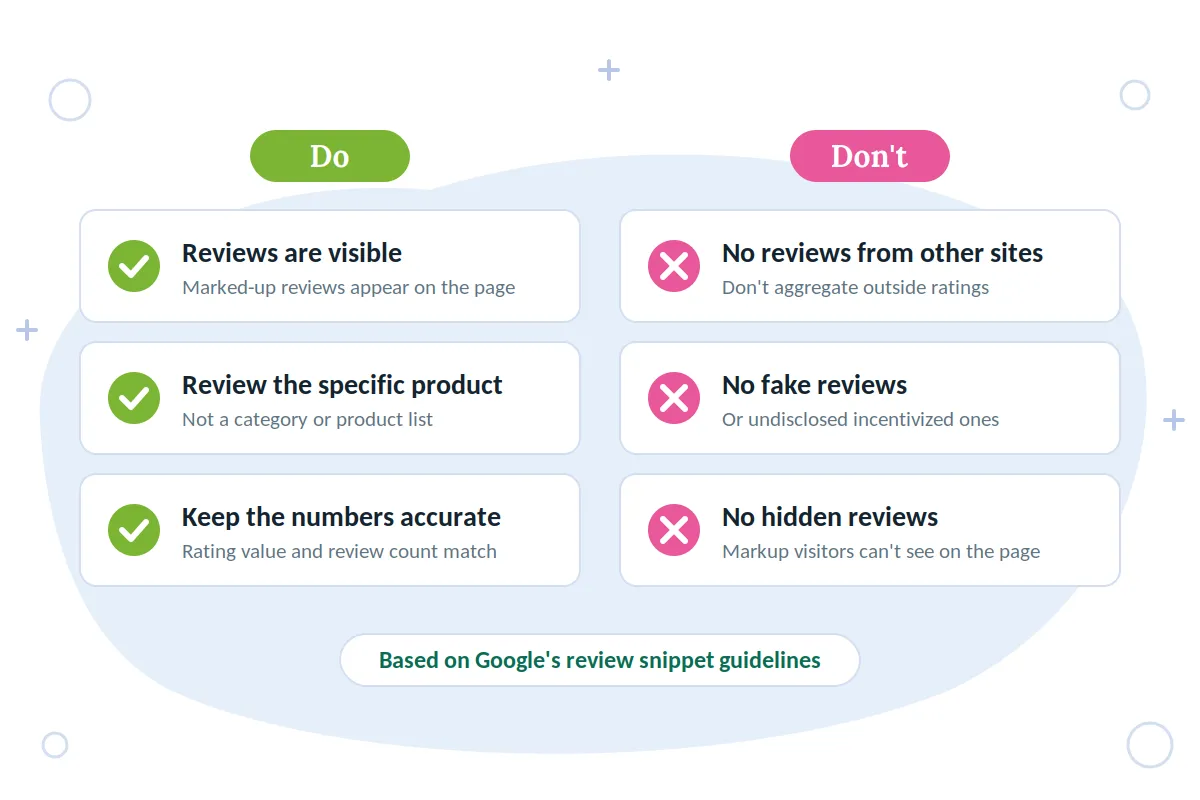
- Reviews must be visible. The marked-up reviews and ratings should be readily available to visitors on the page.
- Review the specific product. Don't use product reviews as generic ratings for a category or product list.
- Don't aggregate reviews from other websites. Google specifically says not to aggregate reviews or ratings from other sites.
- Don't use fake reviews. Fake reviews, and incentivized reviews that aren't disclosed, can violate Google's guidelines.
- Keep the numbers accurate. The rating value, review count, and rating count should represent your actual review data.
Common Shopify Review Schema Problems
These six problems account for most review markup issues. A structured data pass from our SEO audit services usually catches all of them.
- Missing AggregateRating. The page shows reviews, but the Product markup has no aggregate rating.
- Incorrect review count. The markup says 150 reviews while the page shows 142.
- Rating doesn't match the page. The markup says 4.9 while the visible page says 4.6.
- Duplicate Product schema. Multiple apps or theme code output separate Product objects, each with its own ratings.
- Review content isn't visible. The markup contains reviews that visitors can't access on the product page.
- Reviews associated with the wrong product. This is especially likely with dynamic review widgets or complex variant setups.
How to Validate Shopify Review Schema
Use all four checks below, since each catches something different. Pair them with Google Analytics services to see whether review snippets change how shoppers behave.
- Google Rich Results Test. Test the live product URL or a code snippet and review any errors or warnings.
- Inspect the JSON-LD. View the page source and search for
application/ld+jsonto see what's actually output, and compare ratings and counts to the page. - Check Schema.org markup. Use the Schema.org validator to inspect the structured data itself.
- Check Google Search Console. Monitor how Google processes the page and any reported structured data issues.
Google recommends validating structured data before deployment and using URL Inspection afterward to see how Google sees the page.
Why Are My Shopify Review Stars Not Showing?
There are several possible causes. If your product pages themselves are thin or inconsistent, ecommerce optimization services can strengthen them alongside your markup.
- Invalid structured data: Syntax errors or missing properties
- Mismatch with visible content: The markup doesn't match the reviews on the page
- No recrawl yet: Google hasn't reprocessed the page since you changed it
- Eligibility: The page doesn't meet the feature's requirements
- Duplicate or conflicting markup: More than one source outputs ratings
- Google's choice: Google simply decided not to display the enhancement
The central point: passing Google's structured data test does not guarantee that review stars will appear in search.
Frequently Asked Questions
1. What is review schema in Shopify?
Structured data that describes the customer reviews and ratings for a product so Google can read them.
2. Does Shopify automatically add review schema?
Not by itself. Review apps or themes may output it, so check your page source to see what your store actually produces.
3. What is AggregateRating in Shopify?
A schema type that represents the combined rating across many reviews, including the average value and the number of reviews.
4. How do I add review JSON-LD to Shopify?
Add rating and review properties to your Product markup manually, or use an app like JSON-LD for SEO that generates them from your live reviews. Keep them matching what's visible on the page. Our ecommerce marketing services can help you gather more reviews to mark up.
5. Why aren't my Shopify review stars showing on Google?
Common reasons include invalid or mismatched markup, no recrawl yet, duplicate schema, eligibility, or Google choosing not to show them.
6. Does Shopify review schema guarantee Google star ratings?
No. It can make a page eligible for review snippets, but Google decides what appears.
Automate Shopify Review Schema
Keep product reviews and structured data in sync
Once you know what accurate review markup looks like, the challenge is keeping it right as reviews arrive. JSON-LD for SEO by DiscoverMyBusiness automates and maintains your structured data, including dynamic product reviews, product schema, and product variants, plus Google Merchant Center-related structured data. It supports 20+ review apps, including Judge.me, and works with Shopify Markets and international domains. Because trusted reviews also influence buying decisions, conversion rate optimization helps turn that social proof into more orders.
The aim is keeping your data accurate and in sync. It can't guarantee Google stars or rankings, since Google makes that call.
Key Takeaways
- Two types do the work: Review describes one customer's feedback, and AggregateRating describes the combined score, both nested inside your Product schema
- Markup must match the page: Ratings and counts should reflect reviews shoppers can actually see, for the specific product
- One source of truth: Review apps, themes, and SEO apps can each add markup, so check for duplicates before adding more
- Follow Google's guidelines: No fake or undisclosed incentivized reviews, and no aggregating reviews from other websites
- Stars are never guaranteed: Valid markup can make a page eligible, but Google decides what appears
(877) 522-7738
Blogs
Enterprise SEO: How Large Websites Can Scale Rankings Effectively
Large websites don’t win by fixing pages one at a time. Learn how enterprise SEO scales rankings through crawl control, template fixes, safe content scaling and AI search readiness.
How to Customize Sales Popups on Shopify to Match Your Brand
Learn how to customize sales popups on Shopify to match your brand, from colors, fonts, and position to message text, timing, and mobile testing.
How Shopify Sales Notifications Help Build Social Proof and Increase Sales
Learn how Shopify sales notifications build social proof, reduce shopper hesitation, and support sales, plus best practices and how to add them to your store.
Franchise SEO Challenges and How Multi-Location Brands Can Overcome Them
Franchise SEO is mostly a coordination problem. See the 10 challenges multi-location brands face, from duplicate location pages and listing drift to profile ownership and AI search, and how to fix each one at scale.
Google Ads Benchmarks 2026: What the Numbers Actually Mean for Your Account
Google Ads Search averages for 2026 are a 6.64% CTR, $5.42 CPC, 8.18% conversion rate and $66.69 cost per lead. Learn how to find your break-even CPL and which metric is holding your account back.
Best Shopify Sales Popup Apps to Boost Customer Trust and Conversions
Compare seven Shopify sales popup apps on features, customization, pricing, and ease of use, and learn how to pick one that builds trust without guesswork.
Franchise vs Enterprise Digital Marketing: Key Differences & Best Practices
Franchise and enterprise marketing both manage many locations under one brand, but they run on different rules. See who controls the budget, brand and data in each model, and the best practices that work for both.
How to Add a Shopify Sales Popup: Step-by-Step Guide
Learn how to add a Shopify sales popup in seven steps. Pick an app, set display rules, test on mobile, and track whether it works, with no coding needed.
Google Partner Rewards Store Not Working? We Hit a Redirect Loop, and Here’s What to Do
Stuck in a Google Partner Rewards Store redirect loop? Discover the exact causes behind the login bug and practical troubleshooting steps to redeem your partner points.
GloriaFood Is Shutting Down: Your 7-Step Plan and a Replacement to Try
With Oracle discontinuing GloriaFood, restaurants must plan ahead: explore a 7-step migration blueprint, data export tips, and top online ordering replacements.
Best Shopify Image Optimization Apps: How to Choose the Right Tool for Your Store
Learn what to look for in a Shopify image optimization app, the main types of tools, how to compare apps fairly, and the mistakes to avoid when choosing the right one.
Shopify Image Optimization Checklist: What to Do Before and After Uploading Product Photos
Use this Shopify image optimization checklist to prepare product photos before you upload, finish the job after, avoid common mistakes, and handle large catalogs in bulk.
Beehiiv Newsletter Platform: Pricing, Features, and Monetization Tools
Explore the beehiiv newsletter platform to streamline your communication and engage with your audience effectively.
Shopify Core Web Vitals and Images: How to Find and Fix Image-Related Speed Issues
Learn how images affect Shopify Core Web Vitals, how to find image-related speed issues, the most common mistakes, and how to fix them, including for large product catalogs.
Shopify Fake Cart Bot Attack: What Stopped 500+ Fake Carts an Hour (and a Script We Can’t Rule Out)
A client’s Shopify store was hit with 500+ fake carts an hour, and captchas, rate limits and bot apps didn’t stop it. Here’s why the traffic bypassed our security, the one fix that worked, and a third-party script lead we’re still tracing.
Getting information about your case and your options is your FIRST move. Get a FREE case evaluation now…
Find Yourself a Marketing Expert Near You!
(877) 522-7738