
Shopify SEO Apps Compared: Structured Data Features
TL;DR:
- What it covers: A comparison of four Shopify SEO apps focused on structured data: two dedicated JSON-LD tools (JSON-LD for SEO by DiscoverMyBusiness and Ilana’s JSON-LD for SEO) and two all-in-one SEO apps (Smart SEO and StoreSEO).
- What it compares: Schema coverage, product and review support, Google Merchant Center compatibility, custom schema options, language support, and pricing, based on Shopify App Store listings.
- What to consider: Choose features that fit your store, and check your theme and existing apps to prevent duplicate Product schema.
- What to keep in mind: No app guarantees higher rankings or rich results. Google decides which search features appear.
Shopify has hundreds of SEO apps, but they don’t all approach structured data the same way. Some are dedicated JSON-LD and schema tools. Others bundle structured data into a broader SEO suite alongside image optimization, meta tags, and audits. Current Shopify App Store listings show both approaches.
This article compares a handful of apps on structured data functionality only: what schema they cover, how they handle products and reviews, Merchant Center support, and customization. It doesn’t rank apps by overall SEO score or review count.
What Should You Look for in a Shopify Structured Data App?
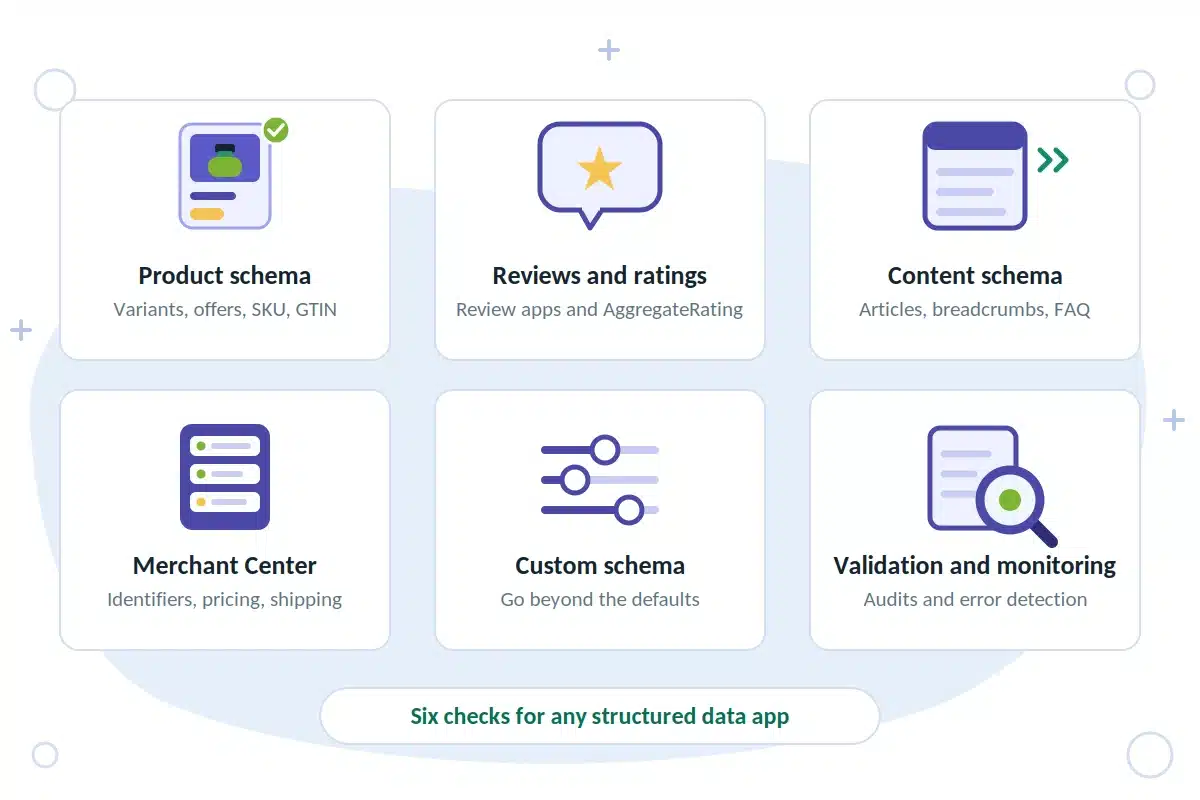
Six criteria separate apps that look similar on paper. Judging them well takes some technical SEO services know-how, so use this list as your starting point.
- Product schema: Does it cover Product, variants (ProductGroup), offers, price, availability, SKU, GTIN, and brand?
- Review and rating schema: Does it support Review and AggregateRating, dynamic review data, and the review apps you use?
- Content schema: Does it handle Article, BreadcrumbList, FAQ, Video, Recipe, Organization, and LocalBusiness where you need them?
- Google Merchant Center support: Does it represent product identifiers, pricing, availability, shipping, returns, subscription pricing, and minimum quantities?
- Custom schema: Can you add or adjust structured data beyond the app’s default templates?
- Validation and monitoring: Does it offer structured data audits, rich result monitoring, Search Console integration, error detection, and troubleshooting support?
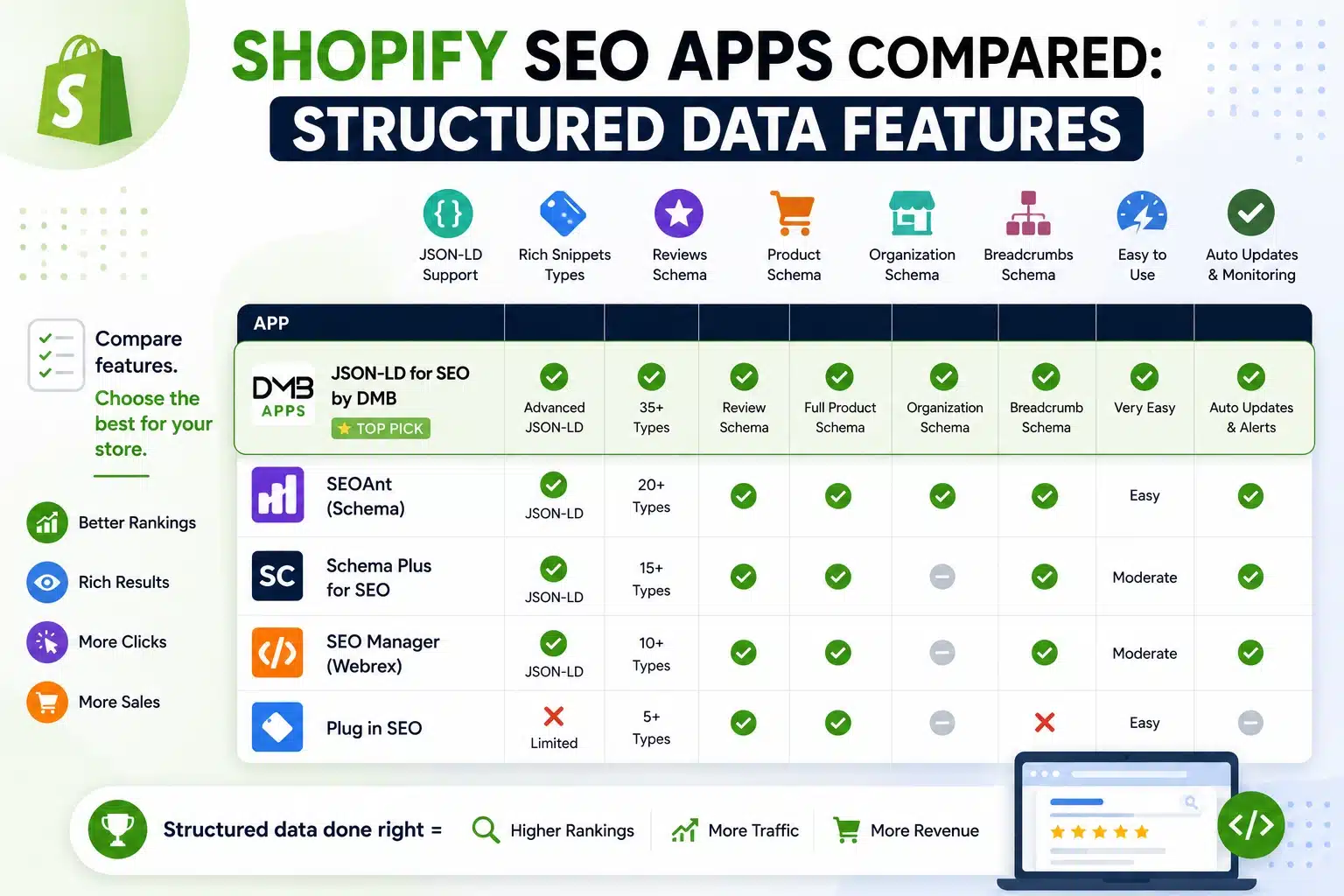
Shopify SEO Apps Compared
Rather than cover dozens of apps, this comparison looks at four Apps whose Shopify App Store listings describe structured data clearly. If you’d like an expert to help you choose, our Shopify SEO services team can review your options.
1. JSON-LD for SEO by DiscoverMyBusiness is a dedicated structured data app. Its listing covers products, reviews, blogs, breadcrumbs, pages, homepage, recipes, and videos, with Google Merchant Center-related schema fields, Custom Schema, Search Console support, and 20+ review apps including Judge.me.
2. Ilana’s JSON-LD for SEO is another dedicated option and has been on the App Store since 2015. Its listing describes schema for products, reviews, blogs, breadcrumbs, homepage, loyalty, recipes, FAQs, and video, Merchant Center compatibility, a structured data audit, and ongoing monitoring of rich results.
3. Smart SEO AI & Image Optimizer (by Sherpas Design) is a broader SEO suite. JSON-LD sits alongside AI meta tags and alt text, image optimization, broken links, indexing controls, and audits, and the listing says it works with Judge.me and Loox.
4. StoreSEO AI SEO Optimizer (by Storeware) is also a broader platform. Its listing includes JSON-LD and FAQ schema, local SEO, breadcrumbs, sitemaps, image tools, AI content, and Google Search Console and Analytics connections.
Structured Data Feature Comparison Table
This table reflects what each app’s Shopify App Store listing states. “Not listed” means the listing doesn’t mention it, not that the app can’t do it. Check each app’s documentation and test before you rely on a feature. The table also serves as a handy brief for any ecommerce SEO services conversation.
| Feature | DMB | Ilana’s JSON-LD | Smart SEO | StoreSEO |
|---|---|---|---|---|
| Product schema | Listed | Listed | JSON-LD listed, types not detailed | JSON-LD and schema generator listed, types not detailed |
| Review apps | 20+ incl. Judge.me | 20+ incl. Judge.me, Klaviyo Reviews, Stamped.io | Judge.me, Loox | Not listed |
| Article or blog schema | Listed | Listed | Not listed | Not listed |
| Breadcrumbs | Listed | Listed | Not listed | Listed |
| FAQ schema | Per DMB’s page | Listed | Not listed | Listed |
| Video schema | Listed | Listed | Not listed | Not listed |
| Business or local | Business schema listed | Business details listed | Local SEO tag listed | Local SEO listed |
| Merchant Center | Merchant-related fields listed | Listed, with or without a feed | Not listed | Not listed |
| Custom schema | Listed | Customizable for preorders, condition, subscriptions, minimum quantity | Not listed | Not listed |
| Search Console | Listed | Not listed (rich result monitoring instead) | Listed on Pro plan | Listed on paid plans |
| Free plan | No (30-day free trial) | No (free trial) | Yes (JSON-LD is on Pro) | Yes (schema generator is on paid plans) |
| Languages | English, French, German, Spanish | English | 20 languages | 11 languages |
One pattern stands out: the two dedicated apps list more schema types, while the all-in-one suites list structured data as one feature among many.
Dedicated Schema App vs. All-in-One SEO App
Whichever model you choose, structured data should slot into a broader SEO strategy rather than stand alone.
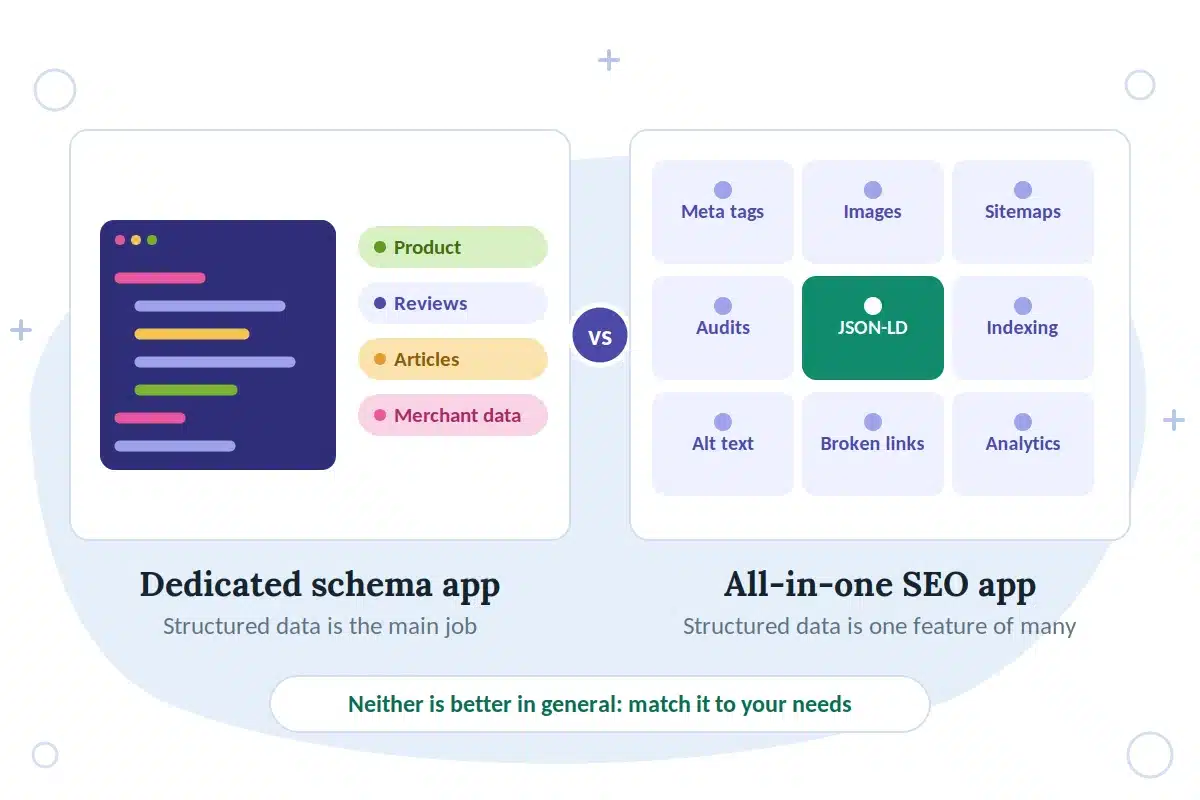
Dedicated structured data apps focus primarily on JSON-LD and schema coverage, product data, reviews, rich result related markup, Merchant Center compatibility, and structured data troubleshooting.
All-in-one SEO apps combine structured data with other tools such as meta tags, image optimization, broken links, sitemaps, indexing, AI content, SEO audits, and analytics.
For example, Smart SEO’s listing combines JSON-LD with image optimization, indexing controls, meta tags, audits, and other features. StoreSEO combines JSON-LD and schema with product optimization, image tools, Search Console and Analytics, and other SEO functions.
Neither model is better in general. If structured data is your main need, a dedicated app may offer more depth. If you need many SEO tasks handled in one place, a suite may be more convenient. Just check how deep the schema coverage goes.
What Type of Shopify Store Needs Which Features?
Instead of naming one universal best app, match features to your situation. Our ecommerce optimization services take the same store-first approach.
- Small store: Look for basic Product schema, a free or low-cost plan, simple installation, and minimal configuration.
- Large catalog: Prioritize automated product and variant schema, bulk handling, dynamic updates, and customization.
- Store with lots of reviews: Prioritize dynamic product reviews, review app compatibility, accurate aggregate ratings, and duplicate schema prevention.
- International store: Look for multiple languages, Shopify Markets support, international domains, and localized structured data. DMB lists English, French, German, and Spanish, plus Markets and international domain support, while Smart SEO lists 20 languages.
- Store using Google Merchant Center: Prioritize product identifiers, pricing, availability, shipping and returns, and merchant-related structured data.
What to Check Before Installing a Shopify SEO App
A few minutes of checking now can save hours of cleanup later. For a thorough baseline, our SEO audit services record exactly what your store outputs today.
- Check your existing schema: View a product page’s source and search for
application/ld+json. - Check your theme: It may already generate Product or other structured data.
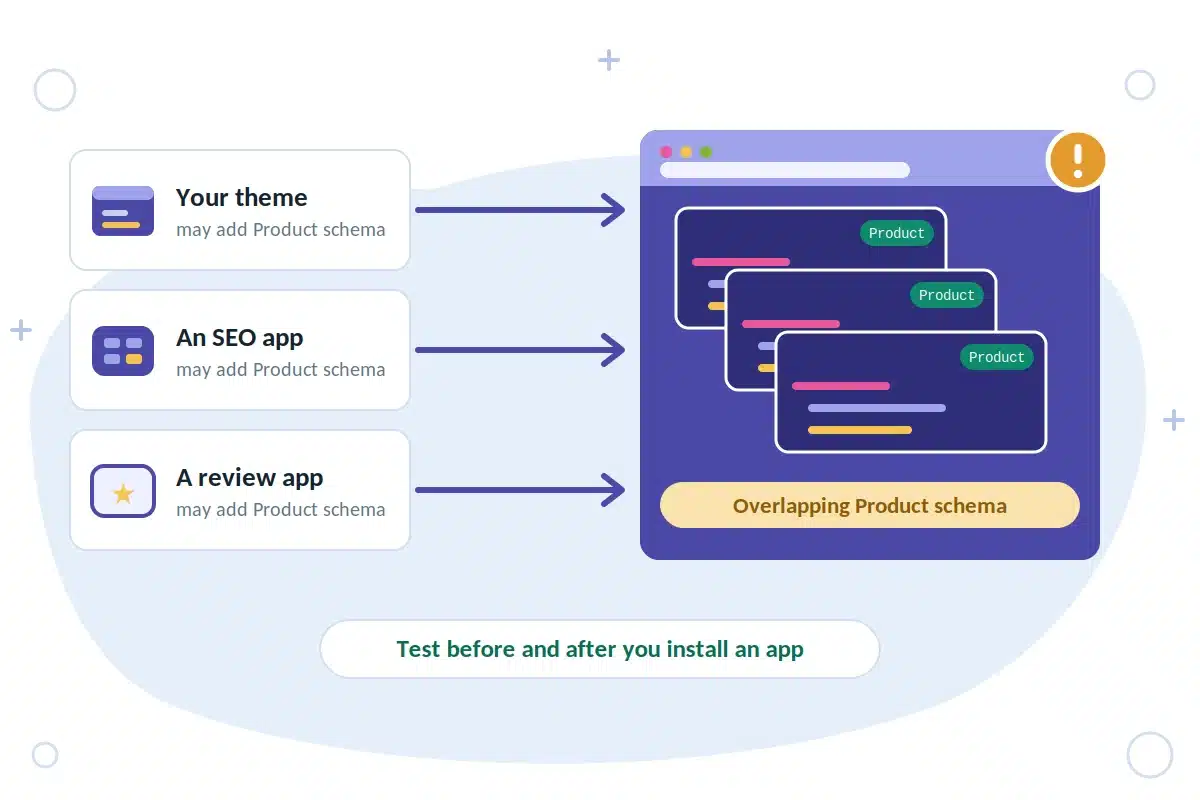
- Check your existing SEO apps: You don’t want multiple apps generating overlapping Product schema.
- Check your review app: Review apps can also contribute structured data.
- Test before and after installation: Record what the page outputs before you install, then compare afterward.
Common Problems With Shopify SEO Apps and Structured Data
Most problems arise when apps, themes, and inventory change without anyone re-checking the markup, which is why steady website maintenance services pay off.
- Duplicate Product schema: Theme, SEO app, and review app can each output a Product block.
- Conflicting prices: Different schema sources report different prices for the same product.
- Incorrect availability: Structured data doesn’t match Shopify inventory.
- Review count conflicts: The visible reviews and the review count in the markup don’t match.
- Incomplete merchant data: Important product information isn’t represented consistently.
- Too much schema: More markup isn’t automatically better. Structured data should be relevant and accurate.
How to Compare Shopify SEO Apps Yourself
Follow these seven steps to make your own call. When you reach the integrations step, Google Analytics services can help you connect the Google side properly.
- Identify the schema you actually need: List the types your store uses: products, reviews, articles, business details, and so on.
- Inspect your current theme to see what it already outputs.
- Check each app’s supported schema types in its listing and documentation.
- Check integrations, especially your review app and Google tools.
- Compare pricing at your store size, since some apps price by product or page count.
- Install and test rather than relying only on marketing claims. Most apps offer a free plan or trial.
- Validate the resulting markup before you commit.
How to Validate an SEO App’s Structured Data
Once an app is installed, check its output with four methods. If you use Merchant Center, our Google Merchant Center management team can also confirm your product data lines up with the markup.
- Google Rich Results Test for eligibility, errors, and warnings.
- Schema Markup Validator for the Schema.org markup itself.
- Google Search Console to monitor how Google processes your pages over time.
- Page source inspection, searching for
application/ld+jsonto see exactly what’s output and to spot duplicates.
Pricing Comparison
Pricing matters, but it should come second to structured data capabilities, since the plans include very different things. Once the app cost is settled, our ecommerce marketing services can help you plan where the rest of your budget works hardest.
| App | Free plan | Starting paid price | Structured data focus |
|---|---|---|---|
| DMB | No (30-day free trial) | $4.99/month (Starter, 1 to 100 pages) | Dedicated JSON-LD |
| Ilana’s JSON-LD | No (free trial) | $399/year | Dedicated JSON-LD |
| Smart SEO | Yes | $14.99/month (Pro, includes JSON-LD) | All-in-one SEO |
| StoreSEO | Yes | $14.99/month (Lite, includes schema generator) | All-in-one SEO |
JSON-LD for SEO by DiscoverMyBusiness
What DMB focuses on
DMB’s current App Store listing describes:
- Product, Article, and Business schema
- Dynamic Product Reviews
- Custom Schema
- Breadcrumbs, pages, and the homepage
- Videos and recipes
- Merchant Center-related structured data
- 20+ review app integrations, including Judge.me
- Google Search Console
- Shopify Markets and international domains
- English, French, German, and Spanish
Since the app reads from your existing review platform, pairing it with online reputation management helps keep the ratings it marks up strong and genuine.
Why it may fit a structured data focused store
The positioning is straightforward: automated structured data means less manual schema maintenance and easier management across products and content. That can suit stores that want schema handled consistently without editing theme code.
It doesn’t guarantee rich snippets, rankings, or placement in Google. Those depend on Google.
How to Install JSON-LD for SEO in Shopify (Video Tutorial)
Prefer to watch? This video walks through how to install JSON-LD for SEO from the Shopify App Store so structured data is running on your store.
How to Add Custom Schema in Shopify (Video Tutorial)
Custom Schema is one of the features that sets dedicated apps apart. This video shows how to add custom schema in Shopify, and JSON-LD for SEO offers Custom Schema for cases the defaults don’t cover.
Install JSON-LD for SEO by DiscoverMyBusiness →
Frequently Asked Questions
1. What is the best Shopify SEO app for structured data?
It depends on the schema coverage you need, your review app and other integrations, your store size, and whether you want broader SEO tools in the same app. Test your top choices before committing. JSON-LD for SEO has a 30-day free trial, which makes it easy to try.
2. Do Shopify SEO apps add JSON-LD?
Many do. Some are dedicated JSON-LD apps and others include it as one feature of a broader suite, sometimes only on paid plans.
3. Does Shopify already have Product schema?
Many themes output Product schema already, so check your page source before adding an app.
4. Can two Shopify SEO apps create duplicate schema?
Yes. Two apps, or an app plus your theme, can each output Product markup. Keep one source of truth. If the duplicate lives in your theme code, our Shopify web design services team can clean it up.
5. Which Shopify SEO apps support Product schema?
Dedicated JSON-LD apps and many all-in-one suites do. Check each listing and test the output on your own store.
6. Do Shopify SEO apps work with Google Merchant Center?
Some list Merchant Center compatibility and others don’t mention it, so verify it if you use Merchant Center.
7. Does a Shopify schema app guarantee rich results?
No. Schema can make eligible pages candidates for rich results, but Google decides what appears.
Shopify SEO App Comparison: Key Takeaways
There’s no single overall winner, but the documented differences point to clear guidance. Once your structured data is in place, conversion rate optimization helps turn the extra visibility into orders.
Key Takeaways
- Dedicated JSON-LD apps focus primarily on structured data and schema management.
- All-in-one SEO apps add structured data alongside broader SEO tools.
- Large stores should pay particular attention to automation, variants, integrations, and consistency.
- Review-heavy stores should check review app integrations and rating schema.
- International stores should verify multilingual and Markets capabilities.
- Merchant Center users should check how the app handles product identifiers and other product data.
(877) 522-7738
Blogs
Enterprise SEO: How Large Websites Can Scale Rankings Effectively
Large websites don’t win by fixing pages one at a time. Learn how enterprise SEO scales rankings through crawl control, template fixes, safe content scaling and AI search readiness.
How to Customize Sales Popups on Shopify to Match Your Brand
Learn how to customize sales popups on Shopify to match your brand, from colors, fonts, and position to message text, timing, and mobile testing.
How Shopify Sales Notifications Help Build Social Proof and Increase Sales
Learn how Shopify sales notifications build social proof, reduce shopper hesitation, and support sales, plus best practices and how to add them to your store.
Franchise SEO Challenges and How Multi-Location Brands Can Overcome Them
Franchise SEO is mostly a coordination problem. See the 10 challenges multi-location brands face, from duplicate location pages and listing drift to profile ownership and AI search, and how to fix each one at scale.
Google Ads Benchmarks 2026: What the Numbers Actually Mean for Your Account
Google Ads Search averages for 2026 are a 6.64% CTR, $5.42 CPC, 8.18% conversion rate and $66.69 cost per lead. Learn how to find your break-even CPL and which metric is holding your account back.
Best Shopify Sales Popup Apps to Boost Customer Trust and Conversions
Compare seven Shopify sales popup apps on features, customization, pricing, and ease of use, and learn how to pick one that builds trust without guesswork.
Franchise vs Enterprise Digital Marketing: Key Differences & Best Practices
Franchise and enterprise marketing both manage many locations under one brand, but they run on different rules. See who controls the budget, brand and data in each model, and the best practices that work for both.
How to Add a Shopify Sales Popup: Step-by-Step Guide
Learn how to add a Shopify sales popup in seven steps. Pick an app, set display rules, test on mobile, and track whether it works, with no coding needed.
Google Partner Rewards Store Not Working? We Hit a Redirect Loop, and Here’s What to Do
Stuck in a Google Partner Rewards Store redirect loop? Discover the exact causes behind the login bug and practical troubleshooting steps to redeem your partner points.
GloriaFood Is Shutting Down: Your 7-Step Plan and a Replacement to Try
With Oracle discontinuing GloriaFood, restaurants must plan ahead: explore a 7-step migration blueprint, data export tips, and top online ordering replacements.
Best Shopify Image Optimization Apps: How to Choose the Right Tool for Your Store
Learn what to look for in a Shopify image optimization app, the main types of tools, how to compare apps fairly, and the mistakes to avoid when choosing the right one.
Shopify Image Optimization Checklist: What to Do Before and After Uploading Product Photos
Use this Shopify image optimization checklist to prepare product photos before you upload, finish the job after, avoid common mistakes, and handle large catalogs in bulk.
Beehiiv Newsletter Platform: Pricing, Features, and Monetization Tools
Explore the beehiiv newsletter platform to streamline your communication and engage with your audience effectively.
Shopify Core Web Vitals and Images: How to Find and Fix Image-Related Speed Issues
Learn how images affect Shopify Core Web Vitals, how to find image-related speed issues, the most common mistakes, and how to fix them, including for large product catalogs.
Shopify Fake Cart Bot Attack: What Stopped 500+ Fake Carts an Hour (and a Script We Can’t Rule Out)
A client’s Shopify store was hit with 500+ fake carts an hour, and captchas, rate limits and bot apps didn’t stop it. Here’s why the traffic bypassed our security, the one fix that worked, and a third-party script lead we’re still tracing.
Getting information about your case and your options is your FIRST move. Get a FREE case evaluation now…
Find Yourself a Marketing Expert Near You!
(877) 522-7738