
SuperOkay | The All-in-One Client Portal for Freelancers and Agencies
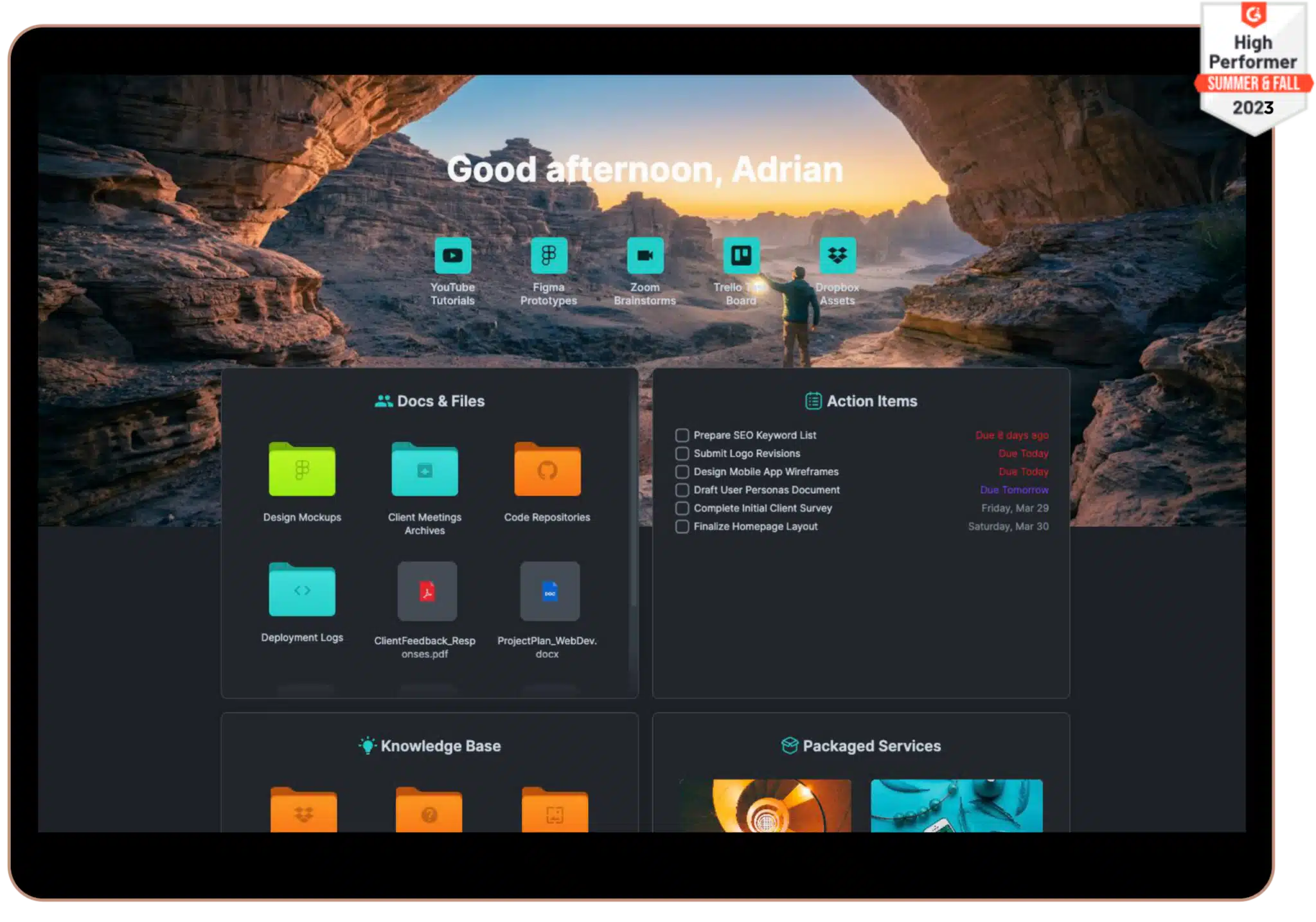
SuperOkay is an all-in-one client portal platform designed to simplify how freelancers, agencies, and creative teams manage client work, documents, and approvals. It provides a central hub where teams can share files, create interactive documents, collect client sign-offs, and integrate favorite tools all in one branded workspace. By combining these capabilities into a single ecosystem, SuperOkay allows businesses to reduce scattered emails, streamline communication, and deliver a more professional client experience. Primarily serving small to medium-sized agencies and freelancers, SuperOkay offers user-friendly solutions without enterprise-level complexity. Its plans, flexible templates, interactive docs, apps integration, and client portals make it especially valuable for businesses that want to keep projects organized, clients informed, and workflows efficient while building trust and credibility.

Table of Contents
- What Is SuperOkay and What Does It Do
- How SuperOkay Can Help Your Business
- SuperOkay Features: Everything You Need to Wow Your Clients
- How to Use SuperOkay: From First Login to Client Delight
- SuperOkay Pricing: Choose the Plan That Fits Your Business
- SuperOkay Client Portal: A Branded Central Hub Where Your Clients Can Access Everything
- SuperOkay Interactive Documents: Smart, Responsive Docs That Drive Collaboration and Clarity
- SuperOkay Embedded Apps Integration: Bring All Your Favorite Tools into One Unified Interface
- SuperOkay Client Sign‑Off Workflow: Get Approvals Faster With Built‑In Approval Controls
- SuperOkay Alternatives: How It Compares to Other Client Portals
- SuperOkay: Is It Worth It? Unlocking Value for Your Business
- FAQs: SuperOkay Explained
What Is SuperOkay and What Does It Do
SuperOkay is a platform for client management for businesses to organize projects, communicate with clients, and streamline approvals from a single workspace. It is particularly popular among freelancers, small agencies, and creative teams who want a professional, branded portal for each client without complicated setups.
Here is what SuperOkay does:
- Centralized Client Portals: SuperOkay allows businesses to create branded client portals where clients can access all project materials, files, and updates in one place
- Interactive Documents: Teams can build interactive briefs, proposals, and documents that include embedded content, pricing tables, and checklists to guide clients through the workflow
- Client Sign-Off: Clients can approve documents and projects directly within the portal, eliminating back-and-forth emails and speeding up project completion
- Templates: Reusable templates for briefs, proposals, and recurring projects save time and maintain consistency across clients
- Apps Integration: SuperOkay supports embedding tools like Figma, Trello, Miro, Airtable, and more so that clients and teams can view and collaborate without leaving the portal
- Flexible Pricing Plans: Users can choose from Free Plan, Solo, Solo+, or Business Plan depending on the number of clients, projects, and features required
- Affiliate Program: SuperOkay offers an affiliate program that allows users to earn rewards for referring new clients
In short: SuperOkay gives businesses a complete toolkit to manage client interactions, deliver professional projects, and improve workflow efficiency, helping teams focus less on administrative tasks and more on growing their business.
How SuperOkay Can Help Your Business
Whether you are a freelancer, a growing marketing team, or a large agency handling multiple clients, SuperOkay is designed to support you at every stage and scale with your needs. Its combination of client portals, interactive docs, apps integrations, and templates allows you to streamline collaboration, reduce administrative overhead, and deliver a professional client experience.
Here is how SuperOkay delivers value across different business sizes and roles:
- SuperOkay for Freelancers: Professional Client Management Without Complexity
Freelancers can use SuperOkay to share proposals, briefs, and project updates in a branded portal. The Free Plan and Solo Plan provide essential features for independent contractors to keep client work organized and collect approvals efficiently - SuperOkay for Growing Teams: Scale Without Losing Control
Small marketing teams and creative teams can leverage the Solo+ Plan to manage multiple clients and projects simultaneously. Interactive documents, client sign-off tools, and templates allow teams to maintain consistent communication and project quality - SuperOkay for Large Agencies: Manage Multiple Clients Seamlessly
Agencies with numerous clients can benefit from the Business Plan to create customized portals for each client, integrate embedded apps, and track project progress. Templates and reusable workflows reduce repetitive work and improve team efficiency - SuperOkay for Sales and Account Managers: Focus on Deliverables, Not Emails
With SuperOkay, client approvals, documents, and communications are centralized, allowing sales and account managers to focus on high-value interactions and avoid chasing scattered emails - SuperOkay for Marketing Managers: Streamline Campaign Collaboration
SuperOkay integrations with tools like Airtable, Trello, and Figma allow marketers to provide clients with real-time updates and visibility, helping campaigns stay on track and under budget - SuperOkay for Customer Support Teams: Improve Client Experience
Client portals and sign-off tools make it easier to address client requests and provide updates quickly, improving satisfaction and trust
In summary: SuperOkay enables teams of all sizes to manage clients professionally, save time, and focus on delivering results rather than administrative tasks.
SuperOkay Features: Everything You Need to Wow Your Clients
What makes SuperOkay stand out as a client management tool, and which features can truly transform the way you work with clients
SuperOkay offers a comprehensive set of features designed to simplify client management and improve workflow efficiency:
- Client Portal: Provides a centralized, branded space for clients to access documents, proposals, updates, and project files
- Interactive Documents: Build proposals, briefs, and contracts with embedded content, checklists, and pricing tables for a more engaging client experience
- Client Sign-Off: Clients can approve projects and documents directly in the portal, eliminating back-and-forth emails and speeding up delivery
- Templates: Reusable templates for proposals, briefs, and recurring workflows save time and ensure consistency across clients
- SuperOkay Apps Integration: SuperOkay supports embedding tools such as Figma, Trello, Miro, and Airtable so teams and clients can collaborate seamlessly
- Pricing Plans: Choose from Free Plan, Solo Plan, Solo+ Plan, and Business Plan depending on the number of clients and level of features required
- SuperOkay Affiliate Program: Users can earn rewards by referring new clients to SuperOkay
These features empower freelancers, agencies, and creative teams to streamline client communication, deliver professional projects, and maintain control over workflows.
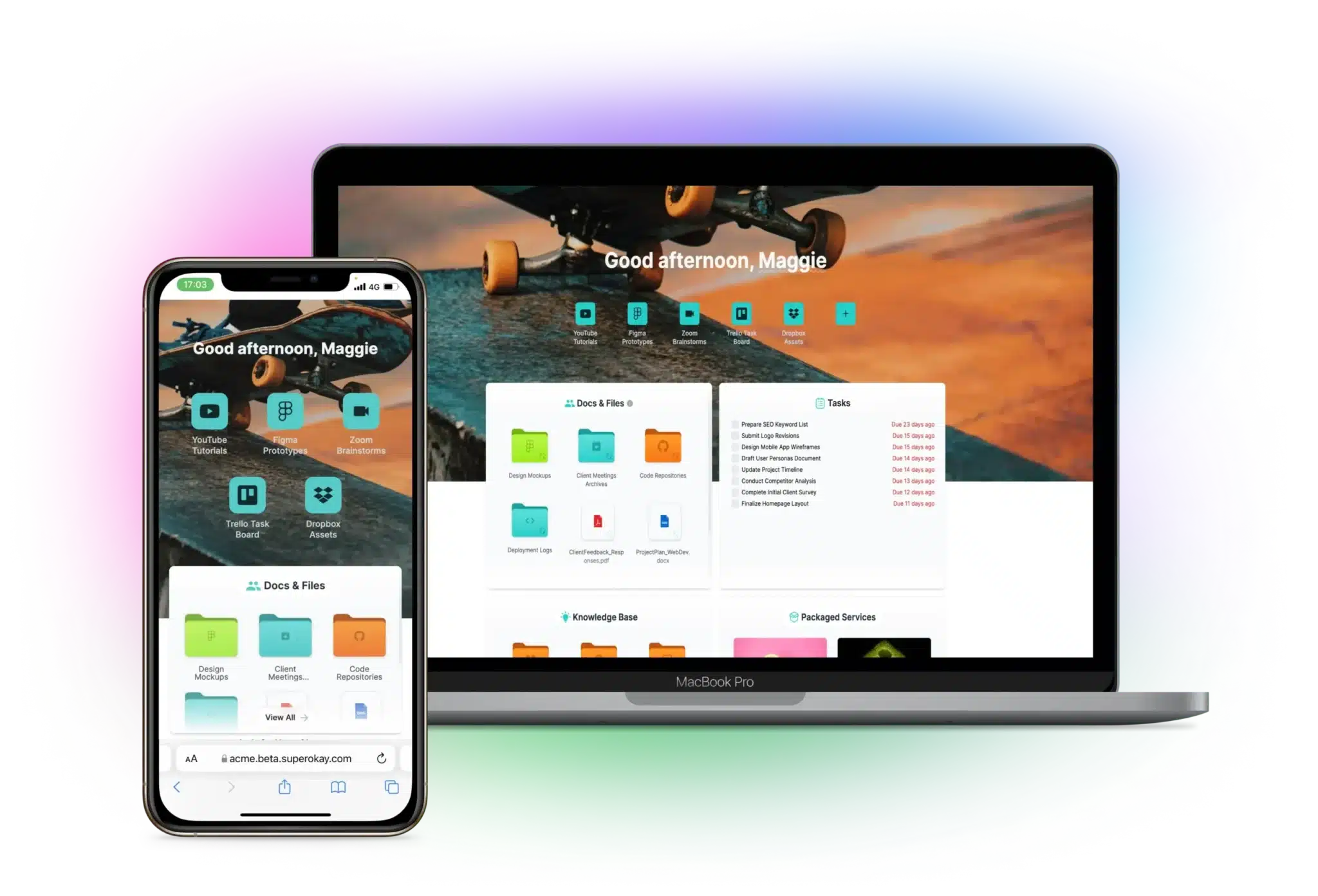
How to Use SuperOkay: From First Login to Client Delight
Using SuperOkay is intuitive and designed to get teams and freelancers productive quickly.
Here is a step-by-step overview:
- Create an Account: Sign up for SuperOkay and select the plan that fits your needs, such as Free Plan, Solo, Solo+, or Business Plan
- Set Up a Client Portal: Customize the portal with your branding, logos, and project-specific content to provide clients a professional workspace
- Build Interactive Documents: Use templates or create new briefs, proposals, or contracts with embedded files, checklists, and pricing tables
- Share with Clients: Send clients the portal link so they can access project documents, view updates, and provide feedback
- Collect Client Sign-Off: Clients can approve documents or projects directly in the portal, speeding up workflow and reducing email back-and-forth
- Integrate Apps: Embed tools like Figma, Trello, or Airtable for real-time collaboration without leaving SuperOkay
- Reuse Templates: Save templates for recurring projects to save time and maintain consistency across clients
- Monitor and Manage Projects: Track document status, approvals, and client interactions in one place for a clear overview
By following these steps: SuperOkay helps freelancers and agencies streamline client management, save time, and deliver a more professional experience.
SuperOkay Pricing: Choose the Plan That Fits Your Business
SuperOkay pricing plans designed to suit freelancers, agencies, and teams of all sizes.
Below is a detailed breakdown of SuperOkay’s pricing plans:
| Plan | Price | Best For | Key Features | Limitations |
|---|---|---|---|---|
| Free Plan | $0/month | Individual freelancers just getting started |
|
|
| Solo Plan | $9/month | Busy freelancers managing multiple clients |
|
|
| Solo+ Plan | $29/month | Freelancers/small teams wanting branding control |
|
|
| Business Plan | $112/month | Teams needing complete client management |
|
None |
Each plan is tailored to fit the specific needs of freelancers, agencies, and businesses of all sizes. All pricing is in USD, and each plan provides essential tools for managing clients, documents, approvals, and collaborations efficiently.
SuperOkay Client Portal: A Branded Central Hub Where Your Clients Can Access Everything
Why Client Portals Matter for Business Success
SuperOkay’s client portals are designed to centralize all client communications, files, and project information in one branded space. By providing a professional, white-labeled portal, businesses can reduce email clutter, improve transparency, and ensure clients always know where to find key project details. The result is stronger client relationships, smoother project management, and a more professional image.
Supported Tools & Features: Everything in One Place
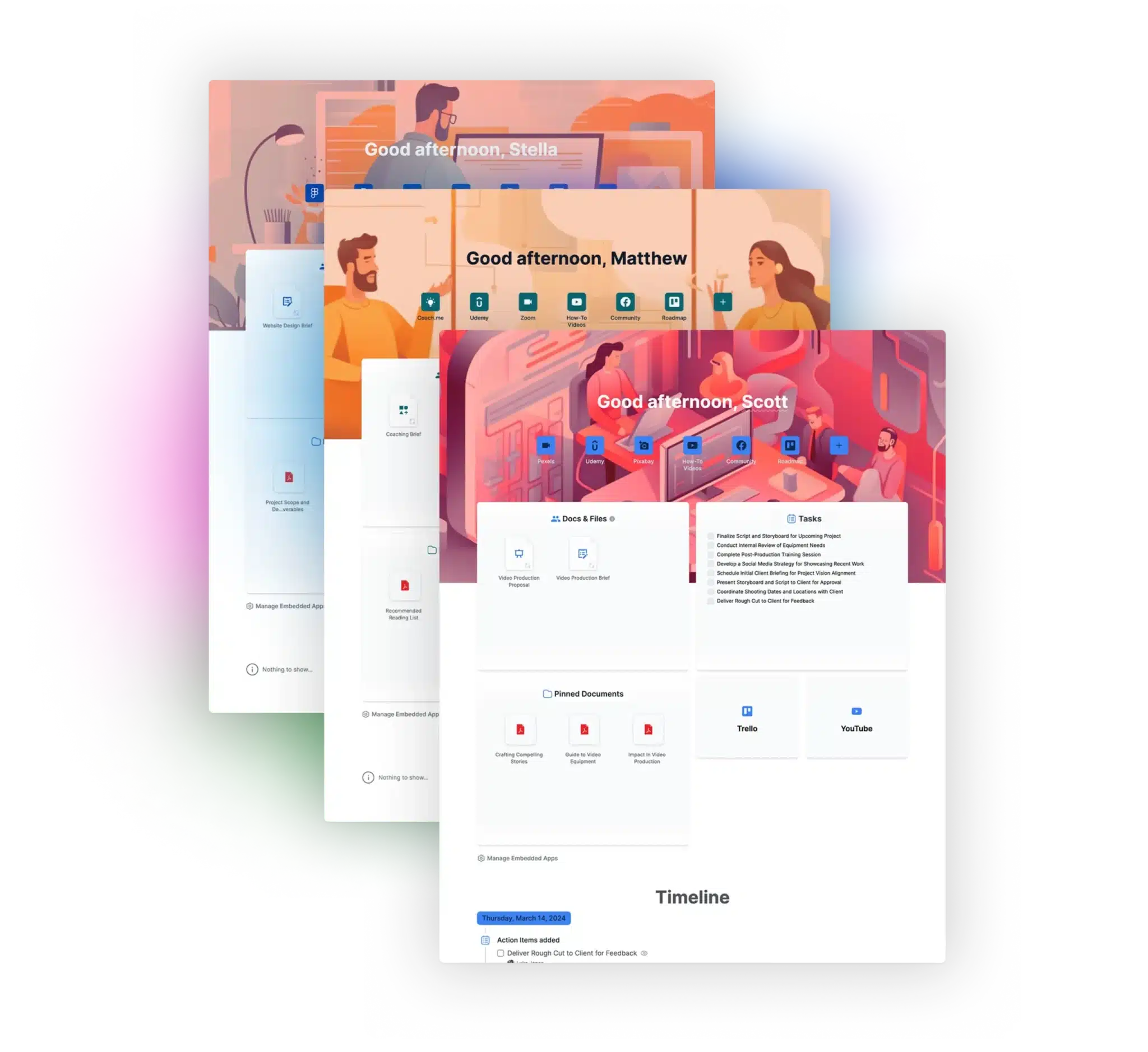
Clients can access documents, files, tasks, quick links, embedded apps, and project updates directly within the portal. Custom branding options allow businesses to apply logos, colors, and fonts so the portal reflects their brand identity. Features like file sharing, project templates, and task tracking make collaboration simple and organized.
Client Portals in Action: Freelancers to Large Agencies
From solo freelancers managing one client to agencies handling dozens of accounts, the client portal ensures every stakeholder has access to the right information at the right time. Portals streamline onboarding, reduce misunderstandings, and provide clients with a consistent, professional experience.
SuperOkay Interactive Documents: Smart, Responsive Docs That Drive Collaboration and Clarity
Why Interactive Documents Matter for Business Success
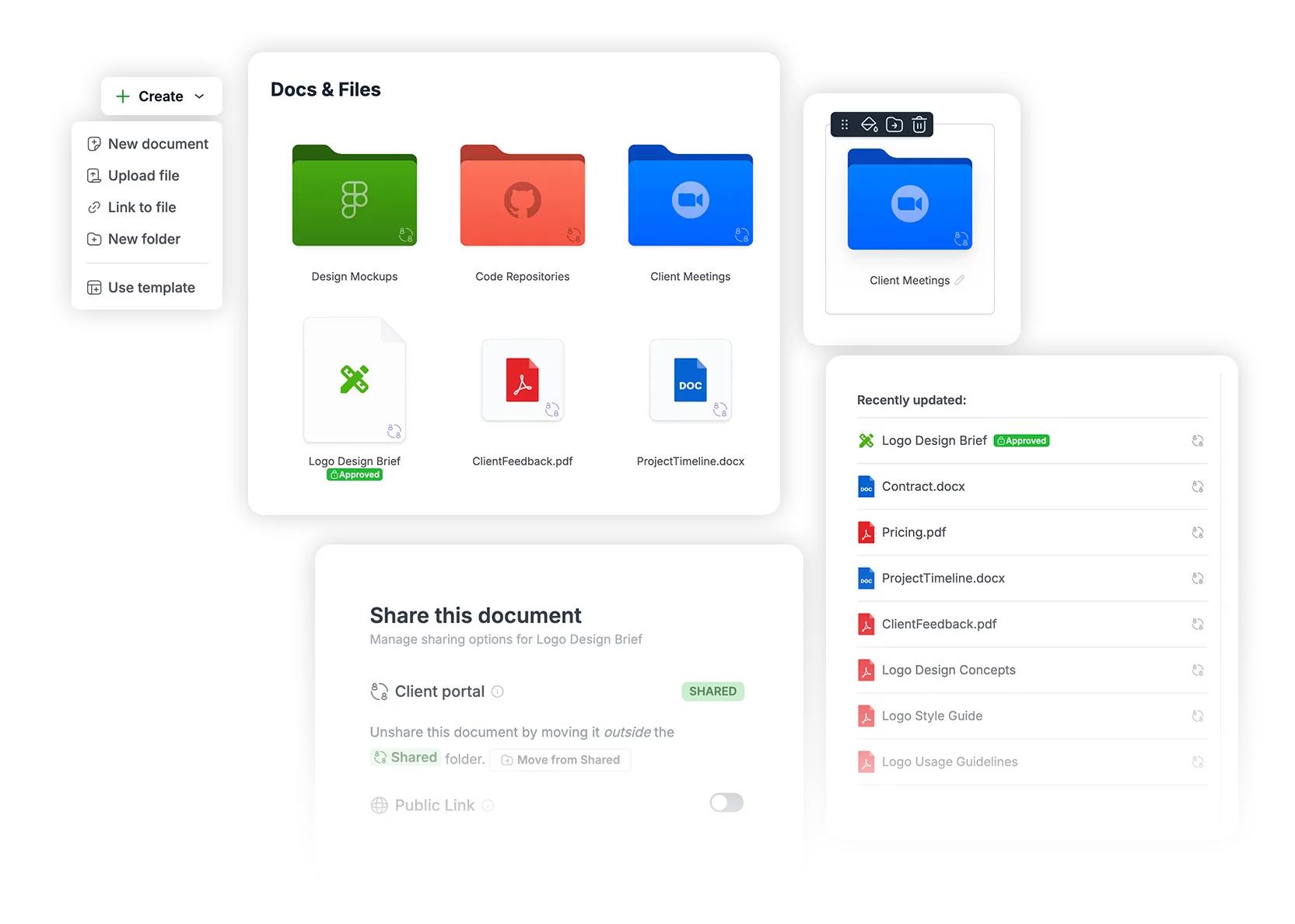
SuperOkay’s interactive documents transform traditional static files into responsive, engaging tools. They allow clients to provide input directly, respond to prompts, and review proposals or briefs in real time. This keeps projects moving quickly and ensures both teams and clients are aligned on expectations.
Supported Tools & Features: Dynamic Content That Works for You
Documents can include pricing tables, checklists, embedded media, multiple-choice fields, file uploads, and rating inputs. Templates allow teams to reuse layouts for similar projects, saving time and maintaining consistency across clients. Smart document building ensures every project delivers information clearly and professionally.
Interactive Docs in Action: From Simple Briefs to Complex Proposals
Whether it’s a single-page brief for a small project or a detailed proposal for a large client, interactive documents help teams collect feedback, secure approvals, and maintain organized records of communication. This keeps workflows efficient and clients engaged.
SuperOkay Embedded Apps Integration: Bring All Your Favorite Tools into One Unified Interface
Why App Integrations Matter for Business Success
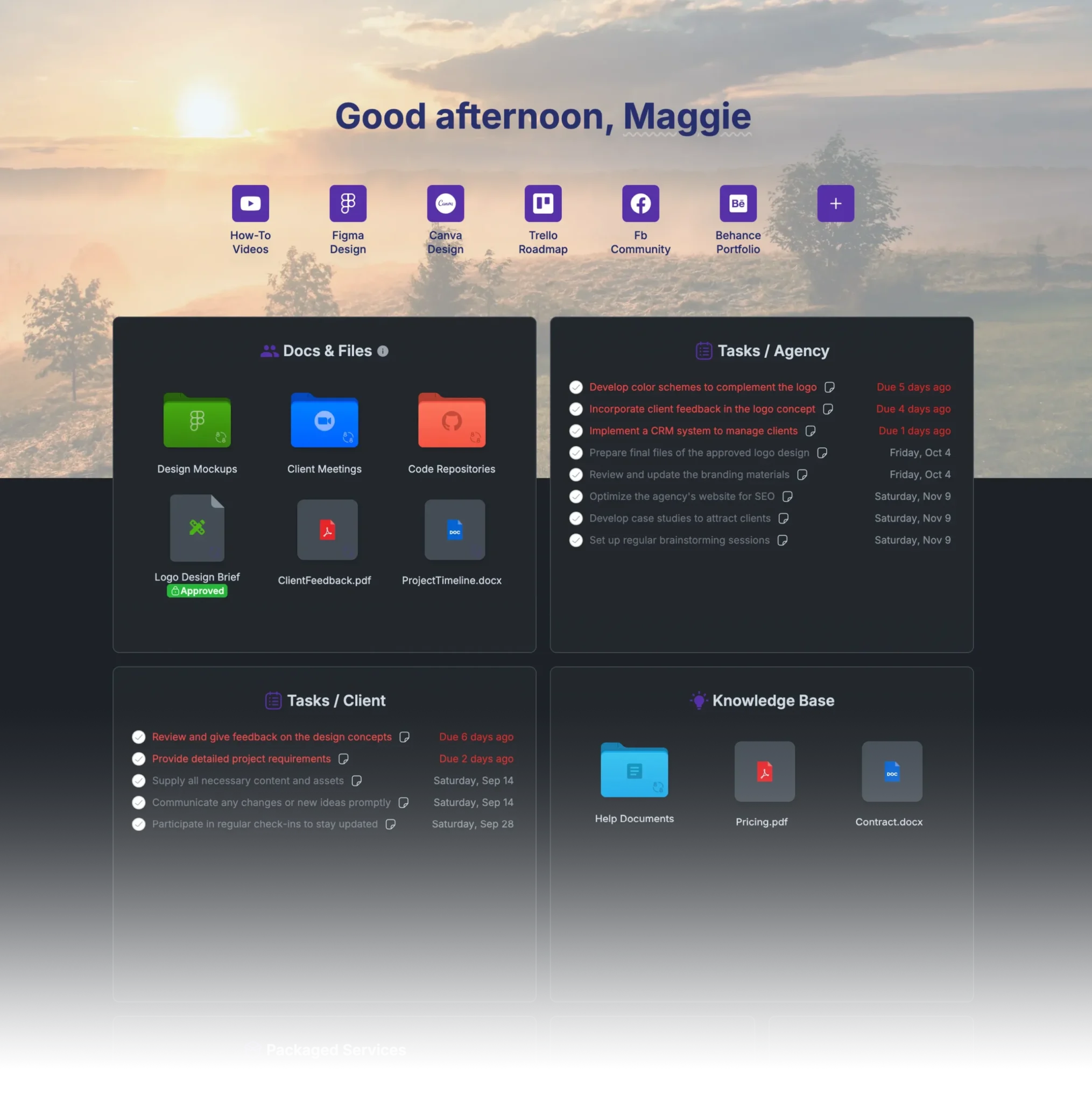
SuperOkay’s embedded apps integration allows businesses to consolidate the tools clients and teams already use into a single portal. This eliminates the need for clients to switch between multiple platforms, making collaboration faster and more efficient.
Supported Tools & Features: Work Seamlessly Across Platforms
Popular integrations include Figma, Trello, Miro, Airtable, and more. Embedded apps display directly in the portal, letting clients view designs, project boards, or databases without leaving SuperOkay. This keeps data organized and ensures everyone stays on the same page.
App Integration in Action: Streamlining Collaboration for Every Project
Teams can manage multiple tools while clients experience one cohesive interface. Designers, marketers, and project managers can embed live project updates, keeping clients informed and reducing delays caused by scattered tools or miscommunication.
SuperOkay Client Sign‑Off Workflow: Get Approvals Faster With Built‑In Approval Controls
Why Client Sign-Off Matters for Business Success
SuperOkay’s client sign-off workflow accelerates approvals and eliminates email back-and-forth. By providing clear approval paths directly in documents or projects, businesses can finalize decisions faster and reduce bottlenecks in delivery.
Supported Tools & Features: Clear Approvals Made Easy
Approval buttons, notifications, and status tracking ensure clients can review and confirm documents quickly. Teams can see which items have been approved, which are pending, and which need revisions, giving full visibility into the project lifecycle.
Client Sign-Off in Action: From Small Projects to Large Campaigns
Whether handling a single project for a freelancer client or coordinating multi-phase campaigns for an agency, client sign-off keeps projects moving. Real-time approvals reduce delays, enhance accountability, and help teams deliver projects on time and to client satisfaction.
SuperOkay Alternatives: How It Compares to Other Client Portals
When exploring client portal and collaboration platforms, it’s natural to compare SuperOkay with other popular solutions. While each tool has its strengths, SuperOkay stands out for its intuitive client portals, interactive docs, embedded apps integration, and simple approval workflows.
Here’s how SuperOkay stacks up against some of the competition and what alternatives you might consider for your business.
- SuperOkay vs SuiteDash
SuiteDash is a comprehensive business management and client portal platform that combines CRM, project management, billing, and client workspace tools all in one place. It offers strong automation, integrated messaging, and customizable portals that go beyond what SuperOkay provides. Reviewers note that SuiteDash may be better for teams needing advanced operational features alongside a portal. - SuperOkay vs Assembly
Assembly is another client portal solution often compared to SuperOkay. Users report that Assembly delivers a solid interface with client collaboration and portal tools, and may be easier for some teams to onboard. While SuperOkay emphasizes simplicity and clean design for client deliverables, Assembly can be a good alternative when support responsiveness and usability are priorities. - SuperOkay vs Accelo
Accelo focuses on service businesses and professional project workflows, spanning sales, projects, tickets, and retainers in one solution. While SuperOkay centers on client portals and document interactions, Accelo provides a broader service automation perspective. Teams that want end‑to‑end service management including timesheets, financial tracking, and client work operations may prefer Accelo. - SuperOkay vs Softr
Softr offers a flexible client portal alternative with drag‑and‑drop building, responsive designs, and robust integrations, positioning itself as a user‑friendly option for businesses that want custom portal experiences with easy setup. Like SuperOkay, Softr allows branded client access, but teams seeking extensive no‑code customization and database‑backed portals might find Softr appealing.
Each of these alternatives brings something different to the table, from broader business toolsets to deeper customizations, so choosing the right one depends on your workflow needs, team size, and how much you prioritize automation, CRM, and integrated project management alongside the client portal experience.
SuperOkay: Is It Worth It? Unlocking Value for Your Business
SuperOkay is certainly worth considering for businesses looking for an intuitive, professional client portal solution that simplifies collaboration, document sharing, and approval workflows. It offers a clean interface, interactive document tools, embedded app support, and flexible pricing plans that make it suitable for freelancers, agencies, and growing teams. Many users appreciate how quickly they can set up branded client portals and centralize project communication without complex setups. SuperOkay’s focus on ease of use means teams can start managing client work without a steep learning curve, and the availability of templates helps maintain consistency across projects. While some competitors offer more extensive automation, CRM, or advanced business management features, SuperOkay’s strengths lie in its elegant client experience and streamlined portal functions. Overall, its combination of clarity, customization, and essential tools makes it a strong choice for service‑based businesses and creative teams aiming to improve client communication and project delivery.
FAQs: SuperOkay Explained
1. What is SuperOkay best used for?
SuperOkay is an all-in-one client portal platform designed for freelancers, agencies, and creative teams. It helps businesses organize client projects, share documents, collect approvals, and collaborate efficiently from a single branded portal. It’s ideal for teams that want to reduce email clutter, streamline client communication, and deliver a professional experience.
2. Does SuperOkay have a free plan?
Yes, SuperOkay Free Plan is available that allows you to:
- Manage 1 client and 1 project
- Store 0.5GB of files
- Use 10 documents, 10 tasks, and 10 embedded apps
- Access task management, Smart Document Builder, and client collaboration portal
This is perfect for freelancers or small projects looking to test the platform without committing financially.
3. What are the pricing plans for SuperOkay?
SuperOkay provides four flexible plans in USD to fit different business needs:
- Free Plan ($0/month): 1 client, 1 project, 0.5GB storage, 10 documents/tasks
- Solo Plan ($9/month): 3 clients, 2GB storage, unlimited projects, public links, PDF downloads
- Solo+ Plan ($29/month): 5 clients, 10GB storage, full white labeling, team roles, project permissions
- Business Plan ($112/month): Unlimited clients and team members, 1TB storage, full white labeling, dedicated support, onboarding call
Plans scale based on team size, clients, storage, and advanced features.
4. Can I upgrade or switch plans later?
Yes, you can upgrade or change your plan anytime without losing data or existing documents. This makes it easy to scale as your business grows or your client needs increase.
5. Does SuperOkay integrate with other tools?
Yes, SuperOkay supports embedded apps integration, allowing you to bring tools like:
- Figma
- Trello
- Miro
- Airtable
Direct integration keeps everything accessible from a single client portal, eliminating constant tab switching.
6. How does client sign-off work in SuperOkay?
SuperOkay includes a built-in client sign-off workflow, allowing clients to:
- Approve documents or projects directly in the portal
- Track which items are approved, pending, or need revisions
- Reduce email back-and-forth and speed up project delivery
This streamlined sign-off process ensures faster approvals, clearer communication, and smoother project delivery for both teams and clients.
7. Is SuperOkay suitable for agencies and remote teams?
Yes, SuperOkay is cloud-based, so remote teams and agencies can access client portals, documents, and tasks from anywhere. Its interactive documents, templates, and approvals ensure smooth collaboration across distributed teams.
8. Does SuperOkay require a long-term contract?
No, SuperOkay offers monthly billing with the flexibility to change or cancel plans anytime. Annual plans may be available depending on promotions, but there is no mandatory long-term commitment.
9. How secure is my data in SuperOkay?
SuperOkay uses secure file storage, encrypted connections, and privacy protocols to protect your client data. All projects, documents, and client information are safely stored within the platform, giving teams peace of mind when managing sensitive work.
Ready to streamline your client management and deliver projects more efficiently? Try SuperOkay today and experience how intuitive client portals, interactive documents, and built-in approvals can save you time, reduce back-and-forth, and impress your clients all from a single platform.
Disclosure: We are independent Affiliates, not employees. We receive referral payments from this company. The opinions expressed here are our own and are not official statements of the company.
(877) 522-7738
Blogs
Enterprise SEO: How Large Websites Can Scale Rankings Effectively
Large websites don’t win by fixing pages one at a time. Learn how enterprise SEO scales rankings through crawl control, template fixes, safe content scaling and AI search readiness.
How to Customize Sales Popups on Shopify to Match Your Brand
Learn how to customize sales popups on Shopify to match your brand, from colors, fonts, and position to message text, timing, and mobile testing.
How Shopify Sales Notifications Help Build Social Proof and Increase Sales
Learn how Shopify sales notifications build social proof, reduce shopper hesitation, and support sales, plus best practices and how to add them to your store.
Franchise SEO Challenges and How Multi-Location Brands Can Overcome Them
Franchise SEO is mostly a coordination problem. See the 10 challenges multi-location brands face, from duplicate location pages and listing drift to profile ownership and AI search, and how to fix each one at scale.
Google Ads Benchmarks 2026: What the Numbers Actually Mean for Your Account
Google Ads Search averages for 2026 are a 6.64% CTR, $5.42 CPC, 8.18% conversion rate and $66.69 cost per lead. Learn how to find your break-even CPL and which metric is holding your account back.
Best Shopify Sales Popup Apps to Boost Customer Trust and Conversions
Compare seven Shopify sales popup apps on features, customization, pricing, and ease of use, and learn how to pick one that builds trust without guesswork.
Franchise vs Enterprise Digital Marketing: Key Differences & Best Practices
Franchise and enterprise marketing both manage many locations under one brand, but they run on different rules. See who controls the budget, brand and data in each model, and the best practices that work for both.
How to Add a Shopify Sales Popup: Step-by-Step Guide
Learn how to add a Shopify sales popup in seven steps. Pick an app, set display rules, test on mobile, and track whether it works, with no coding needed.
Google Partner Rewards Store Not Working? We Hit a Redirect Loop, and Here’s What to Do
Stuck in a Google Partner Rewards Store redirect loop? Discover the exact causes behind the login bug and practical troubleshooting steps to redeem your partner points.
GloriaFood Is Shutting Down: Your 7-Step Plan and a Replacement to Try
With Oracle discontinuing GloriaFood, restaurants must plan ahead: explore a 7-step migration blueprint, data export tips, and top online ordering replacements.
Best Shopify Image Optimization Apps: How to Choose the Right Tool for Your Store
Learn what to look for in a Shopify image optimization app, the main types of tools, how to compare apps fairly, and the mistakes to avoid when choosing the right one.
Shopify Image Optimization Checklist: What to Do Before and After Uploading Product Photos
Use this Shopify image optimization checklist to prepare product photos before you upload, finish the job after, avoid common mistakes, and handle large catalogs in bulk.
Beehiiv Newsletter Platform: Pricing, Features, and Monetization Tools
Explore the beehiiv newsletter platform to streamline your communication and engage with your audience effectively.
Shopify Core Web Vitals and Images: How to Find and Fix Image-Related Speed Issues
Learn how images affect Shopify Core Web Vitals, how to find image-related speed issues, the most common mistakes, and how to fix them, including for large product catalogs.
Shopify Fake Cart Bot Attack: What Stopped 500+ Fake Carts an Hour (and a Script We Can’t Rule Out)
A client’s Shopify store was hit with 500+ fake carts an hour, and captchas, rate limits and bot apps didn’t stop it. Here’s why the traffic bypassed our security, the one fix that worked, and a third-party script lead we’re still tracing.
Getting information about your case and your options is your FIRST move. Get a FREE case evaluation now…
Find Yourself a Marketing Expert Near You!
(877) 522-7738