
tinyEmail | The All-in-One Email Marketing Platform for Modern Businesses
TL;DR:
tinyEmail is an email marketing platform that helps businesses automate campaigns, engage audiences, and grow revenue. It offers a drag-and-drop email builder, advanced segmentation, workflow automation, analytics, and integrations with Shopify, WooCommerce, and WordPress. Flexible plans, including a Free Trial, Standard, Pro, Shopify Pro, and Enterprise, make it suitable for small businesses to large enterprises.
tinyEmail is an all-in-one email marketing platform designed to simplify how businesses grow their audience, manage campaigns, and engage customers. It offers everything from campaign creation and automation to integrations with popular e-commerce platforms like Shopify, WooCommerce, and WordPress. By combining these tools into one ecosystem, tinyEmail empowers entrepreneurs and marketers to streamline communications, improve engagement, and focus on growing their business. Primarily serving small and medium-sized businesses, tinyEmail provides user-friendly solutions without enterprise-level complexity. Its transparent pricing, versatile plans including Free Trial, Standard, Pro, Shopify Pro, and Enterprise options, and features like Connect, Create, and Engage make it especially valuable for online sellers, marketers, and businesses that want a reliable platform for email marketing and audience management.
Table of Contents
- What Is tinyEmail and What Does It Do?
- tinyEmail for Businesses: Boost Engagement and Grow Your Audience
- tinyEmail Features: Powerful Tools to Simplify Email Marketing
- How to Use tinyEmail: Step-by-Step for Smarter Campaigns
- tinyEmail Pricing: Flexible Plans for Every Business Size
- tinyEmail Automated Workflows: Smart Campaigns That Save Time and Drive Engagement
- tinyEmail Drag-and-Drop Email Builder: Create Professional Emails Without Coding
- tinyEmail Advanced Segmentation & Personalization: Target the Right Audience at the Right Time
- tinyEmail Deep Analytics & Insights: Understand What Works and Optimize Performance
- tinyEmail Alternatives: Comparing Top Email Marketing Platforms
- tinyEmail Is It Worth It?: Make Your Marketing Smarter and Easier
- Frequently Asked Questions
What Is tinyEmail and What Does It Do?
tinyEmail is an email marketing platform that empowers businesses to reach customers, automate campaigns, and optimize engagement. It’s especially popular with small and medium-sized businesses, e-commerce stores, content creators, and marketing teams that want a simple, scalable, and affordable way to manage email marketing without complex setups.
Here’s what tinyEmail does:
- Email Campaign Management: tinyEmail lets businesses design and send email campaigns with an intuitive editor, pre-built templates, and mobile-ready designs.
- Audience Segmentation: Users can segment their email lists based on behavior, interests, purchase history, or engagement to deliver targeted content.
- tinyEmail Automation Workflows: tinyEmail offers automation through tools like Connect, allowing businesses to create sequences for welcome emails, abandoned carts, follow-ups, and more.
- Integration with Popular Platforms: tinyEmail works with Shopify, WooCommerce, WordPress, and Zapier, making it easy to connect email marketing with e-commerce, content, and sales platforms.
- Analytics and Insights: Businesses can track campaign performance, opens, clicks, conversions, and revenue impact to optimize results.
- Scalable Plans: tinyEmail provides flexible pricing plans, including Free Trial, Standard Plan, Pro Plan, Shopify Pro Plan, and Enterprise Plan to meet the needs of businesses at any stage.
In short, tinyEmail gives businesses a complete toolkit for email marketing, audience engagement, and automation, helping them focus on growth rather than technical management.
tinyEmail for Businesses: Boost Engagement and Grow Your Audience
Whether you are a small business, a growing e-commerce store, or a large marketing team managing multiple campaigns, tinyEmail is designed to scale with your needs. Its combination of campaign creation, automation, analytics, and integrations allows businesses to focus on growth instead of scattered tools.
Here’s how tinyEmail delivers value across different business sizes and roles:
- tinyEmail for Small Businesses: Easy and Affordable Email Marketing – Small teams can use the Free Trial or Standard Plan to send professional campaigns, capture subscribers with signup forms, and automate simple workflows without technical complexity. Perfect for local shops, online sellers, and startups wanting engagement without large budgets.
- tinyEmail for Mid-Size Marketing Teams: Scale Campaigns with Automation – With Pro Plan or Shopify Pro Plan, teams can create advanced automation sequences, track performance, and use Connect, Create, and Engage features to optimize customer journeys and increase revenue.
- tinyEmail for Agencies: Manage Multiple Clients with Ease – Agencies can leverage Enterprise Plan to handle multiple client accounts, generate detailed reports, and demonstrate ROI for campaigns while maintaining brand-specific automation workflows.
- tinyEmail for E-commerce Stores: Shopify, WooCommerce, WordPress Integration – Stores benefit from pre-built integrations to sync customer data, automate transactional emails, recover abandoned carts, and send targeted promotions based on behavior and purchase history.
- tinyEmail for Marketing Managers: Data-Driven Optimization – Marketers gain granular insights into open rates, click-throughs, and conversions, enabling them to optimize campaigns, improve targeting, and allocate budgets efficiently.
- tinyEmail for Customer Support Teams: Enhanced Engagement – Automated follow-ups, tagging, and segmentation help support teams engage with customers effectively, track interactions, and improve satisfaction.
tinyEmail Features: Powerful Tools to Simplify Email Marketing
tinyEmail offers a comprehensive set of features designed to simplify email marketing, automation, and audience engagement.
These features include:
- tinyEmail Connect: Automates workflows by linking actions across campaigns, subscriber behavior, and integrations for efficient marketing sequences.
- tinyEmail Create: Drag-and-drop editor and pre-built templates allow users to design professional emails without coding, with real-time previews and mobile-friendly layouts.
- tinyEmail Engage: Tools for segmentation, targeted messaging, and personalized campaigns ensure relevant content reaches the right audience.
- Audience Management: Import and organize subscriber lists, segment audiences based on behavior, and track engagement for smarter campaigns.
- Analytics and Reporting: Monitor opens, clicks, conversions, revenue, and campaign performance with clear dashboards and reporting.
- tinyEmail Integrations: Seamless connection with Shopify, WooCommerce, WordPress, Zapier, and other tools to centralize marketing, sales, and e-commerce efforts.
- tinyEmail Flexible Plans: Options include Free Trial, Standard Plan, Pro Plan, Shopify Pro Plan, and Enterprise Plan to accommodate small businesses to large-scale operations.
These features empower businesses to save time, improve engagement, and maintain control over marketing campaigns.

How to Use tinyEmail: Step-by-Step for Smarter Campaigns
Using tinyEmail is simple and intuitive, helping businesses manage email marketing efficiently.
Here’s a step-by-step overview:
- Create an Account: Sign up for tinyEmail and choose a plan such as Free Trial, Standard, Pro, Shopify Pro, or Enterprise to get started.
- Connect Your Platform: Integrate tinyEmail with Shopify, WooCommerce, or WordPress to sync customers and data.
- Create Campaigns: Use the Create tool to design emails with drag-and-drop templates and personalization features.
- Segment and Target: Use Engage to segment your audience based on behavior, purchase history, and preferences to deliver relevant messages.
- Automate Workflows: Set up Connect sequences for welcome emails, abandoned carts, follow-ups, or multi-step campaigns.
- Preview and Test: Review campaigns in real-time, test emails, and ensure formatting is mobile-friendly.
- Launch and Monitor: Send your campaign, track performance with analytics, and adjust strategies based on insights.
- Optimize and Scale: Upgrade plans as needed to unlock advanced automation, reporting, and multi-client management with Enterprise Plan.
tinyEmail Pricing: Flexible Plans for Every Business Size
tinyEmail pricing plans are designed to suit businesses of all sizes, from startups to large enterprises. Below is a detailed breakdown of tinyEmail’s pricing plans:
| Plan | Price | Description |
|---|---|---|
| Free Trial | $0/month | The Free Trial allows businesses to explore tinyEmail without any upfront costs. It includes access to essential features such as Create, Engage, and Connect, along with the ability to send up to 15,000 emails per month. This plan is perfect for small businesses and beginners who want to test the platform before committing. |
| Standard Plan | $65/month | The Standard Plan is ideal for growing businesses. It includes everything from the Free Trial, plus advanced email automation, audience segmentation, and analytics. Users can send up to 15,000 emails per month and scale effortlessly as their email list grows. This plan is designed for marketers looking to manage campaigns efficiently without breaking the bank. |
| Pro Plan | Pricing varies based on usage | The Pro Plan is designed for businesses with higher email volume needs. It includes all Standard Plan features, plus priority support, advanced automation workflows, and enhanced reporting. Users can send from 15,000 up to 1.5 million emails per month, making it suitable for fast-growing e-commerce stores and mid-sized marketing teams. |
| Shopify Pro Plan | Pricing varies based on usage | The Shopify Pro Plan is tailored specifically for e-commerce stores using Shopify. It includes all Pro Plan features, plus deep Shopify integration for automated transactional emails, abandoned cart recovery, and product-driven campaigns. This plan allows businesses to send a scalable number of emails per month depending on store activity. |
| Enterprise Plan | Custom Pricing | The Enterprise Plan is built for large organizations or agencies managing multiple clients. It includes all features from the Pro and Shopify Pro Plans, plus dedicated account management, custom onboarding, priority support, and unlimited automation capabilities. Email sending limits and pricing are customized based on the organization’s needs. |
Each plan is tailored to fit your specific business requirements, whether you are just starting, scaling your marketing efforts, or managing multiple clients. All charges are in USD, and businesses can start with the Free Trial to test the platform’s features before upgrading.
tinyEmail Automated Workflows: Smart Campaigns That Save Time and Drive Engagement
Why Automated Workflows Matter for Business Success
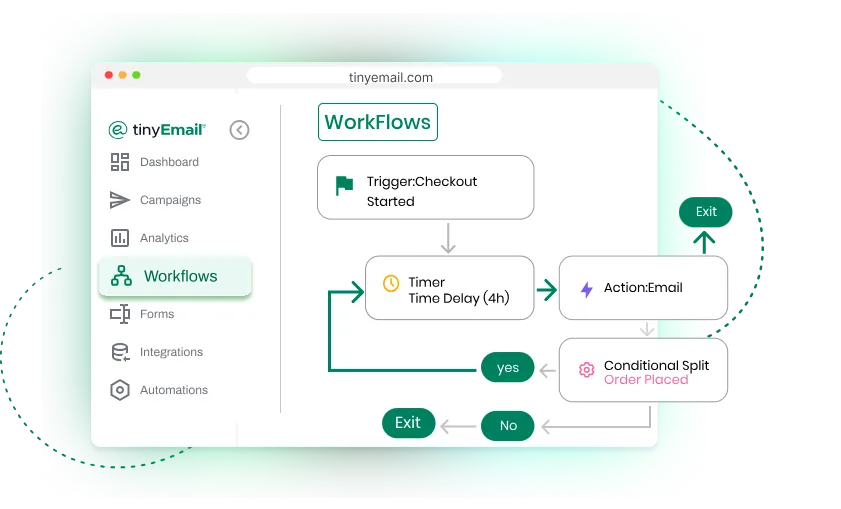
tinyEmail’s Automated Workflows are designed to save businesses time while keeping audiences engaged. By setting up triggers based on subscriber actions like signups, purchases, or inactivity, businesses can send targeted messages without manual effort. This ensures your audience receives timely, relevant communications, increasing open rates, click-throughs, and conversions. The visual workflow builder makes it easy to map out complex sequences without technical expertise.
Supported Tools & Triggers: Automate Every Step
tinyEmail lets you create workflows for welcome series, abandoned cart reminders, re-engagement campaigns, and post-purchase follow-ups. Each workflow can be customized with multiple triggers, conditions, and delays, giving businesses complete control over how and when messages are sent.
Workflow Insights: Track Performance and Optimize
Every automated sequence is tracked in real time, showing metrics like email opens, clicks, and conversions. Businesses can refine workflows based on performance data, ensuring every automated campaign delivers maximum impact.
Automated Workflows in Action: From E-Commerce to Service Businesses
Whether it’s an online store recovering abandoned carts, a subscription business sending welcome emails, or a local service provider following up with clients, tinyEmail Automated Workflows help businesses engage audiences consistently while reducing manual work.
tinyEmail Drag-and-Drop Email Builder: Create Professional Emails Without Coding
Why Drag-and-Drop Email Building Matters for Business Success
tinyEmail’s Drag-and-Drop Email Builder enables businesses to design professional, responsive emails without coding knowledge. Marketers and business owners can quickly create newsletters, promotions, and transactional emails that look polished on all devices. This ensures every email reflects the brand’s identity while driving engagement.
Supported Tools & Templates: Build Emails Effortlessly
Users can choose from a library of pre-designed templates or create custom layouts using drag-and-drop blocks. Add images, buttons, videos, and personalized text elements seamlessly. The platform provides live previews, so emails can be tested and adjusted before sending.
Editing & Customization: Make Every Email Unique
tinyEmail allows easy customization of fonts, colors, layouts, and content. Users can also save templates for future campaigns, streamlining email production and maintaining consistent branding.
Email Builder in Action: From Promotions to Newsletters
Whether it’s an e-commerce promotion, a product launch, or a content newsletter, tinyEmail’s builder lets businesses produce high-quality campaigns quickly, ensuring marketing efforts remain visually compelling and effective.

tinyEmail Advanced Segmentation & Personalization: Target the Right Audience at the Right Time
Why Segmentation & Personalization Matter for Business Success
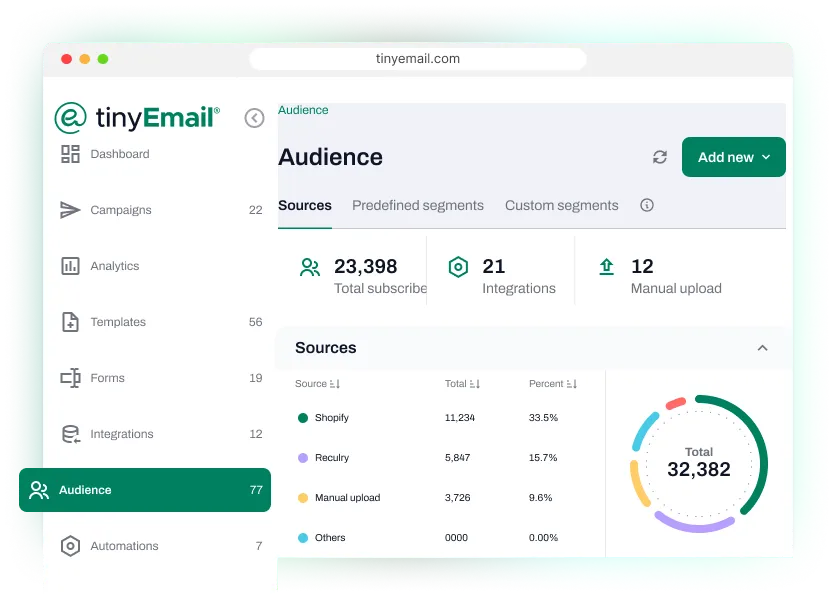
tinyEmail’s Advanced Segmentation and Personalization help businesses send the right message to the right audience. By analyzing customer behavior, purchase history, and engagement patterns, marketers can deliver content that resonates, increasing the likelihood of opens, clicks, and conversions.
Supported Segmentation Tools: Group Audiences Intelligently
Users can create dynamic segments based on attributes like location, purchase frequency, engagement level, and interests. Personalized content blocks can adjust text, images, and offers based on each subscriber’s data, ensuring relevancy at scale.
Performance Tracking: Refine Targeting Over Time
tinyEmail provides insights on how each segment responds to campaigns. Businesses can test subject lines, content, and send times for specific groups, optimizing campaigns for better performance.
Segmentation in Action: From New Subscribers to Loyal Customers
Whether targeting new subscribers with a welcome series, upselling products to existing customers, or re-engaging inactive users, tinyEmail’s segmentation and personalization make campaigns more relevant and impactful.
tinyEmail Deep Analytics & Insights: Understand What Works and Optimize Performance
Why Analytics Matter for Business Success
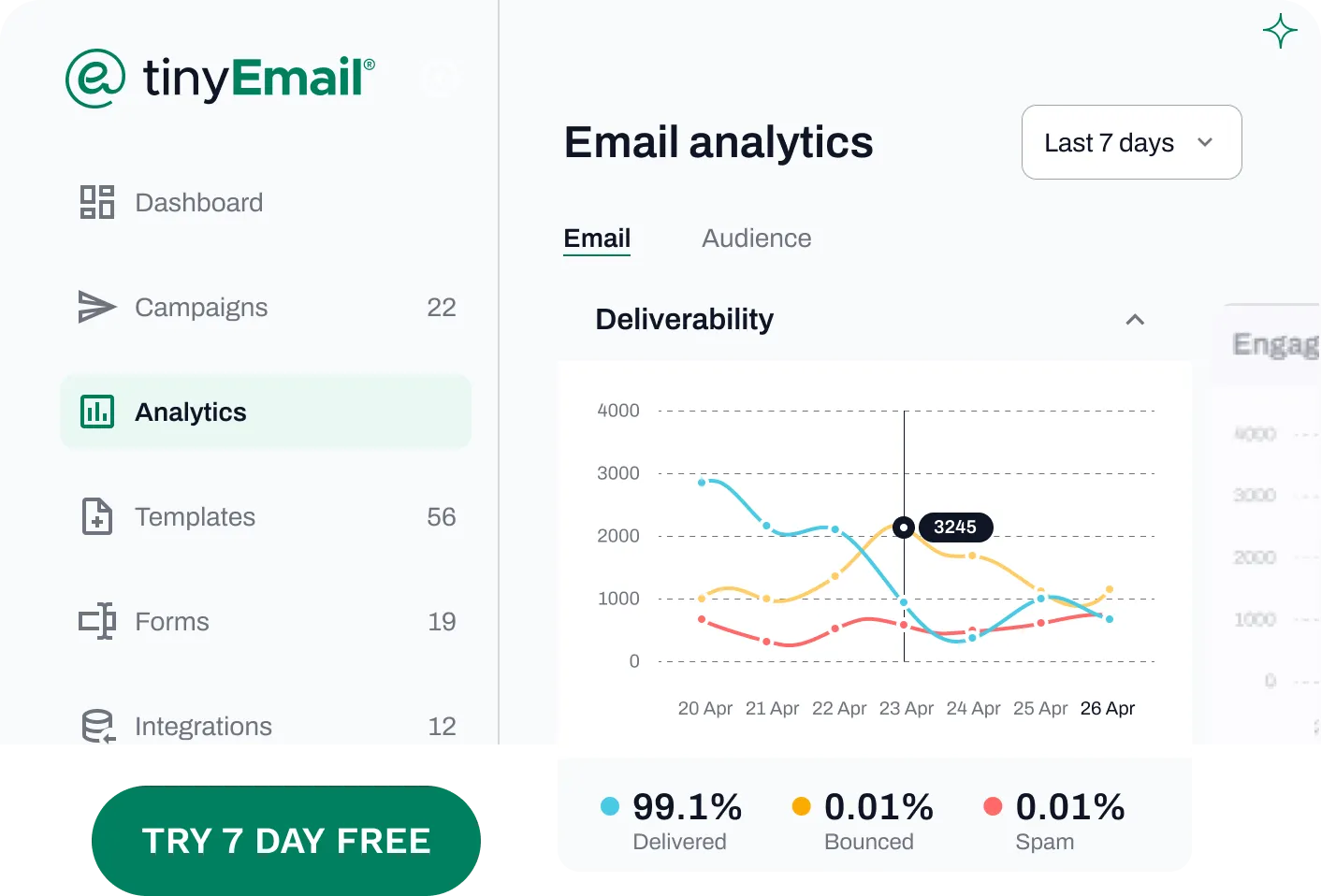
tinyEmail’s Deep Analytics and Insights allow businesses to measure campaign effectiveness and make data-driven decisions. By understanding which emails resonate with audiences, marketers can optimize future campaigns to increase engagement and revenue.
Supported Metrics & Reports: Track Every Interaction
tinyEmail provides detailed metrics on open rates, click-throughs, conversions, subscriber growth, and revenue impact. Dashboards make it easy to visualize performance and spot trends quickly.
Optimization Tools: Improve Campaign Results Continuously
Businesses can A/B test subject lines, content blocks, and sending times to refine campaigns. Insights from analytics help adjust strategies, improve targeting, and maximize ROI.
Analytics in Action: From Small Businesses to Large Teams
Whether it’s a startup evaluating newsletter performance, an e-commerce store analyzing product promotion results, or a marketing team reporting ROI for multiple campaigns, tinyEmail’s analytics give actionable insights that drive smarter decisions.
tinyEmail Alternatives: Comparing Top Email Marketing Platforms
When exploring email marketing and automation platforms, it’s natural to compare tinyEmail with other popular solutions. While each tool has its strengths, tinyEmail stands out for its intuitive interface, automation workflows, and deep integrations with e-commerce platforms. Here’s how tinyEmail stacks up against the competition:
tinyEmail vs Mailchimp
Mailchimp is one of the most widely known email marketing tools, offering comprehensive campaign management, templates, and automation. It is ideal for businesses that need robust reporting and extensive integrations. However, some users find its pricing can quickly scale with larger subscriber lists, making tinyEmail an attractive alternative for cost-conscious businesses.
tinyEmail vs Klaviyo
Klaviyo is popular with e-commerce stores due to its advanced automation and segmentation capabilities. It excels at personalized, behavior-based campaigns, especially for Shopify and WooCommerce. tinyEmail provides similar automation benefits but with a simpler interface and more affordable starting plans, making it easier for small to medium-sized businesses to implement.
tinyEmail vs Omnisend
Omnisend combines email and SMS marketing in one platform, appealing to businesses seeking multi-channel engagement. While Omnisend offers strong omnichannel features, tinyEmail focuses on simplifying email campaigns, segmentation, and automation with a highly user-friendly experience and integrations for Shopify, WooCommerce, and WordPress.
tinyEmail vs ActiveCampaign
ActiveCampaign is well-known for advanced CRM and automation features, targeting users who need detailed workflows and sales integration. tinyEmail competes by offering easy-to-use automation, segmentation, and reporting without the steep learning curve, making it accessible for businesses that want effective campaigns without complexity.
tinyEmail Is It Worth It?: Make Your Marketing Smarter and Easier
tinyEmail is certainly worth considering for a simple, scalable, and affordable email marketing solution for businesses. It offers a range of features including automation workflows, drag-and-drop email builder, advanced segmentation, and analytics, all designed to improve engagement and streamline marketing processes. Its integrations with Shopify, WooCommerce, and WordPress allow seamless syncing of customer data, making campaign creation and management more efficient.
The platform’s pricing plans, including Free Trial, Standard, Pro, Shopify Pro, and Enterprise, cater to businesses of all sizes, from small startups to large agencies, providing flexibility as your business grows. tinyEmail’s user-friendly interface ensures even non-technical users can quickly set up campaigns, automate sequences, and analyze results.
Key Takeaways
- tinyEmail is a cost-effective, user-friendly email marketing platform suitable for small to medium-sized businesses.
- Powerful automation workflows and segmentation allow personalized, targeted campaigns to boost engagement.
- Integrations with Shopify, WooCommerce, and WordPress make it ideal for e-commerce and content-driven businesses.
- Flexible plans, including a Free Trial, allow businesses to start small and scale campaigns as needed.
Overall, tinyEmail’s functionality, affordability, and ease of use make it a strong contender for businesses seeking an efficient email marketing platform without unnecessary complexity.
Frequently Asked Questions
1. What is tinyEmail best used for?
tinyEmail is an all-in-one email marketing platform for businesses to manage campaigns, automate workflows, and engage audiences. It’s ideal for small and medium-sized businesses, e-commerce stores, and marketing teams.
2. Does tinyEmail offer a free trial?
Yes, tinyEmail Free Trial is available that allows sending up to 15,000 emails per month and access to key features like Create, Engage, and Connect.
3. How much does tinyEmail cost?
The Standard Plan is $65 USD per month for 15,000 emails. The Pro Plan scales from 15,000 up to 1.5 million emails. The Shopify Pro Plan is designed for Shopify stores, and the Enterprise Plan has custom pricing for large businesses.
4. Can I switch plans later?
Yes, you can upgrade or downgrade at any time without losing your data or campaigns.
5. Does tinyEmail integrate with other tools?
Yes, tinyEmail integrates with Shopify, WooCommerce, WordPress, and Zapier for seamless campaign automation and data syncing.
6. Is tinyEmail suitable for e-commerce stores?
Yes, it’s perfect for Shopify, WooCommerce, and WordPress stores to send targeted promotions, abandoned cart emails, and automated campaigns.
7. Does tinyEmail require a long-term contract?
No, plans are billed monthly and can be canceled or changed at any time.
8. How secure is my data in tinyEmail?
tinyEmail uses encryption, regular backups, and strict privacy protocols to keep your data safe.
9. Who are tinyEmail partners?
tinyEmail partners with platforms like Shopify, WooCommerce, WordPress, and Zapier to provide seamless integrations, making it easier for businesses to connect email marketing with e-commerce, content, and automation tools.
10. What support options are available?
tinyEmail provides responsive email and chat support along with tutorials and onboarding resources.
Disclosure: We are independent Affiliates, not employees. We receive referral payments from this company. The opinions expressed here are our own and are not official statements of the company.
(877) 522-7738
Blogs
How to Claim Your Business on ChatGPT: Step-by-Step Guide
Learn how to claim your business on ChatGPT with this step-by-step guide to Business Hub, verification, Shopify setup, Business Agents, and insights.
Enterprise SEO: How Large Websites Can Scale Rankings Effectively
Large websites don’t win by fixing pages one at a time. Learn how enterprise SEO scales rankings through crawl control, template fixes, safe content scaling and AI search readiness.
How to Customize Sales Popups on Shopify to Match Your Brand
Learn how to customize sales popups on Shopify to match your brand, from colors, fonts, and position to message text, timing, and mobile testing.
How Shopify Sales Notifications Help Build Social Proof and Increase Sales
Learn how Shopify sales notifications build social proof, reduce shopper hesitation, and support sales, plus best practices and how to add them to your store.
Franchise SEO Challenges and How Multi-Location Brands Can Overcome Them
Franchise SEO is mostly a coordination problem. See the 10 challenges multi-location brands face, from duplicate location pages and listing drift to profile ownership and AI search, and how to fix each one at scale.
Google Ads Benchmarks 2026: What the Numbers Actually Mean for Your Account
Google Ads Search averages for 2026 are a 6.64% CTR, $5.42 CPC, 8.18% conversion rate and $66.69 cost per lead. Learn how to find your break-even CPL and which metric is holding your account back.
Best Shopify Sales Popup Apps to Boost Customer Trust and Conversions
Compare seven Shopify sales popup apps on features, customization, pricing, and ease of use, and learn how to pick one that builds trust without guesswork.
Franchise vs Enterprise Digital Marketing: Key Differences & Best Practices
Franchise and enterprise marketing both manage many locations under one brand, but they run on different rules. See who controls the budget, brand and data in each model, and the best practices that work for both.
How to Add a Shopify Sales Popup: Step-by-Step Guide
Learn how to add a Shopify sales popup in seven steps. Pick an app, set display rules, test on mobile, and track whether it works, with no coding needed.
Google Partner Rewards Store Not Working? We Hit a Redirect Loop, and Here’s What to Do
Stuck in a Google Partner Rewards Store redirect loop? Discover the exact causes behind the login bug and practical troubleshooting steps to redeem your partner points.
GloriaFood Is Shutting Down: Your 7-Step Plan and a Replacement to Try
With Oracle discontinuing GloriaFood, restaurants must plan ahead: explore a 7-step migration blueprint, data export tips, and top online ordering replacements.
Best Shopify Image Optimization Apps: How to Choose the Right Tool for Your Store
Learn what to look for in a Shopify image optimization app, the main types of tools, how to compare apps fairly, and the mistakes to avoid when choosing the right one.
Shopify Image Optimization Checklist: What to Do Before and After Uploading Product Photos
Use this Shopify image optimization checklist to prepare product photos before you upload, finish the job after, avoid common mistakes, and handle large catalogs in bulk.
Beehiiv Newsletter Platform: Pricing, Features, and Monetization Tools
Explore the beehiiv newsletter platform to streamline your communication and engage with your audience effectively.
Shopify Core Web Vitals and Images: How to Find and Fix Image-Related Speed Issues
Learn how images affect Shopify Core Web Vitals, how to find image-related speed issues, the most common mistakes, and how to fix them, including for large product catalogs.
Getting information about your case and your options is your FIRST move. Get a FREE case evaluation now…
Find Yourself a Marketing Expert Near You!
(877) 522-7738